

Instead of manually copying every closed deal into Slack, build a workflow that detects a newly won deal, checks whether it has already been announced, and posts a short team notification. A Mesh App Slack integration needs a supported way to read deal changes and an authorised Slack destination; confirm the source connection before configuring the message.
- For a Mesh App Slack integration, verify deal-change access before building the Slack notification.
- Notify on the transition to won, not every update to an already-won deal.
- Keep customer details in the CRM; send Slack only the information needed for the handoff.
- Test duplicate prevention, failed delivery and reopened deals before enabling the workflow for your team.
Why this matters
A closed-deal announcement should start a handoff, not create another place to maintain customer records. Your team needs to know what changed, who owns the next action and where to find the authoritative record.
Mesh App is best suited to small and medium-sized businesses seeking modular CRM/ERP software. Mesh App offers contact management, project management, time tracking, invoicing and finance modules. The advantage is that these business functions are available within its modular platform; the constraint for this workflow is that automation still depends on supported deal access and your Slack permissions.
For a 2026 implementation, treat Slack as the notification layer. Keep deal status, customer details and delivery decisions in the business system rather than maintaining parallel records in chat.
Before you start
- Source access: Ask your administrator to confirm how your account exposes deal changes: a documented connector, webhook or API. Confirm that the available data identifies the deal, its status and the event or update. Proceed only with a supported route.
- Slack access: Have permission to create or install a Slack app, authorise an incoming webhook and select the intended channel. Obtain approval for the customer information that the message will contain.
- The non-obvious gotcha: An updated deal is not necessarily a newly won deal. Require previous-status information or persistent delivery history; otherwise, editing an already-won record can generate another announcement.
Write down what “closed” means before building anything. This guide uses won, not lost, as the announcement condition. Use your source system’s actual status identifier rather than assuming its display label is the value supplied to the automation.
Deal-change source and qualification
The source configuration determines whether this is a reliable handoff or a stream of repeated messages. Use documented event behaviour, not assumptions based on a connector’s name.
Configure the source
- Identify the supported route for obtaining deal changes. If using a connector, check its documented triggers; if using an API, check the documented authentication, permissions and retrieval method.
- Select an event that includes status changes, or retrieve changed records through a supported scheduled process. Do not assume a record-created event also covers later changes.
- Capture a representative test event. Identify the stable deal identifier, current status, owner and any documented event identifier or revision information.
- Define the qualification rule: the current status represents won, and the previous status did not represent won. When previous status is unavailable, compare against a stored prior state.
- Set the starting boundary. Decide whether existing won deals should be excluded when the workflow first starts, and record that decision before enabling delivery.
Expected result: A newly won test deal qualifies, while an unrelated edit or a lost deal does not. Existing won records remain outside the announcement queue unless you intentionally include them.
Keep a small processing record
Store enough information to distinguish a new event from a replay. A practical design records the deal identifier, qualifying event identifier or revision, processing state and delivery outcome. These are workflow design fields, not claimed names of fields in the source application.
For your 2026 configuration record, document who owns the connection and where failures are reviewed. Avoid credentials tied to an employee’s personal access when an approved service identity is supported.
Do not retrieve customer data merely because it is accessible. The notification process needs only the fields required to qualify the event, identify the handoff and prevent duplicate delivery.
Slack destination and message configuration
An incoming webhook is one Slack-supported route for sending a message into an authorised conversation. It handles message delivery; it does not detect deal changes or supply the missing source connection.
Authorise the destination
- In Slack’s app management interface, select Create New App, then From scratch. Enter an app name and choose the intended workspace.
- Open Incoming Webhooks and enable Activate Incoming Webhooks.
- Select Add New Webhook to Workspace, choose the destination conversation and select Allow. Follow your organisation’s app-approval process if installation requires administrator consent.
- Save the generated webhook URL in your automation’s secret storage. Do not paste it into customer records, shared documents or message templates.
- Send a clearly marked test message through the authorised connection. Check that it appears in the intended conversation before connecting live deal events.
Expected result: A test message reaches the approved Slack destination without exposing the webhook credential to readers of the message.
Write the message for a handoff
Use a compact message containing the deal reference, responsible owner and next action. Include an account or project name only when the channel’s audience is authorised to see it. Leave contract documents, personal contact details and financial information out unless the handoff genuinely requires them.
A useful template has these labels:
- Deal reference: A stable identifier or approved descriptive name.
- Responsible owner: The person or team accountable for the next step.
- Next action: The specific action the receiving team should take.
Those labels are proposed message text, not application settings. Keep them consistent so readers can scan notifications without interpreting a different format each time.
For a 2026 rollout, check channel membership as well as message content. A technically successful delivery is still the wrong outcome when it exposes customer information to an inappropriate audience.
Delivery control and acceptance testing
Build duplicate protection before enabling live announcements. A successful test post proves the destination works; it does not prove that retries, repeated events or source edits behave correctly.
Configure delivery control
- Build a delivery key from the stable deal identifier and the qualifying event identifier or revision. Use the source’s documented event semantics to decide what makes an event distinct.
- Check persistent processing history before sending. If the qualifying event already has confirmed delivery, stop that execution.
- Reserve the event for processing using a mechanism that prevents concurrent executions from sending the same announcement. A simple lookup alone does not prevent simultaneous runs from both proceeding.
- Submit the message to Slack and inspect the response. Mark delivery as successful only after receiving the documented success response.
- Keep failed or uncertain attempts visible for investigation. Retry confirmed failures according to the destination’s response instructions; investigate ambiguous outcomes before replaying them blindly.
Expected result: Replaying a confirmed event does not create another announcement, and an unsuccessful attempt remains traceable rather than disappearing from the workflow history.
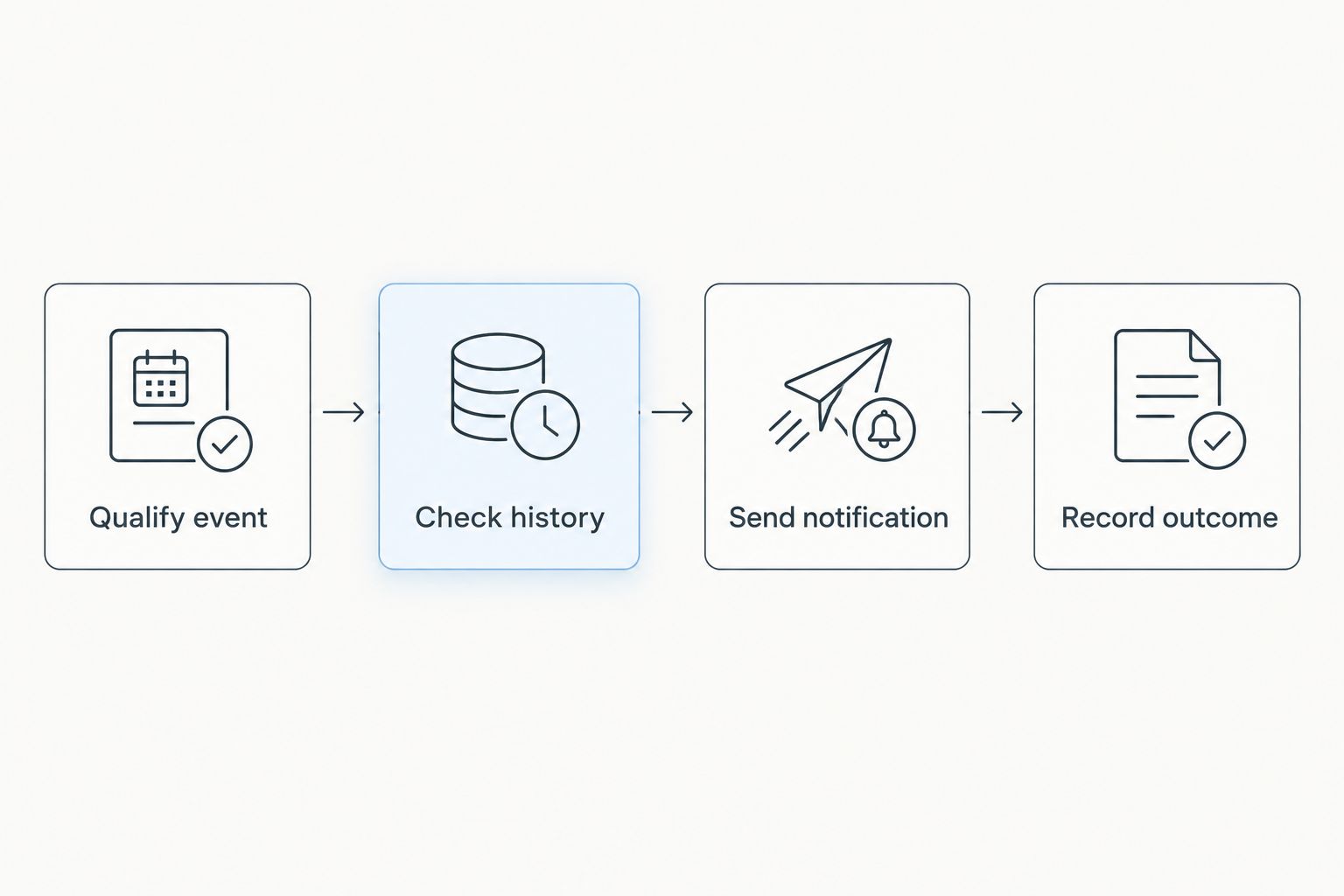
The core sequence is Qualify event, Check history, Send notification, then Record outcome. Each stage serves a separate purpose: eligibility, duplicate prevention, delivery and evidence of what happened.
Run acceptance tests
Use at least 4 test cases before enabling the workflow for the team. These are acceptance criteria, not claims about measured performance.
| Test case | Expected Slack result | What it checks |
|---|---|---|
| Move a test deal from open to won | 1 message | The qualifying transition reaches Slack |
| Edit that won deal without changing status | 0 messages | Ordinary updates do not repeat the announcement |
| Replay the confirmed qualifying event | 0 additional messages | Delivery history blocks a replay |
| Cause a controlled delivery failure | A visible failed attempt | Errors remain available for investigation |
Also test the reopening policy separately. Keep the test records and observed outcomes with your 2026 workflow documentation so a later configuration change can be checked against the same expectations.
Notify Slack when a won deal changes
A second workflow makes sense when a delivery team needs to hear about material changes after the sale. Keep it separate from the first-win announcement so readers can distinguish a new handoff from an amendment.
Best for initial handoffs: Use the first-win workflow when the team only needs a signal to start work. Best for active delivery coordination: Use a controlled update workflow when approved changes to ownership or scope require attention.
| Workflow | Best for | Advantage | Limitation |
|---|---|---|---|
| First-win notification | Starting the customer handoff | Keeps the announcement focused on a specific transition | Does not report later changes |
| Selected-change notification | Coordinating work after the win | Reports changes the delivery team needs to act on | Requires field-level change detection and stricter filtering |
To configure selected-change notifications, define the fields that matter, compare their previous and current values, and require an actual change before sending. Give each update its own delivery identity rather than reusing the original win event’s identity.
Do not enable notifications for every edit. A spelling correction and a changed delivery owner need different treatment. Start with an explicit list of operational changes and require an owner for each resulting action.
Troubleshooting
Every edit produces another announcement
The workflow is checking current status without checking the transition or processing history. Require a qualifying change into won, then check the event’s delivery key before sending. Review concurrent execution handling as well as the filter.
The test works, but live deals never appear
Compare the test payload with a live event. Check whether the trigger includes updates, whether status identifiers match and whether the connection can read the relevant records. Inspect the source execution history before changing the Slack configuration.
Slack rejects the message
Inspect the response and verify that the stored webhook is active and belongs to the intended destination. Reauthorise through the approved process if access has changed. Never troubleshoot by posting the credential into a support conversation.
The responsible owner is missing
Check whether the source supplies an owner identifier rather than a display name. Add a supported lookup if necessary, or use an approved team label as the fallback. Do not assume a CRM user identifier is a Slack member identifier.
A reopened deal triggers an unwanted second announcement
Define whether reopening and winning again counts as a new handoff. For a lifetime-first-win policy, retain a deal-level announcement marker; for repeated-win announcements, track each qualifying transition separately. Apply the chosen policy consistently.
Customize your workflow
Extend the process only after the notification passes its acceptance tests. If your team uses an automation service, the Mesh App to Zapier lead automation guide provides an adjacent workflow to review; confirm the documented connection and events before applying that approach here.
Separate notification success from project-creation success. A Slack announcement should not imply that a project, invoice or onboarding task exists unless the relevant action has completed and its result has been checked.
Assign an operational owner to the workflow. During your 2026 access review, check the source credentials, Slack authorisation, channel audience, delivery history and reopening policy together—not as unrelated settings.
FAQ
How do I set up a Mesh App Slack integration for closed deals?
Start by confirming a supported way to read deal changes, then connect qualifying won events to an authorised Slack destination. Add persistent delivery history and test the workflow before enabling live notifications.
Does a Slack incoming webhook detect when a deal closes?
No. A Slack incoming webhook receives messages; a separate supported source connection must detect and qualify the deal change.
Can I notify Slack whenever a won deal is updated?
Yes, as a workflow design, provided your source exposes the required changes. Restrict notifications to selected fields and distinguish updates from the original win announcement.
How do I stop duplicate closed-deal notifications?
Check persistent processing history using a stable identity for each qualifying event. Prevent concurrent executions from sending the same event, and record delivery only after confirmed success.
What should a closed-deal Slack message contain?
Include an approved deal reference, the responsible owner and the next action. Keep unnecessary personal information, documents and financial details out of the message.
Should a reopened deal create another Slack announcement?
Only if your team defines a later win as a new handoff. Choose between a lifetime-first-win rule and a separate announcement for each qualifying win transition.
Can I build this without a native Slack connector?
A native connector is not essential if a supported source connection can send qualifying events to Slack through an authorised delivery method. Confirm the source access and authentication requirements before choosing the implementation.
One last thing
A failed response and a failed delivery are not always the same event. If a request times out after submission, investigate whether the announcement arrived before replaying it. Duplicate prevention needs an explicit policy for uncertain delivery, not just successful and failed runs.


