

Instead of manually copying customer details into a project after every sale, design a mesh app automatic client onboarding workflow that checks the closed deal, creates the delivery project, and assigns the handoff. For Mesh App, use this setup blueprint to connect contact management and project management through an automation route supported by your account.
- Mesh App combines contact management and project management; automate client onboarding only through a supported connection.
- The mesh app automatic client onboarding workflow should create one project per eligible deal, not per status update.
- Validate the customer, project owner, and agreed scope before creating the delivery project.
- Keep project creation separate from client communications and financial actions.
Why this matters
A closed deal records a sales outcome. A delivery project records responsibility, scope, and the work needed to serve the customer. Copying information between them leaves room for mismatched contacts, missing owners, and tasks based on an outdated proposal.
Mesh App is best for small and medium-sized businesses seeking contact management and project management within a modular CRM/ERP platform. Its stated modules also include time tracking, invoicing, and finance. Those modules define the potential scope of the handoff, not permission to automate every downstream action.
For your 2026 onboarding process, separate the decision to start delivery from the decision to contact the customer or create financial records. A won deal should supply the starting information; it should not bypass a scope check.
The useful outcome is specific: a project linked to the right customer, assigned to a responsible person, with a traceable connection to the originating sale.
Before you start
- Access and permissions: Have access to the customer records and project-management functions you intend to use. Confirm that your chosen automation route supports reading the sales event and creating or updating projects before configuring the workflow.
- A delivery handoff template: Prepare the agreed scope, project naming rule, required customer fields, owner assignment, and onboarding tasks. Use an approved example of a closed deal as your reference record.
- The duplicate-creation gotcha: A record update is not necessarily a new sale. Keep a stable source-deal identifier and a durable record of the created project so reopening, editing, or retrying the same deal does not create another project.
Mesh App includes the relevant contact-management and project-management modules, but the execution route must match the functions available to your account. Use the supported automation controls or connection method you have verified; do not treat a workflow diagram as evidence of a particular integration.
The terms below describe configuration responsibilities rather than application screen labels. Apply them through the actual controls in your chosen setup.
Closed-deal trigger
- Define the qualifying event. Select the event that represents a successful sale in your sales process. Require a transition into the agreed closed state, rather than accepting every subsequent edit to a closed record.
- Define eligibility. Exclude records that should not start delivery, such as cancelled work or a sale explicitly awaiting approval. Write these rules into the workflow rather than leaving them in a salesperson's memory.
- Carry the source identifier. Include the stable identifier for the originating sale in the information passed to the next stage. A customer name alone is not a reliable duplicate check.
- Check previous processing. Look for an existing source-to-project mapping before allowing project creation. If the source identifier already has a project, route the event to review or an update path.
- Choose the exception destination. Assign failed validation and uncertain events to a responsible person. Do not let them disappear because no project was created.
Expected result: An eligible closed deal reaches the handoff once, with its source identifier intact. Later edits do not behave like new sales.
For the 2026 workflow, document the qualifying event in plain language. Anyone reviewing a failed run should be able to explain why the record passed or failed without reconstructing the sales conversation.
Customer and scope mapping
- Match the existing customer. Use the contact or organisation identifier carried by the source record. Keep the customer relationship attached to the project instead of relying on a copied name.
- Check required information. Require the agreed customer reference, delivery scope, and project owner. Route incomplete records to review before project creation.
- Choose the authoritative scope. Use the approved delivery description, not whichever note was edited most recently. Preserve a reference to the agreement your team will fulfil.
- Map each destination deliberately. Define where the customer reference, project name, owner, start conditions, and scope belong. Keep internal sales comments separate from anything intended for the client.
- Handle absent dates explicitly. If the sale does not establish a delivery date, send the project for scheduling. Do not turn the deal's closing date into a promised start date.
Expected result: The workflow produces a validated project payload tied to an existing customer and an agreed scope. Missing information creates a visible exception, not an invented default.
Before adding more fields, decide which information the delivery team actually needs. The project management software for small businesses guide provides a related starting point for organising the project side of this handoff.
Project creation and handoff
- Create the project from validated information. Use the project-creation action supported by your chosen route. Include the source reference so the delivery record remains traceable to the sale.
- Assign a responsible owner. Apply an explicit assignment rule or send the project for assignment. A project without a responsible person is not a completed handoff.
- Add onboarding tasks. Use your approved delivery template to define the scope review, scheduling check, and internal handoff. Keep service-specific tasks separate from the shared onboarding core.
- Record the project identifier. Save the connection between the source-deal identifier and the created project in durable storage supported by your setup. Later runs need that mapping.
- Request the internal review. Notify the responsible person through a supported notification route. Require confirmation of scope and ownership before any separate client-facing action.
Expected result: There is 1 project per eligible deal, a recorded source-to-project connection, and an owner who knows what needs review.
The creation step needs a partial-failure rule. If project creation succeeds but a later task or notification fails, recover against the recorded project instead of starting the entire creation sequence again. That distinction prevents a retry from becoming a duplicate.
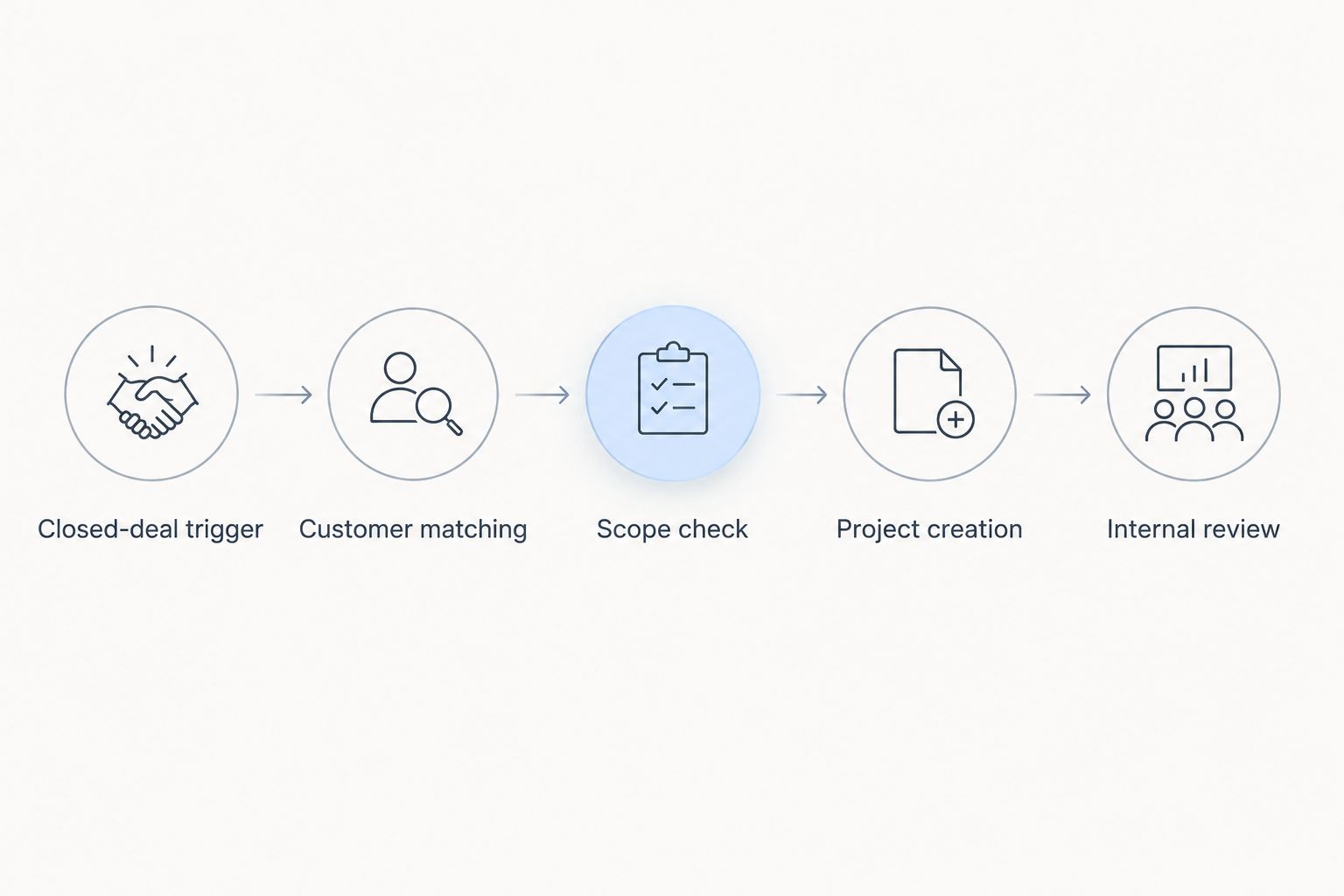
Acceptance tests and release
- Test a complete deal. Submit an eligible record with the required customer reference, approved scope, and owner. Confirm that the resulting project contains the intended information.
- Test a repeated event. Submit the same source identifier again. Confirm that the workflow finds the existing mapping rather than creating another project.
- Test an incomplete deal. Remove a required handoff field. Confirm that the workflow stops before creation and sends a useful exception to the responsible person.
- Test a partial failure. Interrupt a downstream action after project creation. Confirm that recovery uses the existing project identifier.
- Approve the release. Record who owns exception handling, how to pause execution, and how to resume safely after a correction.
Expected result: Your test record demonstrates successful creation, duplicate prevention, missing-field handling, and recovery without relying on production customers.
Use 3 core test cases before release: a complete deal, a repeated event, and an incomplete deal. Add the partial-failure test to check recovery. These are acceptance checks, not a claim about how many tests every business needs.
Keep a dated 2026 record of the mapping and approval rules. When someone changes a sales field or delivery template, repeat the relevant tests before accepting new live events.
Update onboarding when a closed deal changes
A second workflow handles amendments after the project exists. It is useful when a customer corrects contact details or the team approves a change to the delivery scope.
Update the mapped project; do not recreate it. Retrieve the existing project using the saved source-to-project connection, then evaluate which changes are allowed to pass through.
| Workflow | Best for | Advantage | Limitation |
|---|---|---|---|
| Automatic project creation | Repeatable handoffs with approved scope | Removes repeated copying after the eligibility check | Incorrect mappings repeat the same mistake |
| Controlled project updates | Approved amendments to existing work | Keeps selected project information aligned | Unrestricted updates can overwrite delivery decisions |
| Manual project approval | Bespoke work or unsettled scope | Keeps a person responsible for ambiguous decisions | Requires an explicit handoff before delivery starts |
For the update variant:
- Retrieve the project mapped to the source record.
- Compare only the fields designated for synchronisation.
- Apply approved changes through a supported update action.
- Route changes to scope, responsibility, or committed dates for review.
- Record the outcome against the existing mapping.
Define 2 approval gates if your process needs them: scope approval before project creation, and handoff approval before client communication. Keep both gates visible in the 2026 workflow specification.
Automatic updates are useful for controlled changes. They are a poor substitute for agreement on what the delivery team has already committed to do.
Troubleshooting
The same deal creates multiple projects
Check whether the trigger accepts every edit instead of a qualifying state transition. Then inspect the source identifier and saved mapping. Prevent another creation attempt when a project is already recorded, and ensure simultaneous runs cannot both pass the duplicate check.
A closed deal produces no project
Inspect the eligibility result before retrying. The record might be missing a required customer reference, scope, or owner. Correct the source information and reprocess it through the same validation path; bypassing the checks hides the underlying problem.
The project is attached to the wrong customer
Inspect how the customer was matched. Replace name-based matching with the stable customer identifier available through your supported setup. Review the affected project manually before enabling further runs with the corrected mapping.
A project exists, but onboarding tasks are missing
Treat this as a partial failure, not a missing project. Use the saved project identifier to add or repair the missing tasks. Check the task template and the permissions of the account executing that action.
A later sales edit overwrites delivery information
Restrict the update workflow to explicitly approved fields. Separate source-controlled information from delivery-owned information, and send scope or scheduling changes for review. Restoring a value is not enough if the same unrestricted update rule remains active.
Customize your workflow
Start with the smallest useful handoff: validated customer, approved scope, project owner, and traceable source reference. Expand only after those elements survive the acceptance tests.
For consulting or IT work, make scope review and responsibility assignment explicit. For trades or construction work, include the location and scheduling information your team requires before dispatch. These are template choices, not claims about built-in automation features.
Time tracking, invoicing, and finance belong to later decisions. Opening a project does not establish that work has started, that recorded time is approved, or that an invoice should be issued.
Keep financial actions outside the initial project-creation workflow until their approval rules are defined. This gives each action a clear business condition instead of making the sales status responsible for everything.
For Mesh App's modular CRM/ERP setup, decide which module owns each piece of information. Your 2026 workflow documentation should state who can change it and which changes require another review.
FAQ
How do I set up a mesh app automatic client onboarding workflow?
Define an eligible closed-deal event, validate the customer and scope, create the project through a supported route, and save the source-to-project mapping. Test repeated events and incomplete records before allowing live execution.
Does closing a deal mean onboarding should start immediately?
No. Project creation should depend on your delivery eligibility rules, including approved scope and a responsible owner. Keep unresolved sales records in a review path.
Can I automate this without a third-party connection?
Use a native route only if your account supports the required trigger, validation, project action, and duplicate handling. Otherwise, use a verified supported connection or retain a manual approval handoff.
How do I stop duplicate onboarding projects?
Store a stable source-deal identifier and its corresponding project identifier, then check that mapping before creation. Also ensure that simultaneous runs cannot create separate projects for the same source.
What should happen when a closed deal changes?
Update the existing mapped project only for fields approved for synchronisation. Send changes to scope, ownership, or committed dates for review rather than overwriting delivery decisions automatically.
Should the workflow email the client or create an invoice?
Keep client communication and financial actions separate from initial project creation. Add them only after defining their approval conditions and verifying a supported execution route.
Who is Mesh App best suited to for this handoff?
Mesh App is suited to small and medium-sized businesses seeking contact management and project management in a modular CRM/ERP platform. The onboarding workflow still needs account-specific verification of its execution route and permissions.
One last thing
The most useful onboarding safeguard is the source-to-project mapping, not the welcome message. Without that connection, a retry cannot reliably distinguish unfinished onboarding from work that already exists.
Before expanding the Mesh App client onboarding workflow, prove that you can pause it, find the project created from a particular deal, and resume without creating another project. Make that recovery test part of your 2026 release checklist.


