

Property management time tracking is the recording of working time against properties, tasks and clients to support workload planning and defensible billing. This 2026 guide explains how to handle tenant calls, inspections, contractor coordination and owner reporting without losing the connection between time worked and the property served.
- For zeiterfassung hausverwaltung, record property, task and billing status together; a total number of hours is insufficient.
- Mesh-web suits property management teams seeking time tracking alongside contact management, projects, invoicing and finance.
- Start with a shared tracking template, then test software against the same property management workflow.
- Separate employee working-time records from client billing decisions; recorded time is not automatically chargeable.
Why time tracking matters for property managers
A property manager’s working day crosses several boundaries: one employee serves different buildings, one building generates different tasks, and one task involves several people. A timesheet organised only by employee leaves those relationships unclear.
Your useful unit of analysis is the property and task, not just the employee’s daily total. That distinction lets you investigate repeated coordination work, compare assignments and explain the effort behind additional services.
Time tracking also has a narrower role than a complete property management system. Use the property management software guide to distinguish your broader operational requirements from the recording workflow described here.
For your 2026 setup, define what the records must answer before choosing software. Workload planning, employee attendance and client billing are separate purposes. They need clear rules even when they share a system.
Set up property management time tracking
1. Define the decisions your records must support
Start manually with a shared document. Write down the questions your team needs to answer, such as which properties absorb unplanned work or which additional services still need billing review.
Avoid collecting detail simply because a form allows it. Each required field should support an operational decision, a reporting requirement or a recordkeeping obligation that you have checked for your business.
As a practical starting point, select 3 properties for a pilot: one with routine administration, one with active maintenance and one with additional assignments. This is a suggested test scope, not a performance benchmark.
- Name the decisions the records must support.
- Identify who reviews each type of record.
- Separate attendance, workload and billing purposes.
- Choose pilot properties with different work patterns.
- Document what counts as a complete entry.
2. Create a consistent property and task structure
Build a spreadsheet template before configuring a platform. Give each property a stable reference and use a controlled list of task categories rather than letting every employee invent labels.
Keep the structure understandable during a busy day. Someone returning from an inspection should know where to record the visit without searching through overlapping categories. Record a unit reference only when the work genuinely concerns that unit.
For example, contractor coordination and an inspection are different activities even when both concern the same repair. Separate entries preserve that distinction without requiring a transcript of every conversation.
- Use one stable reference for each property.
- Distinguish property-wide work from unit-specific work.
- Define categories for administration, inspections and coordination.
- Add a category for internal business administration.
- Keep sensitive tenant details out of task labels.
3. Choose a recording method that preserves context
A shared spreadsheet is a valid starting method when your team can maintain consistent entries and review them reliably. Its limitation is procedural: you must control labels, corrections and versions yourself.
Software becomes relevant when you want time tracking alongside other business records. Mesh-web offers a modular CRM/ERP platform with contact management, project management, time tracking, invoicing and finance modules. Mesh-web time tracking is best suited to teams seeking those functions in one modular platform.
That module list does not establish specialist property accounting, tenancy administration or a particular approval workflow. Test how the actual setup handles your property references and billing decisions before committing.
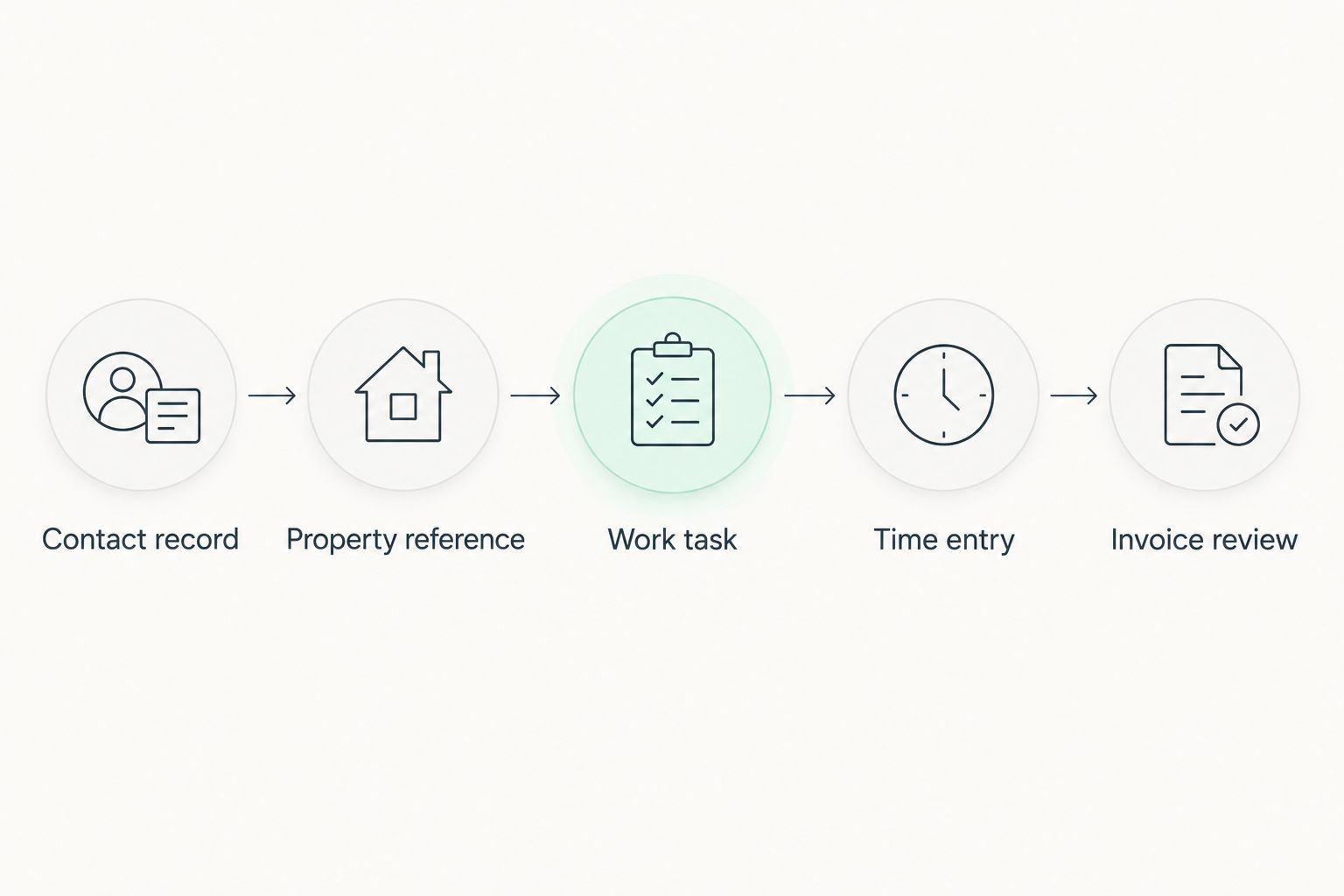
Use the following record chain as a design checklist, not as a claim about an automatic integration:
- Contact record: identify the relevant client or contact.
- Property reference: identify the building served.
- Work task: describe the activity performed.
- Time entry: record the time spent.
- Invoice review: decide how the work should be treated.
4. Record work close to the activity
Begin with a simple habit: enter the work when you finish an activity or reach a natural stopping point. A spreadsheet works for this process; a software interface should be tested against the same routine.
Decide how employees should handle interruptions. A tenant call during owner reporting should not leave two overlapping entries or force someone to reconstruct the whole afternoon later.
Test field recording separately from desk recording. Do not assume mobile access, offline behaviour or synchronisation from a product’s general description. Ask employees to demonstrate an inspection entry using the proposed setup.
For the pilot, schedule a 15-minute daily review of unclear entries. This is a suggested review window, not a promised administrative saving.
- Record the activity near the time it happens.
- Stop or separate entries when the work changes.
- Check for overlapping recorded periods.
- Test entry creation after an inspection.
- Resolve unclear notes during the pilot review.
5. Separate recorded time from billable work
Use a manual billing-status column before building any automation. The employee records what happened; the responsible reviewer decides how the applicable agreement treats that work.
Routine management activity, additional assignments and internal administration should remain distinguishable. A property reference proves where effort went, but it does not prove that an owner owes an additional fee.
For your 2026 billing process, retain the task context needed to review an entry without copying unnecessary personal information into an invoice description. Review wording as well as duration.
The presence of invoicing and time-tracking modules does not, by itself, prove that approved hours move automatically between them. Verify that handoff in any product evaluation.
- Mark entries as included, additional or awaiting review.
- Check the relevant service agreement before billing.
- Identify who approves additional work.
- Keep internal administration separate from client work.
- Review invoice descriptions for unnecessary personal data.
6. Set access, correction and retention rules
Start with a written access list and a correction procedure. Decide who enters time, who reviews it and who needs reports. These responsibilities remain necessary whether you use a spreadsheet or software.
Working-time records and property activity reports serve different audiences. An owner’s explanation of work performed does not automatically require access to employee attendance details or internal notes.
For an Austrian business in 2026, check the applicable employment and data-protection requirements with qualified advisers. Confirm the required records, handling of breaks, retention obligations and any employee-representation requirements for your circumstances.
Treat permissions, correction history and exports as evaluation questions. Do not assume a platform supports a control until you have checked it.
- Assign access according to each person’s responsibilities.
- Define how employees request corrections.
- Record who reviews disputed entries.
- Establish retention rules for each record type.
- Check export contents before sharing reports externally.
7. Review the pilot before expanding it
Run the pilot for 10 working days as a suggested starting period. Include desk administration and property-related field work so that your review covers both recording situations.
Compare the entries with the questions you defined at the start. Can you identify the property, understand the activity and determine who should review its billing status? An export containing hours but no useful context fails that test.
Do not judge the pilot only by whether employees submitted timesheets. Look for inconsistent categories, duplicated work and entries that need explanation. Fix the recording rules before extending the process across your portfolio.
- Check whether every entry has a valid property reference.
- Review entries with unclear or overlapping categories.
- Compare field and desk recording difficulties.
- Trace a sample entry through billing review.
- Update the template before adding more properties.
Compare your recording options
Choose the method that answers your reporting questions with a process your team can maintain. A narrow recording requirement does not automatically justify replacing your wider software setup.
The table separates functional fit from limitations. It does not assume that a software category includes every control your business needs.
| Option | Best for | Main advantage | Key limitation |
|---|---|---|---|
| Shared spreadsheet | Teams testing property references and task categories | You can revise the recording structure directly | Your team must manage versions, validation and corrections |
| Dedicated time-tracking software | Teams focused on recording and reviewing time | Keeps the evaluation centred on time-entry needs | Check property references, approvals and exports individually |
| Existing property management system | Teams whose current system already supports the required time records | Avoids introducing another recording location | Confirm the actual time-entry and reporting functions |
| Mesh-web time tracking within its modular CRM/ERP platform | Teams seeking time tracking alongside contacts, projects, invoicing and finance | Offers those business modules within a modular platform | Specialist property-management functions and specific workflow controls require verification |
Use the same sample work in every evaluation: an inspection, contractor coordination and an owner request. Ask the person entering time and the person reviewing it to complete their parts. A demonstration is only useful if both can follow the record.
Choose on the evidence of your workflow, not the length of a feature list. Keep your current property-specific systems where they serve a requirement the proposed replacement has not demonstrated.
Common mistakes property managers make
Combining all work under the owner’s name
An owner can be associated with several properties. Recording only the owner makes property-level review difficult because the building served is no longer explicit.
Keep the client relationship and property reference distinct. Then check whether reports preserve both rather than forcing you to reconstruct the connection from notes.
Treating a tenant contact as the billing decision
The person who requests help is not automatically the party responsible for an additional charge. A tenant call explains the activity’s origin, not its contractual treatment.
Record the contact when relevant, then review the work against the applicable agreement. Do not make the requester field a shortcut for billing status.
Requiring sensitive detail in every description
An operational entry needs enough information to identify the work, not a full account of a tenant’s circumstances. Detailed personal information can travel into reports when descriptions are reused.
Use neutral task wording and refer to the appropriate case record where necessary. Check exported descriptions before sharing them with owners or other recipients.
Confusing elapsed time with staff effort
A meeting attended by several employees creates separate staff effort, even though the meeting has one elapsed duration. Those measurements answer different questions.
Choose which measurement each report presents. Do not compare a property’s summed employee time with another property’s meeting durations as though they were equivalent.
FAQ
What is the best way to track time for a property management company?
Track each entry against a property, task and billing status. Begin with a shared template, then test whether software preserves that context through review and reporting.
Can a property management company start with a spreadsheet?
Yes, a spreadsheet is a practical starting method for defining property references and task categories. Assign responsibility for consistent labels, corrections and version control before relying on the records.
Is recorded property management time automatically billable?
No, recorded time is evidence of work performed, not automatic permission to charge. Review the relevant service agreement and approval requirements before treating an entry as additional billable work.
Can Mesh-web replace specialist property management software?
A replacement decision requires checking the specialist functions your business needs. Its stated scope includes contact management, projects, time tracking, invoicing and finance, but that does not establish tenancy administration or specialist property accounting.
Should property managers record travel time separately?
Record travel separately when you need to distinguish it from work performed at the property. Check its employment-record and billing treatment independently rather than assuming that one rule answers both questions.
What should an Austrian property manager check before rollout?
Check applicable employment and data-protection requirements, access responsibilities and correction procedures. Confirm the rules for your circumstances with qualified advisers and test the proposed software controls before rollout.
One last thing
Before you expand your 2026 rollout, open a property report without its free-text descriptions. If you cannot identify the building, activity and review status from the remaining fields, essential information is buried in notes.
Fix the structure before adding more entries. A clear property reference is more useful than a longer description that somebody must interpret later.


