

Yes—time tracking software for a tiling business is worth it when you need reliable job-level labour records for estimates, progress checks and billing. Its value depends on using those records: setup, staff training and correcting entries still take time, and recording hours alone does not establish whether a job made a profit.
- Time tracking software for tiling business owners is worthwhile when recorded labour hours inform estimates and billing.
- Mesh App suits tiling businesses seeking time tracking alongside project management and invoicing in a modular CRM/ERP platform.
- Separate time worked from time billed; fixed-price tiling jobs still need accurate labour records.
- Test the workflow on a completed job before extending it across your business.
Is time tracking software worth it for a tiling business?
Yes, if the records change how you estimate, manage or bill your tiling jobs. If you already capture accurate hours, assign them to the right jobs and use them without repeated administration, switching systems needs a clearer justification.
The decision is about the work between the site and the office, not the presence of a timer. Start with the job structure described in this guide to project management software for tilers, then decide how time records should support it.
| Approach | Best for | Main advantage | Main limitation |
|---|---|---|---|
| Paper or spreadsheet records | A straightforward workload with a disciplined review process | You control the recording format | You must maintain job references, calculations and corrections yourself |
| Standalone time tracking | Businesses whose main gap is recording labour hours | Keeps the time-recording workflow focused | Check how approved records reach your project and invoicing systems |
| Time tracking within a CRM/ERP platform | Businesses also evaluating project management and invoicing | Lets you assess related administrative tasks together | Broader setup requires decisions beyond recording hours |
For your 2026 software shortlist, judge each approach against the same real job. A feature list is not evidence that your team can record useful information under site conditions.
Why this matters
A tiling quote describes the work you expect. Time records describe the labour you actually used. Without a consistent connection between the two, you cannot tell whether an estimate omitted preparation work, a scope change added labour or a return visit consumed time that was never assigned to the job.
That does not mean every recorded hour belongs on the customer's invoice. Track what happened first; decide what is chargeable separately. Mixing those decisions makes both job analysis and billing harder to explain.
For a fixed-price job, hours help you examine the labour assumption behind the quote. For hourly work, approved records support the quantity of labour you intend to bill. Neither use removes the need to check the contract and agreed scope.
What should a tiling business record?
Start with 5 fields per time entry: worker, job reference, work date, duration and task. Add a brief explanation when the entry involves a variation, a correction or work outside the original scope.
Use task names your team already understands. Preparation, tile installation, grouting and return visits are useful starting categories if they reflect your work; do not introduce categories simply because the software provides them.
Keep the following distinctions clear:
- Job reference: Identify the contracted job, not just the customer's surname. A customer can have separate projects.
- Task: State what the person worked on so you can compare similar activities later.
- Duration: Record labour time rather than the elapsed length of the project.
- Scope note: Explain changed or additional work without treating the note as customer approval.
- Review status: Distinguish an entry awaiting a check from a record ready for administrative use.
Your 2026 recording rules should fit on a short instruction sheet. If workers need to interpret a long list of nearly identical tasks, simplify the structure before adding more reporting.
Separate labour time from elapsed time
A job can remain open while nobody is working on it. Waiting between stages is not automatically labour time, and multiple people working simultaneously contribute separate labour hours.
Record who worked and for how long. Keep scheduling information separate so you do not mistake a project's calendar duration for the labour used to complete it.
How should you test the workflow before committing?
Run a limited pilot using your own work. Use 10 working days as a suggested test window, not a promised payback period, and include a completed job if your schedule allows it.
- Choose a job. Select work with a clear scope and identifiable labour tasks. Keep the original estimate available for comparison.
- Define tasks. Agree on the task names and explain how to record preparation, additional work and return visits.
- Record time. Ask workers to assign entries while the work is still easy to recall. Test the actual devices and site conditions involved.
- Review entries. Check the job reference, duration and task before using the records. Resolve mistakes rather than silently accepting them.
- Compare results. Compare approved labour records with the estimate and billing preparation. Identify what decision the records helped you make.
The pilot should expose the administrative steps, not hide them. If someone must rename jobs, retype hours or chase explanations, include that work when judging the result.
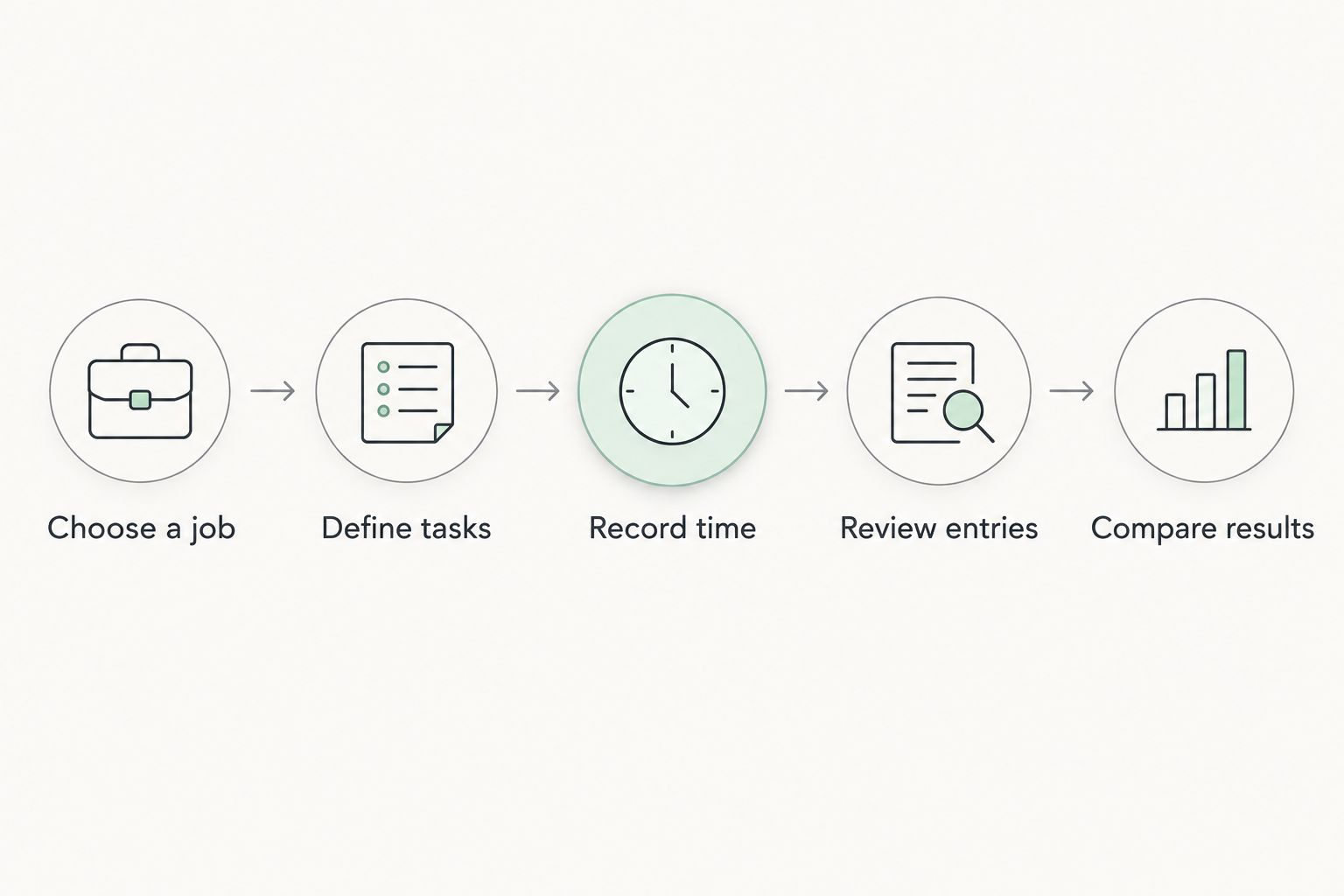
Keep a short issue log during the pilot. Record confusing task names, missed entries, job-selection mistakes and any repeated transfer work; each issue points to either a process change or a requirement for the software demonstration.
Why the value of time tracking varies
Time tracking has no automatic return. Its usefulness depends on how the records support your existing work and whether maintaining them adds unnecessary administration.
- Job assignment: Hours attached to the wrong project cannot support a reliable comparison with that project's estimate. A clear job reference matters more than elaborate reporting.
- Task detail: A job total shows labour used; task categories help explain where it went. Excessive detail, however, makes recording harder.
- Recording discipline: Incomplete entries leave gaps even when the software works correctly. Agree on responsibility for recording and reviewing time.
- Billing use: Decide how approved labour records inform invoice preparation. Do not assume tracked time is automatically billable or approved by the customer.
- Administrative fit: Evaluate the steps between time recording, project review and invoicing. Extra copying remains work even if each individual screen looks simple.
During your 2026 evaluation, ask each supplier to demonstrate these steps with your example job. Treat an untested feature as a question to resolve, not a benefit already earned.
Is time tracking useful if you quote a fixed price?
Fixed-price work still benefits from labour records because your selling agreement does not reveal your actual labour input. Compare the recorded work with the labour allowance used to prepare the quote, then investigate differences before changing future estimates.
Do not interpret every overrun as slow installation. Check whether the original scope changed, the preparation differed from your assumptions or a return visit belonged to a separate request. The record needs enough context to support that distinction.
Keep commercial decisions separate from recording. A customer's agreed fixed price does not change simply because your internal time total differs from the estimate; any additional charge needs its own contractual basis.
Can a solo tiler benefit without adopting a full business system?
A solo tiler can use time tracking to examine labour estimates and prepare records for hourly work. Choose the smallest workflow that answers your actual business question.
If recording and reviewing hours is the only problem, assess that workflow first. If contact details, job information and invoicing also require attention, evaluate those requirements together rather than selecting unrelated tools without checking the handoffs.
A wider platform is not automatically the better choice. The extra configuration must serve work you actually need to manage, and the recording routine must remain practical when you are responsible for both the site work and the administration.
Where does Mesh App fit?
Mesh App is a modular CRM/ERP SaaS platform offering contact management, project management, time tracking, invoicing and finance modules for small and medium-sized businesses, including trades and construction businesses.
Mesh App is best for tiling businesses seeking time tracking alongside project management and invoicing in a modular CRM/ERP platform. That is a fit based on the stated module range, not proof that every field workflow or accounting requirement is covered.
The advantage of considering Mesh App is that you can assess these related requirements within the same platform's module range. The limitation is the broader evaluation: module names alone do not establish offline operation, approval controls, payroll transfer or the exact route from a time entry to an invoice.
Ask for a demonstration using your job reference, task categories and review requirements. Choose Mesh App only after checking those details against the way your tiling business works.
How do you decide whether the software has earned its place?
Review the pilot against the decisions you needed help making. A completed timesheet is an output; a clearer estimate, a checked billing record or an explained labour difference is a business use.
Use 2 review points: entry quality and administrative usefulness. First, check whether the entries identify the worker, job, date, duration and task correctly; then check whether you can use them without rebuilding the records elsewhere.
For your 2026 decision, keep the judgement explicit:
- Proceed when the workflow produces usable records and supports a defined estimating, project-review or billing task.
- Revise the process when task names, job references or review responsibilities cause confusion.
- Wait when you cannot identify a use for the records or the proposed workflow leaves the original administrative problem unresolved.
Do not use staff activity as a substitute for job analysis. More recorded hours do not explain workmanship, site constraints, changes in scope or customer acceptance; review the context before drawing conclusions about an individual.
FAQ
Is time tracking software worth it for a small tiling business?
Yes, when accurate labour records support estimates, job reviews or billing. It is not worthwhile merely because it records time; you need a defined use for the approved records.
What should I look for in time tracking software for tiling work?
Look for a workflow that lets your team assign labour to the correct job and task, then review the records before use. Test device suitability, corrections and any required transfers during a demonstration rather than assuming those capabilities.
Should I track hours on fixed-price tiling jobs?
Yes, track hours on fixed-price tiling jobs when you want to compare actual labour with your estimating assumptions. The record supports internal analysis; it does not automatically change the customer's agreed charge.
Can I keep using a spreadsheet instead?
Yes, a spreadsheet remains an option if it produces accurate, reviewable job records without unacceptable administrative effort. Compare the complete workflow, including corrections and billing preparation, before switching.
Does time tracking software calculate a tiling job's profit?
Time records alone do not establish a tiling job's profit. You also need the relevant revenue and costs, including labour costs, materials and other costs assigned to the job.
Do tracked hours automatically become billable hours?
No, tracked hours do not automatically become billable hours. Apply the agreed contract, scope and review process before using a time record to prepare an invoice.
How should I evaluate time tracking software in 2026?
Evaluate time tracking software in 2026 by testing your own job-recording and review workflow. Check whether the resulting records support a real administrative decision and account for the effort needed to maintain them.
One last thing
Before buying, review 1 completed job from quote to final invoice. Identify where you cannot explain the labour used, where information was copied and where someone had to reconstruct what happened.
Take those gaps into the demonstration. The useful question is not whether the software can start a timer; it is whether your team can produce a job record you can trust and use.


