

No—a CRM is not necessary for a solo freelancer if your current system reliably tracks clients, commitments and follow-ups. It becomes useful when you lose track of enquiries, repeatedly reconstruct client histories or struggle to connect sales activity with project delivery. In 2026, the decision should turn on those problems, not on whether a freelancer is supposed to use CRM software.
- Is a CRM necessary for a solo freelancer? No, unless your current client management process leaves important work untracked.
- Keep a spreadsheet when you can reliably find client details, pending decisions and the next follow-up.
- Choose CRM software for organised client histories; choose broader business software when project delivery also needs attention.
- Mesh App combines contact management, projects, time tracking, invoicing and finance; assess which modules your workflow actually needs.
Is a CRM necessary for a solo freelancer?
A solo freelancer needs a dependable client management process, not necessarily a dedicated CRM. The CRM software for freelancers guide covers the broader software decision; start here by comparing the workflows you need to manage.
| Approach | Best for | Main advantage | Main limitation |
|---|---|---|---|
| Spreadsheet, email and calendar | Freelancers with straightforward client relationships | You can maintain a simple process using familiar tools | You must keep separate records consistent |
| Dedicated CRM | Freelancers managing enquiries, proposals and repeat business | Client records and sales activity have a defined home | Project delivery and billing need separate evaluation |
| Modular CRM/ERP platform | Freelancers whose client work also involves projects, hours and invoices | You can assess several business functions within one platform | A broader scope demands more setup decisions |
Stay with the simplest approach that keeps every commitment visible. Moving to software does not solve a habit of leaving conversations undocumented, and staying with a spreadsheet does not excuse missing follow-ups.
The useful distinction is between a system you actively maintain and information you merely store. A long contact list is not a reliable process if you cannot tell which enquiry needs a response next.
Why this matters
As a solo freelancer, you handle both the client relationship and the work itself. A proposal discussed during a call can become a delivery commitment without anyone else checking that you recorded it.
That makes visibility more important than software complexity. You need to distinguish a prospect awaiting a proposal from a client awaiting finished work, even when both conversations sit in the same inbox.
For your 2026 software review, start with the point where information becomes hard to retrieve. If that point is a missing next action, improve follow-up tracking; if it is unrecorded work, address project or time tracking instead.
Buying a CRM for the wrong problem creates another place to enter information. Identifying the actual gap gives you a narrower, more useful buying brief.
Spreadsheet, email and calendar: best for a simple workflow
Keep your existing tools when you can answer three questions without searching through disconnected notes: Who needs a response? What have you promised? What happens next?
A spreadsheet can hold client names, contact details, enquiry status and next actions. Your calendar can hold dated commitments, while email retains the conversation itself. The strength of this approach is familiarity; the weakness is that you remain responsible for keeping the pieces aligned.
Use explicit next actions rather than vague notes. Write “send revised scope” instead of “proposal ongoing,” and record the agreed follow-up date where you will actually review it.
This approach stops being sufficient when maintaining the connections becomes the problem. If you routinely open several files just to understand a client's position, assess whether a client record would reduce that work.
Recommendation: keep the spreadsheet while it remains reliable, not merely because it already exists.
Dedicated CRM: best for enquiries and client follow-ups
A dedicated CRM fits a relationship-management problem: you need a clearer record of prospects, conversations, proposals and next actions. Evaluate those tasks before considering features unrelated to your work.
The advantage is a consistent place to organise the commercial relationship. The limitation is scope: do not assume that a CRM also meets your project planning, time recording or invoicing requirements.
Check the actual workflow during evaluation. Can you find the latest agreed scope, identify the next action and distinguish an open proposal from accepted work? Assess the specific software rather than treating the CRM label as proof of functionality.
A CRM also needs maintenance. If you leave old opportunities open and skip updates after calls, the system becomes another incomplete record.
Recommendation: choose a dedicated CRM when client follow-up is the problem you need to fix.
Modular CRM/ERP software: best for broader client administration
A modular platform deserves consideration when your difficulty extends beyond winning work. You might need to manage the project, record time and prepare invoices as well as organise client information.
Mesh App is best for freelancers evaluating contact management alongside projects, time tracking, invoicing and finance in a modular CRM/ERP platform. Its stated scope includes those modules; assess each against an actual task you need to perform.
The benefit is breadth of scope. The trade-off is that you must decide which parts belong in your process rather than treating every available module as necessary. A platform offering several functions does not, by itself, establish how data passes between them.
Explore Mesh App with a written workflow in hand. Ask how your enquiry becomes a project, how work is recorded and how invoice information is handled; verify the answers before changing your process.
Recommendation: consider broader software only when your administrative problem is broader than contact management.
Why the need for a CRM varies
The right choice depends on the shape of your work, not simply on being self-employed. Use these factors to describe your situation before comparing software:
- Relationship complexity: Several contacts, changing scopes and repeated conversations require more context than a straightforward one-off engagement.
- Follow-up responsibility: If proposals wait for decisions, you need an explicit next action and a reliable way to revisit it.
- Project handover: Once a client accepts, agreed deliverables need to move into a delivery process rather than remain buried in sales notes.
- Billing workflow: Hourly work, project work and ongoing engagements require you to organise different information before invoicing.
- Record-keeping discipline: A tool is only useful when you consistently enter the information needed for the next decision.
Do not turn these factors into an arbitrary client-count threshold. A freelancer with complicated engagements has a different requirement from someone with straightforward repeat orders.
Your 2026 requirements list should describe actions, not adjectives. “Find the agreed scope before replying” is testable; “better organisation” is not.
How to decide without rebuilding your business first
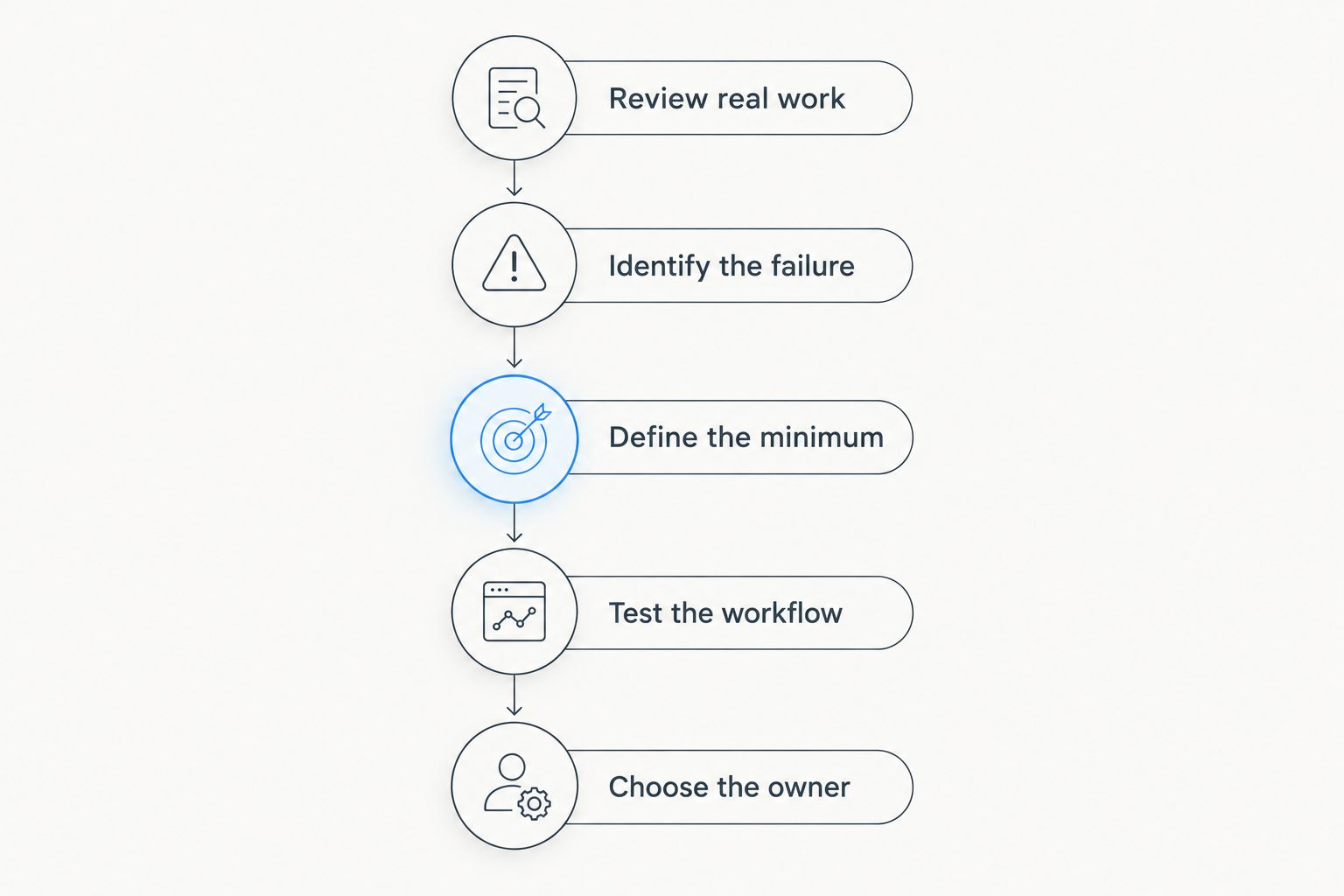
Use the following process to test whether your current tools are sufficient. This is a practical evaluation sequence, not a promise about implementation time or results.
1. Review real work
Select 1 completed project, 1 active project and 1 open enquiry from your own records. These examples let you examine past decisions, current delivery and future work without inventing a demonstration scenario.
For each example, locate the client details, agreed scope, latest communication and next action. Record where you had to search or reconstruct information from memory.
2. Identify the failure
Separate a missing habit from a missing capability. An undocumented phone call requires a recording habit; an unclear overview of open enquiries requires a better way to organise and review them.
Write down the consequence in plain language. “I cannot tell which proposals need a reply” gives you a clearer requirement than “I need automation.”
3. Define the minimum
List only the information needed to avoid that failure. For follow-up management, that includes the client, current status, next action and relevant date.
Keep project delivery details separate unless they contribute to the same decision. This prevents a small client-management problem from expanding into an unnecessary business-system replacement.
4. Test the workflow
Recreate the selected examples in the proposed system or a suitable demonstration environment. Check whether you can retrieve the information and complete the next task without maintaining an extra private tracker.
Test ordinary changes too: a revised scope, an unanswered proposal and a completed engagement. A tidy initial record matters less than a record you can keep accurate as work changes.
5. Choose the owner
Give each kind of information 1 owner: the place you treat as authoritative. Client contact details, project commitments and invoice records should each have a clear home, even if those homes are different tools.
Then decide what happens to the old records. Keeping an unmaintained spreadsheet beside a new system creates uncertainty about which version to trust.
What should you check before adopting CRM software?
Evaluate the work you will perform, including the upkeep. A useful selection process examines both the client-facing task and the administration needed to support it.
Ask these 3 questions during a demonstration:
- Can I find the current situation without reconstructing it from unrelated records?
- Can I record the next action clearly enough to act on it later?
- Can I maintain this process during a busy delivery period?
Then check data handling. Understand what information you can import, what you can export and how you would retain usable records if you changed systems. Do not assume that an export includes every attachment or relationship; inspect the actual output.
Check access and privacy arrangements separately from convenience. Identify what client information you intend to store, who needs access and which contractual or legal obligations apply to your work. Software selection does not replace those decisions.
Finally, assess setup and ongoing maintenance alongside the software subscription. Cleaning existing records, defining statuses and learning the workflow are work you must plan, even when you handle the implementation yourself.
Can I use a spreadsheet instead of a CRM in 2026?
Yes—a spreadsheet is sufficient when you maintain accurate client records and dependable follow-ups. The relevant test is whether it supports your decisions, not whether it has a CRM label.
Keep it structured enough to review. Separate client details from free-form notes, use consistent status names and make the next action visible rather than hiding it inside a long comment.
Do I need CRM software if I already use project management software?
No—not if your existing process also handles enquiries and client follow-ups reliably. Project delivery and sales follow-up are different tasks, so inspect both before adding another tool.
A project board showing accepted work does not automatically show the proposals awaiting a decision. Equally, if your current system already covers both needs, a separate CRM can duplicate administration.
Should I wait until I have more clients?
Base the decision on recurring problems, not a target number of clients. Start evaluating software when your process repeatedly fails to show commitments, context or next actions.
Before switching, try correcting the specific weakness in your current system. If a clear next-action field and a regular review solve it, you have avoided unnecessary migration work; if they do not, you have a concrete requirement to test.
FAQ
Is a CRM necessary for a solo freelancer in 2026?
No—a solo freelancer does not need a CRM when existing tools reliably track clients, commitments and follow-ups. Consider one when important information becomes difficult to retrieve or maintain.
What's the best way to manage clients without a CRM?
Use a structured client list, a calendar for dated commitments and a consistent place for conversation records. Make each client's current status and next action easy to find.
How many clients should I have before getting a CRM?
There is no universal client-count threshold for adopting a CRM. Evaluate relationship complexity, follow-up requirements and the reliability of your current process instead.
Is a CRM better than a spreadsheet for freelancers?
A CRM is the better choice when a spreadsheet no longer supports reliable client histories and follow-ups. A maintained spreadsheet remains sufficient for a straightforward workflow.
Can a CRM replace my invoicing software?
Only if the specific platform provides invoicing functions that meet your requirements. The CRM label alone does not establish billing capability or compliance.
Is Mesh App just a contact manager?
No—Mesh App is a modular CRM/ERP platform with contact management, project management, time tracking, invoicing and finance modules. Evaluate the modules against your actual workflow rather than assuming you need them all.
What should I check before choosing Mesh App?
Check whether Mesh App supports the contact, project, time and invoicing tasks you actually perform. Verify data handling and the specific workflow between relevant modules before committing.
One last thing
A contact without a next action is a stored record, not a follow-up plan. Before replacing software, review an outstanding enquiry and write down exactly what happens next and when you will revisit it.
That small change gives your 2026 decision a useful test. If your current tools make the action visible and dependable, keep them; if the action disappears into disconnected records, evaluate a system that addresses that specific failure.
Choose software to support a process you can explain. Do not buy a larger process merely because the software offers one.


