

Invoicing software costs freelancers the subscription charge plus any paid features, payment-processing charges and setup work needed for their billing workflow. For your 2026 budget, compare the full operating cost rather than the subscription alone; a standalone invoicing tool and a wider business platform solve different problems.
- How much does invoicing software cost for freelancers? Compare subscriptions, required features, payment charges and setup work.
- Mesh App suits freelancers needing invoicing alongside contact management, project management and time tracking.
- Choose standalone invoicing when billing is your only requirement; assess wider software when client and project administration overlap.
- Test invoice creation, corrections and accountant handoff before committing to a subscription.
How much does invoicing software cost for freelancers?
Your budget should cover the software you actually need and the work required to use it. A subscription comparison is incomplete if one option includes your required workflow while another needs separate tools or manual transfers.
Use this breakdown when reviewing current offers. Each row identifies something to verify, not a charge that every vendor applies.
| Budget component | What to check | How to compare it |
|---|---|---|
| Subscription | Billing period, included users and required features | Compare equivalent billing periods and functionality |
| Additional functionality | Whether your required workflow needs extra modules or another subscription | Include only features you will use |
| Payment collection | Charges associated with the payment method you choose | Keep payment-processing charges separate from software charges |
| Setup and migration | Importing contacts, configuring invoice details and checking opening records | Record paid assistance separately from your own time |
| Routine administration | Re-entering information, correcting invoices and preparing accountant handoffs | Test the workflow rather than relying on a feature checklist |
| Leaving the system | Exporting records and preserving access to documents | Verify the exit process before subscribing |
Keep cash outlays and your own working time in separate columns. That gives you a clear financial budget without treating every minute spent on administration as a cash expense.
If billing problems start with scattered customer records, the CRM software for freelancers guide helps you assess the broader requirement. Decide whether you need better invoice creation or better organisation of the information feeding those invoices.
Why this matters
Freelance billing starts before you create an invoice. You need the correct customer details, agreed scope, billing basis and supporting records. Software selection should follow that process, not reverse it.
A narrow tool is a sensible choice when those inputs are already organised. A wider system deserves consideration when you repeatedly transfer information between customer records, projects, tracked hours and invoices.
For a 2026 purchasing decision, write down the problem you want to remove. Make it observable: duplicate customer entry, missing billing notes or a difficult accountant handoff. A requirement you can demonstrate is more useful than a long list of desirable features.
Standalone invoicing: best for a focused billing requirement
Standalone invoicing is the category to assess when your main requirement is creating and managing invoices. Keep the evaluation focused on the documents you issue, the corrections you make and the records you need afterwards.
The advantage is scope: you can judge the tool against a defined billing task. The limitation is the same narrow scope. If customer management, project work or time records sit elsewhere, those separate workflows still need attention.
Choose a standalone tool when invoicing is the problem you need to solve. Do not assume that buying a wider system will improve a process you have not defined.
Before choosing, check whether the specific offer supports your actual invoice format, billing details and accountant's requirements. Category labels do not establish what a particular subscription includes.
Modular business software: best for connected administration
A modular business platform is the category to assess when invoicing belongs within a wider customer and project workflow. Compare the modules you need now, rather than treating the entire feature catalogue as a requirement.
Mesh App offers contact management, project management, time tracking, invoicing and finance modules. Mesh App is best suited to freelancers who need invoicing alongside contact, project and time management.
The relevant advantage is the breadth of those stated modules. The trade-off is a broader selection and setup task: you need to decide which parts of the platform belong in your business. Module availability alone does not establish that every transfer, integration or billing action you need is supported.
When assessing Mesh App invoicing software, demonstrate the handoffs that matter to you. Ask how customer details, project records and time information reach the invoice, and verify the exact workflow rather than assuming it from the module names.
Which approach fits your freelance business?
Use this comparison to shortlist an approach, then evaluate individual products against the same requirements. The table compares scope, not vendor performance or subscription terms.
| Approach | Best for | Advantage | Limitation to investigate |
|---|---|---|---|
| Standalone invoicing | Freelancers with an organised workflow outside billing | A focused selection brief | Separate tools or manual transfers for work outside invoicing |
| Modular CRM/ERP | Freelancers assessing customer, project and billing administration together | A wider set of business functions to evaluate | More configuration decisions and a broader scope to manage |
Neither approach wins simply because it includes more features. A function has value only if it addresses your requirement and works in your actual process.
Write your shortlist around the work you perform. An hourly consultant should test how approved work becomes a billable record; a fixed-scope freelancer should test how agreed deliverables become invoice lines. These are evaluation tasks, not promises about any product.
Why invoicing software costs vary
Your requirements determine which offers belong in the comparison. In 2026, use these factors to keep unlike subscriptions out of the same shortlist:
- Functional scope: Invoice creation alone is a different requirement from invoicing plus contact management, project management, time tracking and finance.
- People involved: Check whether the offer covers everyone who needs access, including an assistant or external accountant where relevant.
- Billing workflow: Evaluate the invoice types, approval steps and supporting records your work requires.
- Payment method: Check charges and contractual terms attached to the method you plan to use, rather than assuming they are included.
- Setup and data transfer: Establish what you can import, what needs cleaning and whether you need paid assistance.
- Accounting handoff: Confirm the documents or export your accountant needs and how you will supply them.
Ask each vendor to distinguish included functionality from optional functionality. Keep the written response with the offer so your comparison does not depend on a sales conversation you cannot reconstruct later.
Also separate a genuine requirement from a preference. A required accountant export belongs in the acceptance test; a feature you have no plan to use does not belong in the budget.
How do I compare offers without missing costs?
Compare offers over the same period and against the same workflow. Use a 12-month budget for a full-year view, then record whether the commitment itself is monthly or annual.
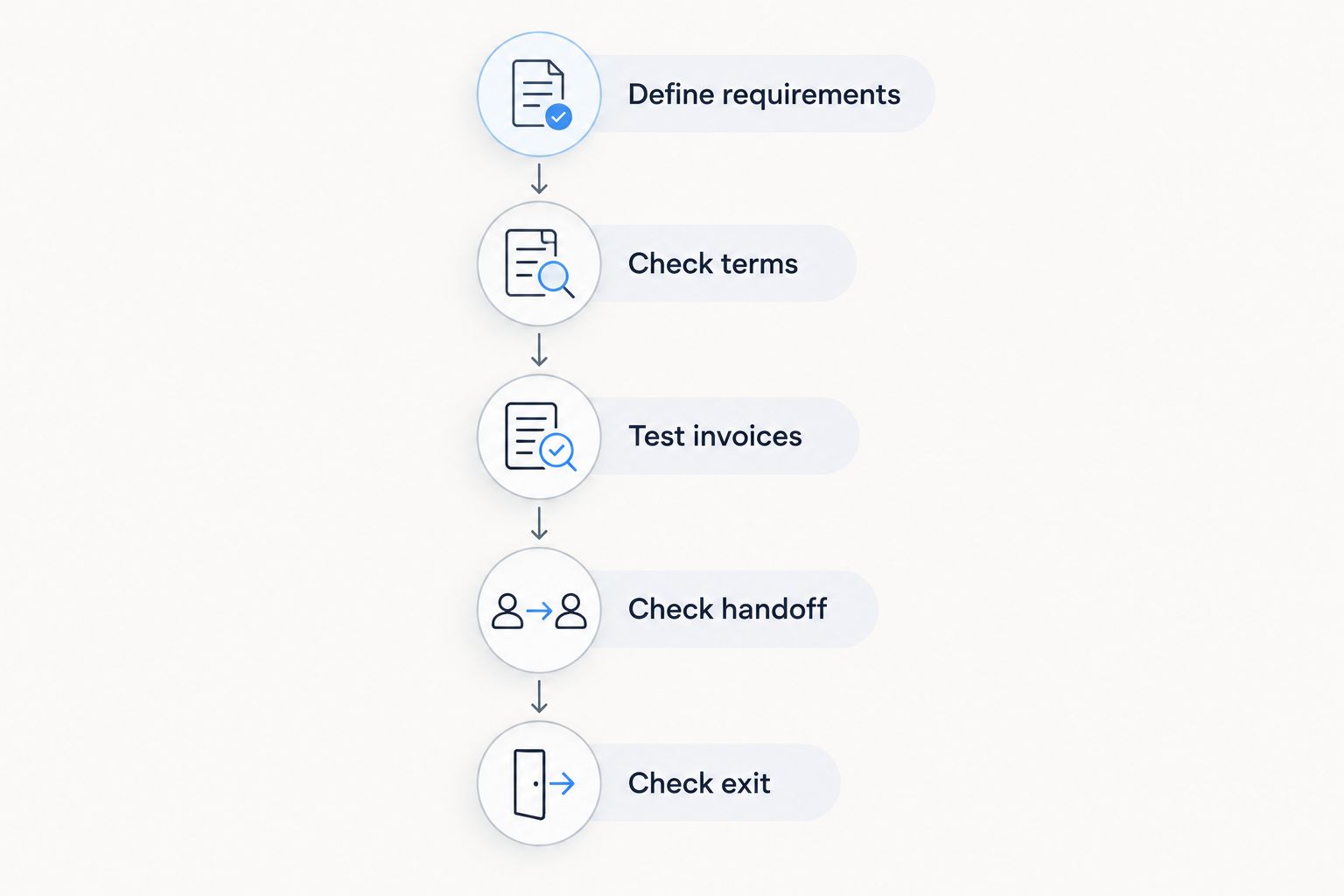
1. Define requirements
List what must happen from completed work to an invoice ready for your customer. Include customer details, invoice lines, tax treatment, supporting information and the accountant handoff applicable to your business.
Keep optional improvements in a separate list. This prevents an attractive extra from distracting you from a missing essential function.
2. Check terms
Record the billing period, included access, selected modules and any contractual conditions that affect your decision. Check the current terms directly before subscribing.
Do not compare an annual commitment with a monthly commitment as if they were interchangeable. Your comparison needs to show both the payment schedule and the obligation you are accepting.
3. Test invoices
Prepare 3 sample invoices: a routine invoice, an invoice requiring a correction and an invoice representing your most demanding real billing situation. Use anonymised details or dummy customer information.
Follow each document through the steps you actually need. Check the result, not just whether a button exists. A successful test ends with a usable invoice and the supporting records your business requires.
4. Check handoff
Ask your accountant which documents and data they need before testing exports. Then generate the relevant output and have the accountant confirm whether it fits their process.
Do not treat a generic export option as proof of compatibility. The required fields, document structure and intended use need to match.
5. Check exit
Verify how you can retrieve customer records, invoice documents and other information you need to retain. Check the procedure and terms before creating a dependency on the system.
An exit check is part of buying software, not merely cancelling it. You need a plan for keeping business records accessible independently of future purchasing decisions.
Should I pay for time tracking as well as invoicing?
Assess time tracking when recorded working time is part of your billing basis. If you invoice agreed deliverables instead, start with the records needed to support those deliverables rather than adding time tracking automatically.
For hourly work, test how you distinguish billable work from non-billable work and how you handle a correction. Then verify how the approved record reaches your invoicing process. Do not infer that connection from the presence of separate modules.
For fixed-scope work, test how you record the agreement and prepare the correct invoice lines. Choose the workflow that matches how you charge, not the workflow with the longest feature list.
Does invoicing software handle Austrian requirements automatically?
Check the specific requirements that apply to your business and customers; do not assume that an invoicing label proves compliance. Invoice content, tax treatment and electronic submission requirements are separate questions.
For a 2026 purchase, ask your accountant to review a sample document and identify any additional requirements before you commit. Have the vendor demonstrate the relevant process using your proposed setup.
Distinguish creating a readable invoice from producing an electronic format required by a particular recipient. Sending a document electronically does not, by itself, establish that it meets that recipient's submission rules.
What should I do before moving existing billing records?
Preserve your existing records before importing anything. Decide which customer data you need for future billing and which historical documents you need to retain without changing.
Test a small, representative sample before attempting the full transfer. Check customer names, addresses, tax details where applicable and links between records. A successful import should preserve meaning, not merely populate fields.
Choose a clear cutover point in your billing process. Avoid issuing the same invoice from two systems, and document which system holds the authoritative record. Your migration plan should make that distinction clear to you and anyone assisting with bookkeeping.
FAQ
How much does invoicing software cost for freelancers in 2026?
The total cost consists of the selected subscription plus applicable additional functionality, payment charges and setup work. Compare current offers against the same billing workflow and commitment period.
What's the best invoicing software approach for a solo freelancer?
Standalone invoicing fits a focused billing requirement; a modular platform fits an evaluation covering customer, project and billing administration together. Test your actual workflow before choosing either approach.
Is Mesh App suitable for freelancers who track billable hours?
Mesh App offers time tracking and invoicing modules alongside contact management, project management and finance. Verify how your required billable-hours workflow works in the selected setup rather than assuming an automatic transfer.
Should I choose monthly or annual billing for invoicing software?
Compare the commitment and payment schedule before choosing monthly or annual billing. Evaluate both over the same period and check the current cancellation and renewal terms.
Do I need accounting software as well as invoicing software?
Check the accounting functions your business requires rather than assuming invoice creation covers them. Ask your accountant which records, documents and exports they need from your chosen system.
Can I move customer data from spreadsheets into invoicing software?
Verify the specific product's import options before planning a spreadsheet migration. Preserve the original files and test representative records before transferring the full dataset.
What should I test before subscribing to invoicing software?
Test invoice creation, a correction, accountant handoff and record export. Use your own billing requirements as the acceptance criteria, with anonymised customer details.
One last thing
Test a correction, not just a clean invoice. Preparing a document from scratch shows only part of the workflow; correcting a billing mistake shows how you maintain clear records when the original document needs attention.
Use that test as a final acceptance check for your 2026 shortlist. Keep the result alongside the subscription terms, selected functions and accountant feedback. You then have a purchasing decision based on your business process rather than a feature count.


