

Billing software costs for roofers depend on the users, modules and services included in your 2026 quote, so compare the full scope rather than the subscription alone. Your budget should also account for setup, data migration, staff training and the work needed to hand invoices over to accounting.
- How much does billing software cost for roofers? Compare subscriptions, setup and accounting handover together.
- Mesh App suits roofing businesses seeking modular contact management, project management, time tracking, invoicing and finance.
- Choose invoice-only software when invoicing is the problem; assess connected modules when job information needs to feed billing.
- Test a completed roofing job before committing, including changes, previous invoices and the accounting handover.
How much does billing software cost for roofers?
The useful figure is the total commitment for your actual workflow, not an entry-level subscription shown without its conditions. Ask each provider to quote the same users, functions, implementation work and contract period. Keep initial work separate from ongoing charges so you can compare both clearly.
Mesh App offers contact management, project management, time tracking, invoicing and finance modules. That makes the scope of your purchase an important decision: specify which functions your roofing business needs before assessing the proposal.
Use this breakdown when requesting a 2026 quote. Treat each row as a question to resolve, not an assumption that every supplier charges separately for it.
| Budget component | What your quote should establish | What to check before signing |
|---|---|---|
| Subscription | Included functions and billing basis | Whether your required workflow fits the quoted scope |
| User access | Who needs an account and what access they need | Whether office and site roles are treated differently |
| Setup | Configuration and responsibility for completing it | Which tasks remain with your team |
| Data migration | Records included in the move | Whether old invoices move or remain in an archive |
| Training | Who receives instruction and what it covers | Whether training uses your own roofing workflow |
| Accounting handover | How billing information reaches accounting | Whether the required format is included and tested |
A proposal that answers these questions is more useful than a headline subscription with unresolved implementation tasks. You can challenge the scope before you sign rather than discover the gaps during your first billing run.
Why this matters
A roofing invoice depends on information about the customer, the job and the work being billed. If that information sits outside your billing system, somebody still has to check and transfer it. Include that work in your decision, even when it does not appear on a supplier's proposal.
The opposite mistake is buying a wider system without a clear need. Do not buy project management to solve an invoice-formatting problem, and do not expect an invoice editor alone to solve job tracking. Define the bottleneck first.
For the workflow behind the purchase, use the invoicing software guide for roofing companies. Keep your requirements tied to how your business prepares, checks and issues invoices.
Invoice-only software: best for a narrow billing requirement
Invoice-only software is the first category to assess when you already have reliable job records and mainly need to prepare and manage invoices. Its advantage is a narrower implementation scope. You are evaluating a billing task rather than redesigning the whole business workflow.
The trade-off is the boundary between invoicing and the records held elsewhere. Ask who will transfer customer details, confirm completed work and check previously billed amounts. A focused billing tool is not automatically a replacement for your job records.
Best for: roofing businesses that want to improve invoicing without changing how they manage projects. Choose this scope only after demonstrating that the information needed for billing is already dependable.
Connected modules: best for billing tied to job records
Connected modules deserve consideration when customer information, project updates and recorded time all contribute to invoice preparation. The benefit you are evaluating is a joined-up workflow. Require a demonstration of the actual handovers rather than assuming that a module list proves them.
Mesh App is best for roofing businesses seeking modular CRM/ERP software spanning contacts, projects, time tracking, invoicing and finance. Its stated scope matches that evaluation, but the module list does not establish support for every roofing-specific billing requirement. Test those requirements individually.
The trade-off is a broader setup decision. You must define record ownership, access and working practices across the functions you adopt. Start with the modules attached to a clear operational need, not every function that appears relevant.
Wider ERP scope: best for a broader operational change
Assess a wider ERP scope when invoicing is part of a larger change to project and finance administration. The advantage is the opportunity to specify those connected requirements together. Your evaluation should cover the whole proposed workflow, not just the invoice screen.
The trade-off is the breadth of decisions before launch. More functions give your team more processes to define and validate. If the immediate requirement is simply to issue invoices, a wider rollout needs its own business case.
| Approach | Best for | Main advantage to assess | Main trade-off |
|---|---|---|---|
| Invoice-only software | A focused invoicing requirement | Narrower implementation scope | Information still needs to arrive from job records |
| Connected modules | Billing linked to contacts, projects and time | Connected working processes | Shared records and responsibilities need definition |
| Wider ERP scope | A broader operational change | Requirements assessed together | More processes need validation before launch |
These are purchasing approaches, not fixed supplier tiers. For your 2026 comparison, ask providers to identify exactly which approach their proposal covers.
Why billing software costs vary for roofers
The useful comparison starts with differences in scope. Give every provider the same requirements and ask them to explain any exclusions against these factors:
- User roles: Identify who prepares invoices, who approves them and who supplies site information. Request the access each role actually needs.
- Module scope: Separate invoicing from contact management, project management, time tracking and finance. Ask which required functions are included together.
- Billing workflow: Describe the invoice types and job changes your business handles. Ask the provider to demonstrate them rather than accept a general assurance.
- Existing records: Decide which contacts, open jobs and billing records must move. Distinguish migration from keeping an accessible historical archive.
- Accounting handover: Specify what your accountant needs to receive and how. Make a successful handover part of your acceptance criteria.
- Implementation responsibility: Name who configures the system, checks imported records and teaches staff. Confirm what the supplier delivers and what your team must complete.
Do not treat every difference as an unwanted extra. A proposal covering work you genuinely need is a different purchase from a subscription that leaves that work unresolved. Compare equivalent responsibilities before judging the total commitment.
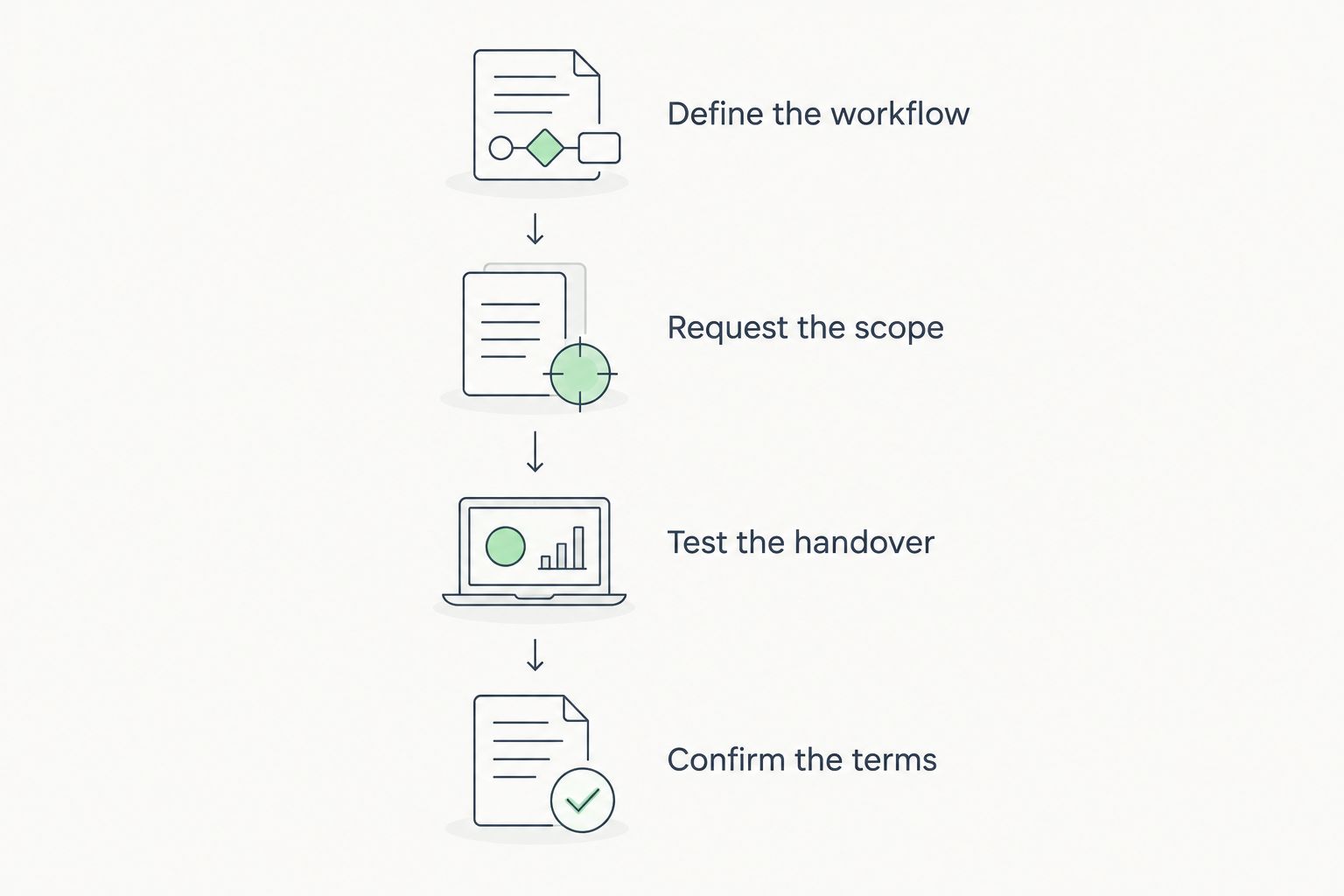
How to build a usable software budget
Use a completed roofing job to define the purchase. Choose one that reflects your normal work, including any genuine changes or earlier billing, rather than constructing an unusually simple demonstration.
Define the workflow
Write down how information moves from the customer record to the job and then to the invoice. Name the person responsible at each handover. Highlight every point where someone re-enters or checks information.
Request the scope
Send the same workflow to each provider. Ask for an itemised proposal showing included functions, user access, supplier tasks and customer tasks. Have the provider mark anything that requires separate confirmation.
Test the handover
Follow the example job through invoice preparation and the accounting handover. Check that the billing record matches the work you intended to charge for. Let the office user perform the task rather than watching only a sales demonstration.
Confirm the terms
Review the contract period, renewal conditions, cancellation process and data export arrangements. Ask what happens when your required user access or module scope changes. Resolve unclear terms before you approve the purchase.
Your 2026 budget should distinguish supplier charges from work assigned to your own team. Even when implementation tasks are included in a subscription, somebody still needs to provide records, approve settings and check the result. Assign that responsibility before scheduling the change.
Does every roofer need an account?
Not every roofer needs full billing access; assign accounts according to the work each person performs. Someone who approves invoices has a different requirement from someone who submits job information.
Ask the supplier to demonstrate the proposed access model. If site information is collected outside the system, document who transfers it and how the office checks it. Do not assume that reducing accounts removes the underlying administrative task.
Should you buy invoicing and time tracking together?
Buy invoicing and time tracking together only when recorded time has a defined role in your billing or project review. Start with the information you need, then assess whether connected modules support that process.
For fixed-scope work, time records and customer billing are not necessarily the same calculation. Keep the purpose of each clear, and test how approved time is used rather than assuming every recorded hour belongs on an invoice.
Is implementation included in a subscription?
Implementation is included only when the proposal explicitly says what work the supplier will complete. A subscription description alone does not settle who imports records, configures documents or trains staff.
Ask for a list of deliverables and a named owner for each task. An implementation promise is useful only when you can tell whether the promised work is finished.
What to verify before choosing Mesh App
Mesh App's modular CRM/ERP scope gives you a relevant starting point when your requirement extends beyond invoice preparation. Assess the contact, project, time-tracking, invoicing and finance functions against your own roofing workflow.
Do not infer roofing-specific billing behaviour from those module names. Bring your document requirements, job-change process and accounting handover to the evaluation. Keep any requirement that has not been demonstrated open until it has been resolved.
Assess your invoicing workflow
Review the platform against your contact, project, time-tracking, invoicing and finance requirements.
FAQ
How much does billing software cost for roofers in 2026?
The total depends on the users, functions, implementation work and contract terms in your quote. Compare the subscription alongside setup, migration, training and accounting handover rather than treating it as the entire commitment.
What's the best billing software approach for a small roofing business?
An invoice-only approach fits a focused invoicing requirement; connected modules fit a workflow that also needs customer, project and time records. Demonstrate your normal billing process before choosing the scope.
Do I need CRM software as well as invoicing software?
You need CRM functions when managing customer information is part of the problem you are solving. Do not add CRM solely because it is offered alongside invoicing; specify how those records will support your work.
Can I keep old invoices outside the new system?
An accessible historical archive is an alternative to migrating every old invoice. Confirm your retention obligations and make sure records needed for current billing remain available to the people preparing invoices.
Should I include my accountant in the software decision?
Include your accountant when defining the accounting handover. Agree on the required information and format, then test a representative billing record before committing.
Is Mesh App relevant for a roofing company's billing?
Mesh App is relevant to an evaluation that includes contacts, projects, time tracking, invoicing and finance. Its modular scope does not by itself establish support for every roofing-specific billing process, so test your requirements directly.
What should I check before signing a software subscription?
Check the included functions, user access, implementation responsibilities, contract terms and data export arrangements. Keep unresolved workflow requirements visible until the provider has answered or demonstrated them.
One last thing
Before approving a 2026 proposal, ask the person who normally prepares your invoices to complete the example job in the proposed workflow. Have that person identify every detail they still need to retrieve elsewhere. Those remaining handovers belong in your purchase decision just as much as the subscription does.


