

Landscapers’ facility management software is a system for organising grounds-maintenance work, site information and service records with the aim of keeping contracted outdoor spaces maintained and billable. This 2026 guide explains how to choose it for recurring visits, weather-related changes and customers who manage several properties—not just one-off landscaping projects.
- Choose facility management software for landscapers around site records, recurring work, crew updates and billing evidence.
- Mesh App suits small trade businesses seeking modular CRM/ERP administration; assess specialist grounds-maintenance requirements separately.
- Use a spreadsheet to define your workflow before evaluating scheduling, project management and time tracking.
- Test a completed visit through to an invoice before committing to a system.
Why facility management software matters for landscapers
Choose around the property you maintain, not just the customer who pays. A property manager can commission work across several sites, each with different access arrangements, maintenance tasks and approval contacts. A customer list alone does not describe that work.
Separate recurring maintenance from installation projects in your 2026 requirements. Grass cutting, hedge care and seasonal clearances need repeatable visit records; a garden redesign needs project stages and change control. Combining both under an undifferentiated task list makes the records harder to interpret.
Start by deciding whether your main problem is customer administration, crew coordination or property maintenance history. The CRM guide for landscaping companies covers the customer-management side; this guide focuses on connecting customers, sites, completed work and billing.
A useful selection test is straightforward: can someone who did not attend the property understand what was requested, what happened and what remains outstanding?
How to choose and implement the right system
1. Map your maintenance workflow before choosing software
Start manually with a spreadsheet and a shared folder. Write down how an enquiry becomes an agreed scope, a scheduled visit, completed work and an invoice. Use an actual maintenance contract rather than an idealised process nobody follows.
Distinguish the paying customer from the service location. Add the person who authorises extras separately from the person who provides access. Those roles belong in your requirements even when one person currently performs all of them.
Keep your initial 2026 requirements limited to decisions that affect delivery or billing. A long feature checklist is less useful than a clear account of where information changes hands.
- List each stage from enquiry to payment review.
- Record who owns each handover.
- Separate customer, property and visit information.
- Mark where staff currently re-enter information.
- Identify which records support invoice approval.
2. Build a site register that crews can understand
Create a standard property record in your spreadsheet before testing any software. Include the site address, service scope, access instructions, responsible contact and exclusions. Keep sensitive access information restricted to the people who need it.
Treat the site register as instructions for work, not a second address book. A billing address tells your office where to send an invoice; it does not explain which entrance a crew should use or which areas fall outside the contract.
For properties with distinct maintenance areas, use consistent names. A note about the rear courtyard is only useful if everyone identifies the same place. Ask a crew member unfamiliar with the property to read the record and explain the assignment back to you.
- Use a unique reference for each property.
- Name service areas consistently across records.
- Separate access instructions from billing details.
- Record agreed tasks and explicit exclusions.
- Assign responsibility for keeping site information current.
3. Match the software category to your main bottleneck
Use your spreadsheet as the baseline demonstration. First establish whether a shared register and calendar already solve the problem; then test software against the handovers that remain difficult.
A CRM/ERP platform addresses business administration across customers, projects and finance. Field-service software focuses on coordinating service work. A maintenance-management system centres on maintenance records and work orders. These categories overlap, so assess individual functions rather than trusting a category label.
Mesh App provides contact management, project management, time tracking, invoicing and finance modules. Those modules make it a candidate for consolidating administrative work; they do not establish specialist capabilities such as route optimisation, offline operation or irrigation-asset management.
Mesh App is best for small trade businesses seeking modular CRM/ERP administration. For landscapers, assess that administrative fit separately from any specialist facility management requirements.
- Identify the handover your current tools cannot handle.
- Separate essential functions from optional conveniences.
- Request a demonstration using your own workflow.
- Check specialist requirements individually.
- Record limitations alongside strengths before choosing.
4. Define recurring work and weather exceptions
Build a sample schedule manually before configuring repeat visits. Describe the contracted service, its timing and the conditions that change it. Avoid treating every postponed task as an identical scheduling event.
A missed visit, a rescheduled visit and an intentionally deferred task represent different outcomes. Decide how each should appear in the work record and whether it changes billing. This is a contract and process decision before it becomes a software setting.
For your 2026 evaluation, ask the vendor to demonstrate a weather-related change without losing the original commitment. The test should show who updates the schedule, how the crew learns about it and where the reason remains visible.
- Define the normal visit pattern for each contract.
- Record weather-related postponements separately from completion.
- Assign an owner for schedule changes.
- Distinguish contracted tasks from requested extras.
- Check how changed work reaches the responsible crew.
5. Capture completion evidence and working time
Begin with a simple completion form. Give crews a clear place to record work performed, time spent, unfinished tasks and anything requiring approval. Specify which evidence is necessary for each service rather than requesting photographs of everything.
Keep completion, customer acceptance and billing readiness separate. A crew can finish its assigned work while an extra task remains unapproved. Your office needs to distinguish those states before preparing an invoice.
Test the recording process on the devices your team actually uses. If work takes place without a reliable connection, require a direct demonstration of the proposed offline process instead of assuming that browser access covers it.
- Record time against the correct property and job.
- Describe completed work using agreed task names.
- Flag unfinished work and its reason.
- Separate approved scope from additional requests.
- Check who can view or edit completion records.
6. Prove the path from site work to invoice
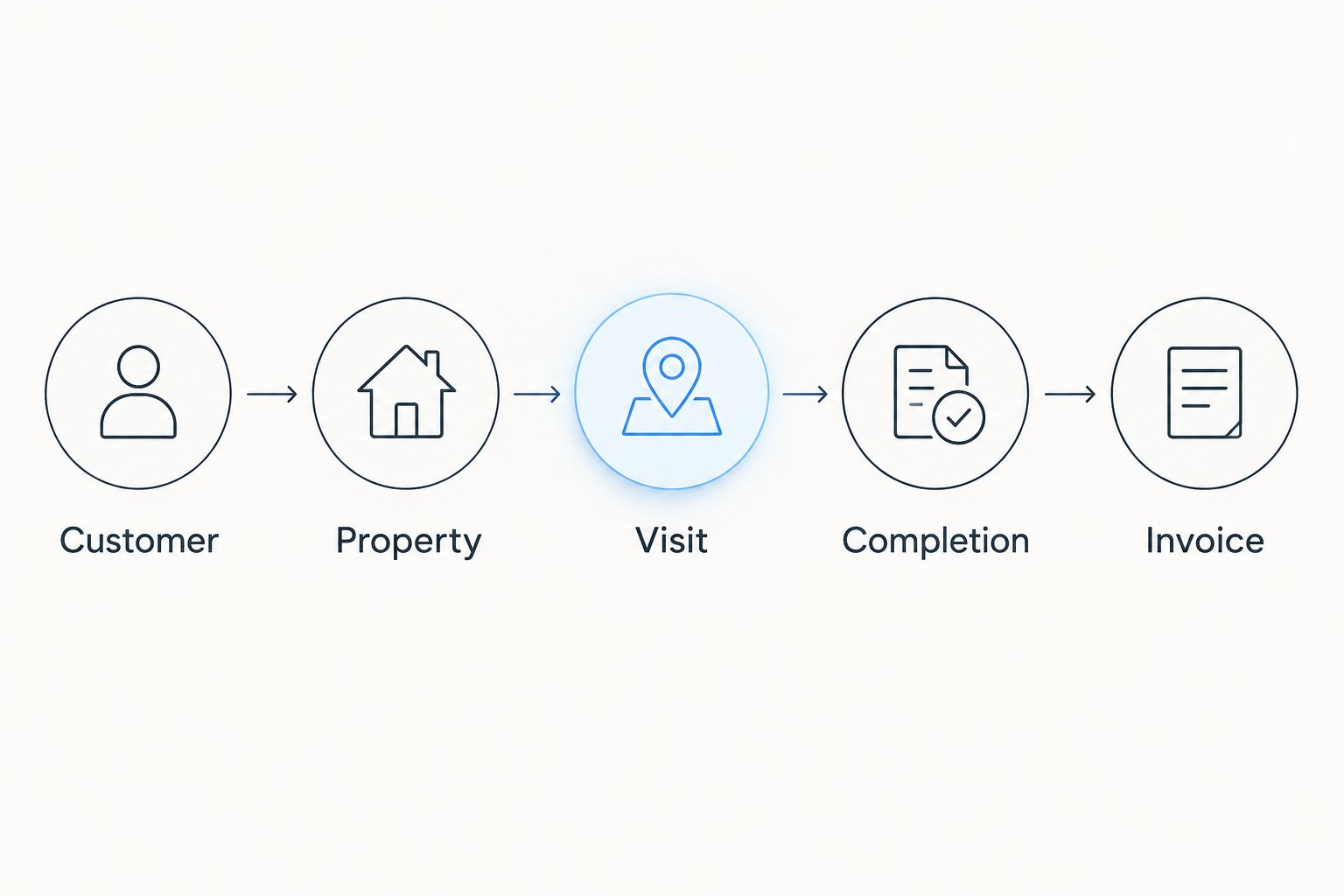
Trace a completed maintenance visit manually through your records. Identify the approved scope, completion evidence, recorded time and billing instruction. Then ask the shortlisted system to reproduce that path without relying on unexplained workarounds.
Use a deliberately bounded trial: 1 property, 5 sample visits and a 14-day evaluation window. These are suggested test limits, not performance benchmarks. Include a routine visit, a postponement and an extra-work request so the trial tests exceptions as well as normal work.
Keep a written log of duplicate entry, unclear responsibilities and missing information. Before expanding, decide whether each issue needs a configuration change, a process change or a different system.
- Trace the customer and property through every record.
- Reconcile completed work with the billing instruction.
- Check how approved extras reach the invoice.
- Test record export before committing to migration.
- Assign responsibility for resolving trial issues.
The workflow you are testing is a chain of accountable handovers. Each stage needs enough information for the next person to continue without reconstructing the job from messages.
Compare the options against your operating needs
For a 2026 shortlist, compare the work each option organises and the gaps you would still need to manage. A good scheduling screen is not proof of a complete maintenance workflow. Equally, a detailed asset register is unnecessary if your immediate problem is transferring approved work into invoices.
| Option | Best for | Main advantage | Key limitation or check |
|---|---|---|---|
| Spreadsheet, shared folder and calendar | Defining a simple workflow before implementation | You control the fields and can revise the process directly | Your team must reconcile changes across separate records |
| Mesh App CRM/ERP | Small trade businesses seeking customer, project, time and finance modules | Covers several administrative functions within a modular platform | Verify recurring visits, field access and specialist grounds-maintenance functions separately |
| Field-service management software | Businesses prioritising crew assignments and service visits | Makes service-job coordination the focus of evaluation | Check site history, finance functions and data export in the actual product |
| Maintenance-management software | Teams managing maintenance tasks and equipment records | Makes work orders and maintenance history the focus of evaluation | Check customer contracts, landscaping workflows and invoicing separately |
These are functional choices, not a ranked list of interchangeable products. If your team maintains irrigation equipment as well as grounds, include equipment-level records in the demonstration. If you mainly deliver contracted visits, prioritise repeat work, exceptions and completion evidence.
Assess your administrative workflow
Compare contact management, projects, time tracking, invoicing and finance with your requirements.
Common mistakes landscapers make
Treating a customer as a single property
One customer record cannot explain the operational differences between several sites. Keep billing relationships separate from property instructions, and make the service location visible on every job record. Otherwise, an office user must reconstruct which property a note concerns.
Scheduling visits without defining exceptions
Repeating a calendar entry does not define what happens after heavy rain, restricted access or an incomplete task. Document the exception process alongside the normal schedule. Require a reason for a changed visit rather than silently replacing the original date.
Letting extra work disappear into visit notes
A request made on site is not the same as approved scope. Record who requested the extra work, who can authorise it and whether approval has arrived. Keep that record distinct from the description of the contracted maintenance visit.
Selecting finance modules without testing field records
Mesh App offers invoicing and finance modules, but your selection still needs to establish how landscaping work reaches those functions. Run the completion-to-invoice test with realistic records. Do not infer a specific automation or integration from the presence of separate modules.
Migrating inconsistent site records unchanged
Moving a spreadsheet into software does not resolve duplicate properties or conflicting instructions. Decide which record is authoritative before importing it. Keep a copy of the original data and check migrated records against it before retiring the old working file.
FAQ
What is facility management software for landscapers?
Facility management software for landscapers organises grounds-maintenance work, property information and service records. Evaluate it around recurring visits, crew instructions, completion evidence and the handover to billing.
Do I need facility management software or a landscaping CRM?
Choose according to the workflow you need to improve. A CRM addresses customer relationships, while facility management requirements centre on properties and maintenance work; test whether your shortlisted system handles both when you need both.
Is Mesh App suitable for a landscaping business?
Mesh App is a candidate for landscaping businesses seeking contact management, project management, time tracking, invoicing and finance modules. Assess recurring maintenance, field access and any specialist equipment requirements separately before selecting it.
Can I start with a spreadsheet instead?
Yes, use a spreadsheet to define customers, properties, work scopes and completion records before choosing software. Add a shared calendar and document folder, then identify which handovers still require repeated manual reconciliation.
Does landscaping software work without an internet connection?
Offline operation depends on the individual product and workflow. Require a demonstration that covers opening job details, recording work and synchronising changes after the connection returns.
What should I test before moving my whole team?
Test the path from an agreed site task to a checked invoice. Include a postponed visit, an extra-work request, time recording and a record export so the evaluation covers exceptions as well as routine work.
Can one system handle maintenance and landscaping installation projects?
Choose a system that demonstrates both workflows if your business delivers both. Keep recurring service records separate from installation stages, scope changes and project completion criteria, even when they share a customer.
One last thing
Make your final 2026 demonstration start with a disrupted visit, not a successful one. Ask someone who did not schedule the work to explain the revised assignment, find the approval for an extra task and identify what is ready to invoice.
Choose the system that makes exceptions understandable. A clean demonstration of routine work does not answer the harder question: whether your office and crew can agree on what happened when the plan changed.


