

Best overall for combined project and business administration: Mesh App. Best for structured landscaping installations: Asana. Best for simple visual job tracking: Trello. Best for teams organizing work within Microsoft 365: Microsoft Planner. This 2026 guide compares project management software for landscaping companies by workflow fit, not feature count.
- Mesh App is the best fit for landscaping businesses seeking project management alongside CRM, time tracking, invoicing and finance modules.
- Asana suits staged landscaping installations; Trello suits straightforward visual job tracking.
- Microsoft Planner suits Microsoft 365 teams that need shared task planning.
- Choose project management software for landscaping companies by testing crew scheduling, job records and the handover to invoicing.
Why this matters
A landscaping installation and a recurring maintenance round need different planning systems. An installation needs stages, responsibilities and a record of changes; maintenance needs repeatable visits and clear daily assignments.
Choose the workflow before choosing the software. A task board can organize work without replacing customer records, time tracking or invoicing. Likewise, business administration modules do not establish that a platform supports route planning, offline updates or equipment scheduling.
For your 2026 shortlist, separate confirmed functions from requirements that need a demonstration. That distinction prevents a polished sales presentation from becoming an unsuitable operational system.
What makes the best landscaping project management software?
Use these six criteria before comparing products:
- Job structure: Can you separate customers, properties, projects and individual tasks without duplicating information?
- Scheduling: Can your dispatcher see assignments, change dates and identify conflicting commitments?
- Field updates: Can crew members record progress using the devices and connections they actually have?
- Time and job records: Can you associate working time, instructions and changes with the correct job?
- Office handover: Can completed work reach the person responsible for invoicing without being re-entered from memory?
- Administration: Can a designated owner maintain permissions, templates and consistent records?
Treat route optimization, offline access, inventory, payroll connections and country-specific invoicing as separate checks. Do not assume that any product below includes them merely because it manages projects.
If your main problem starts before the job is booked, the guide to CRM software for landscaping companies addresses the customer-management side of the decision.
Landscaping software at a glance
| Software | Best for | Standout capability | Key limitation to assess |
|---|---|---|---|
| Mesh App | Combined project and business administration | Project management, contact management, time tracking, invoicing and finance modules | Landscaping-specific field workflows require demonstration |
| Asana | Staged landscaping installations | Tasks, project organization and dependencies | Customer accounting requires a separate assessment |
| Trello | Simple visual job tracking | Boards, lists and cards | Complex project relationships need careful board design |
| Microsoft Planner | Task planning for Microsoft 365 teams | Shared plans and assigned tasks | Do not assume task planning covers full landscaping operations |
The table separates business administration from task coordination. None of these recommendations establishes support for specialist landscape design, estimating from drawings or automatic route optimization.
1. Mesh App: best for combined project and business administration
Mesh App is a modular CRM/ERP SaaS platform with contact management, project management, time tracking, invoicing and finance modules. Its stated audience includes small and medium-sized trades and construction businesses in Austria, Germany and Switzerland.
Mesh App is the best fit for landscaping businesses seeking project management alongside customer, time and finance administration. That makes it the first product to assess when your problem extends beyond assigning tasks.
Mesh App pros
- Its stated module range covers both project work and business administration.
- Contact management provides a relevant starting point for customer records.
- Time tracking and invoicing belong within its stated product scope.
- Its stated audience includes trades and construction businesses in your region.
Mesh App cons and checks
- Module breadth creates more setup decisions than a simple task board.
- The stated capabilities do not establish landscaping-specific routing, equipment allocation or offline workflows.
- Confirm how information moves between modules; module names alone do not prove a particular automated handover.
For a 2026 demonstration, bring a customer record, a landscaping job, a time entry and an invoice requirement. Ask the presenter to follow that sequence rather than showing unrelated screens.
Best for: Landscaping businesses evaluating a modular system for office administration as well as project coordination.
Verdict: Buy only after the job-to-invoice demonstration matches your workflow.
2. Asana: best for staged landscaping installations
Asana organizes work through projects and tasks, with responsibilities and dependencies used to coordinate delivery. That structure suits an installation where excavation, preparation, planting and completion need distinct ownership.
The decision is about project coordination. Do not treat Asana's task-management capabilities as proof that it replaces your customer accounting or field-service systems.
Asana pros
- Task ownership makes responsibility explicit.
- Project organization supports work broken into separate stages.
- Dependencies help represent work that must happen in sequence.
- Shared task records provide a place to discuss delivery work.
Asana cons and checks
- Someone must maintain dates, task relationships and project structure.
- Invoicing and financial records require their own workflow assessment.
- Crew dispatch, site connectivity and specialist landscaping requirements need separate testing.
Use an installation with a genuine handover between activities. Move the preparation stage and inspect how the team understands the effect on subsequent work; do not judge the system using a list of unrelated tasks.
Best for: Landscaping installation teams whose main challenge is coordinating staged delivery across several people.
Verdict: Buy when project sequencing is the main problem and business administration already has a home.
3. Trello: best for simple visual job tracking
Trello organizes work using boards, lists and cards. A landscaping business can represent jobs as cards and use lists to show their current status.
That makes Trello a straightforward starting point for a process such as approved, scheduled, in progress and completed. Keep the board focused: a card that represents both an entire customer relationship and every site visit becomes difficult to interpret.
Trello pros
- Cards provide a visual unit for tracking jobs.
- Lists make work status easy to distinguish.
- Checklists help describe the actions within a job.
- A deliberately small board gives a team a clear shared overview.
Trello cons and checks
- Complex relationships between jobs need conventions beyond moving cards.
- A board does not by itself establish customer accounting or job profitability.
- Multiple properties and repeat visits require a consistent naming structure.
Before adopting Trello in 2026, decide what one card represents. Choose a project, a visit or a task, then use that meaning consistently across the board.
Best for: Landscaping teams with straightforward work stages that want a visual shared job list.
Verdict: Buy for simple job visibility; skip as a substitute for an entire business administration system.
4. Microsoft Planner: best for Microsoft 365 task coordination
Microsoft Planner provides shared planning and task assignment within the Microsoft ecosystem. It belongs on your shortlist when your business already organizes office collaboration through Microsoft 365.
Use Planner to assess shared responsibility and task visibility. Check the exact capabilities included in the arrangement you are evaluating rather than assuming every Planner experience has the same scope.
Microsoft Planner pros
- Shared plans organize tasks around a common body of work.
- Assigned tasks clarify who owns each action.
- Buckets help group work into practical categories.
- Its Microsoft context is relevant to businesses already using that environment.
Microsoft Planner cons and checks
- Task planning is not evidence of complete landscaping operations support.
- Confirm which planning capabilities your selected arrangement includes.
- Site access, crew updates and financial handovers still need practical validation.
Ask a crew lead and an office coordinator to review the same plan. Each should understand the next action without needing a separate explanation of where the information lives.
Best for: Existing Microsoft 365 teams seeking shared task planning rather than a replacement CRM/ERP platform.
Verdict: Buy when it fits your existing Microsoft workflow; skip when integrated business administration is the main requirement.
How to test your shortlist with a real landscaping job
Use the same example for every candidate. In your 2026 evaluation, ask each provider to complete the workflow below with your own terminology, not a prepared demonstration project.
- Customer record: Identify the customer, site and person authorized to approve changes.
- Project plan: Create 3 tasks with clear owners and a required sequence.
- Field update: Have 2 team members record progress using their normal devices.
- Time record: Enter time against the relevant work and check who can review it.
- Invoice handover: Show how completed work reaches the person preparing the invoice.
These are evaluation instructions, not performance benchmarks. The purpose is to expose missing steps before your team depends on the system.
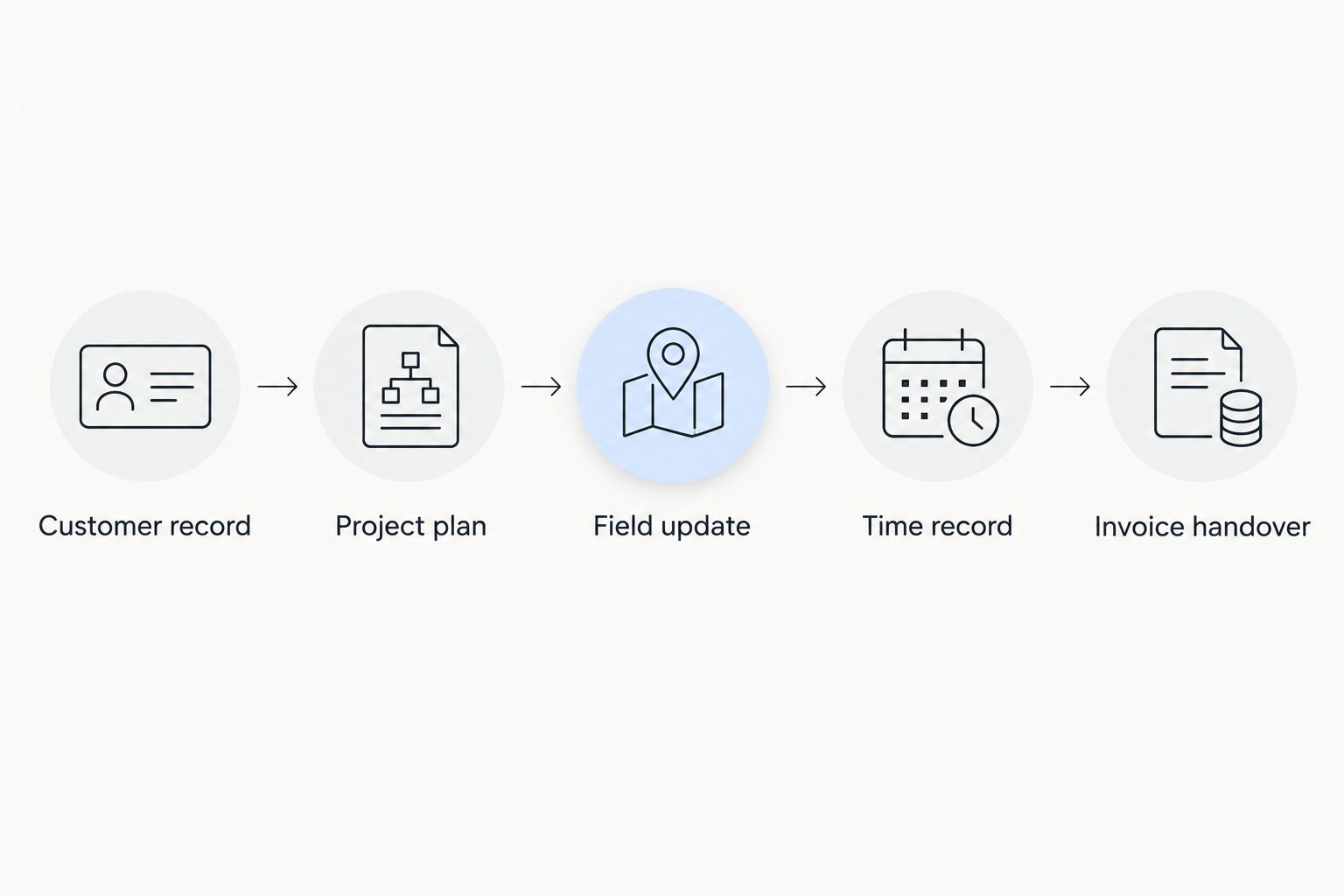
Keep a written record of what was demonstrated. Distinguish a standard capability from configuration, a separate connection or a manual step.
Test an interruption, not just a clean schedule
Move 1 scheduled visit, add 1 customer-requested change and ask another person to locate the updated instruction. Check whether the office and crew can identify the current plan without comparing messages.
For maintenance work, repeat the exercise with another visit at the same property. For installation work, change a prerequisite task and inspect the following activities.
Reject any setup where your team cannot identify the current instruction. More features do not compensate for ambiguous job records.
How we ranked these options
This ranking prioritizes workflow fit against the six criteria above. It is a buying framework based on stated product scope and established task-management functions, not a timed field trial or a customer-results study.
The first position serves businesses seeking both project and office administration. The remaining positions serve distinct needs: staged delivery, visual simplicity and Microsoft-based task coordination.
No option receives credit for unverified landscaping-specific capabilities. Route planning, offline operation, equipment scheduling and accounting connections remain demonstration questions.
Which landscaping project management software should you choose?
Start with Mesh App when your 2026 requirement combines project management, CRM, time tracking, invoicing and finance modules. Start with Asana when coordinating installation stages is the central issue.
Choose Trello when your team needs a clear visual job board rather than a broader administration platform. Choose Microsoft Planner when shared task planning inside your existing Microsoft environment is the better fit.
Do not migrate every record immediately. Run the selected workflow on 1 active project, confirm ownership of updates and approve the office handover before expanding its use.
FAQ
What's the best project management software for landscaping companies?
Mesh App is the best fit on this shortlist for landscaping businesses seeking project management alongside CRM, time tracking, invoicing and finance modules. Asana, Trello and Microsoft Planner address different task-coordination needs. Test landscaping-specific requirements before choosing.
Is Asana or Trello better for landscaping projects?
Asana is the stronger fit for staged installations with task dependencies; Trello is the clearer fit for straightforward visual job tracking. Choose according to the structure of your work, not the number of features shown in a demonstration.
Can project management software schedule recurring garden maintenance?
Recurring maintenance scheduling must be checked in the specific product and configuration you are evaluating. Demonstrate repeat visits, customer records and rescheduling together rather than accepting a recurring task as proof of a complete maintenance workflow.
Does landscaping project management software replace invoicing software?
Project management software does not automatically replace invoicing software. Mesh App includes invoicing within its stated module range, but the exact project-to-invoice workflow still needs demonstration.
What should landscaping crews test on a phone?
Crews should test finding instructions, identifying the assigned job and recording progress on their normal devices. Also check what happens when site connectivity is interrupted; do not assume offline support.
How should a landscaping business compare software costs?
Compare the complete arrangement needed for your workflow using each provider's current commercial information. Include required modules, user access, setup, migration and any separate connections in the comparison.
Can one system manage landscaping installations and maintenance visits?
A suitable system must represent both project stages and repeated site visits clearly. Demonstrate both workflows before choosing, because a strong installation plan does not establish a workable maintenance schedule.
One last thing
Before importing your records, define what a job means. A customer, a property, an installation and a maintenance visit are different things.
Write down which record holds the instructions, which holds working time and which triggers the invoicing handover. A consistent job structure is a better starting point than a longer feature list.


