

Yes, a CRM can track customer service tickets and support requests when it includes case management, supports a suitable custom workflow, or connects to a help desk. Contact records alone are not enough: you also need a separate record for each request, a responsible owner, a status, and a conversation history. This 2026 guide explains how to assess those capabilities and choose a workable support process.
- Can a CRM track customer service tickets and support requests? Yes, with ticket records, ownership, statuses, and conversation history.
- Choose native ticketing for customer-linked support; assess a help desk integration when support needs exceed CRM workflows.
- Mesh App suits small businesses seeking modular CRM/ERP; verify ticket management separately before selecting it for customer support.
- Test replies, reassignment, and reopened requests before moving customer service into your CRM.
Why this matters
A customer record tells you who contacted your business. A support ticket tells you what needs fixing, who owns the next action, and whether the issue is resolved. Confusing those records leaves unanswered requests buried inside otherwise complete customer profiles.
For a service business, an enquiry can also concern an existing job, invoice, or project. Keeping that context accessible helps staff understand the request without treating every message as a new sales opportunity. The CRM software for service businesses guide covers the broader customer-management context.
Choose your support workflow around request ownership, not around where you already store contacts. A shared customer database is useful, but it does not replace an accountable queue of unresolved work.
Can a CRM track customer service tickets and support requests?
Yes. The practical question is whether the CRM supports a complete request lifecycle rather than merely storing notes. Assess the following approaches during your 2026 software evaluation; these are workflow categories, not promises about any particular vendor.
| Approach | Best for | Main advantage | Main limitation |
|---|---|---|---|
| Native CRM ticketing | Teams handling support alongside customer relationships | Keeps requests connected to customer records within the CRM | Ticketing depth depends on the product |
| Configured CRM workflow | Teams with straightforward request handling | Lets you structure requests around your existing working process | Requires configuration and clear rules; communication capture needs checking |
| CRM connected to a help desk | Teams needing a separate support workspace | Separates ticket handling from broader customer management | Requires reliable record matching and synchronisation |
These approaches are not interchangeable. A configured project board can organise support work without automatically collecting incoming emails. A connected help desk can maintain detailed ticket conversations without sharing every field back to the CRM.
Before choosing, ask the supplier to demonstrate an actual request from arrival through resolution. Watch where the message lands, how staff reply, and what happens when ownership changes. A feature labelled customer management does not answer those questions.
What does a usable ticket record contain?
Start with 5 required fields: customer, issue summary, owner, status, and next action. Treat these as a setup recommendation, not a universal software standard. Add further fields only when someone uses them to make a decision.
The ticket also needs a distinguishable identity. Otherwise, separate problems from the same customer can become one confusing conversation. Keep the original request and subsequent replies accessible so the next person can understand what has already happened.
Use separate tickets for unrelated issues. For example, a billing question and a repair request need different next actions even when the same customer raises both.
How do you set up customer support tracking in a CRM?
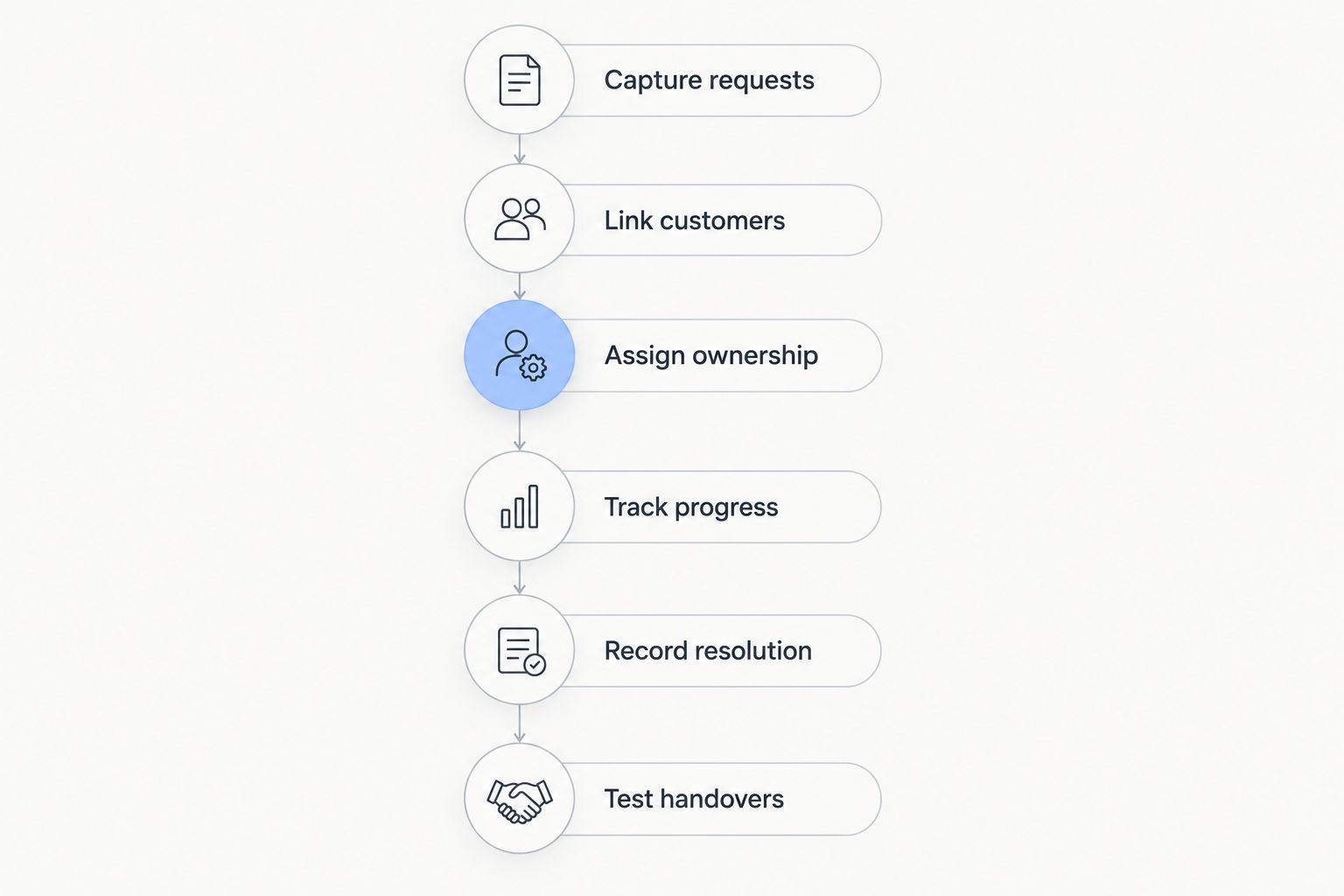
Use these 6 setup steps to build and test the workflow. The sequence applies whether you configure records inside a CRM or connect a dedicated support workspace.
1. Capture requests
Decide which channels your team accepts and how each becomes a ticket. Email capture, forms, phone-call entry, and integrations are capabilities to verify, not features to assume.
Write down the fallback process too. If an automatic import fails, staff still need a defined way to record the request without losing the original message or creating a duplicate.
2. Link customers
Connect each request to the correct contact and, where relevant, the correct company or project. Define how staff handle an unfamiliar email address or a person contacting you on behalf of another organisation.
Avoid creating a new contact automatically without checking the matching rules. A customer with several email addresses should not become several unrelated customer histories.
3. Assign ownership
Give each open ticket a named owner responsible for the next action. A team queue can organise incoming work, but it should not conceal who must respond once work begins.
Specify who handles absence and reassignment. The ownership change should leave enough context for the next person to continue without asking the customer to repeat the problem.
4. Track progress
Begin with 4 statuses: New, In progress, Waiting, and Resolved. Use them as a proposed starting structure, then adjust them to your real process.
Define Waiting carefully. Waiting for a customer reply and waiting for an internal decision require different follow-up actions, even if you initially use the same status. Record what is outstanding and who must act next.
5. Record resolution
Save what fixed the issue, not just a closed status. Include the action taken and any information another colleague would need if the problem returns.
Agree on a closure rule. For example, decide whether staff close a request after providing the answer or after receiving customer confirmation. Apply the rule consistently rather than leaving each employee to improvise.
6. Test handovers
Run 3 test requests: a new enquiry, a request transferred between colleagues, and a resolved issue that the customer reopens. These tests expose different weaknesses in capture, ownership, and history.
For your 2026 rollout, make successful completion of these tests a release condition. Confirm that messages remain attached to the right ticket and that reopened work returns to an actionable queue.
Why CRM support capabilities vary
The word CRM describes customer relationship management, not a fixed ticketing specification. In 2026, assess the following differences directly in demonstrations and documentation:
- Record structure: Check whether requests exist independently from contacts, deals, and projects. Independent records let one customer have several separately managed issues.
- Communication capture: Verify which incoming messages and outgoing replies appear in the ticket history. Do not assume an email integration handles both directions.
- Ownership controls: Check assignment, reassignment, absence cover, and visibility of unassigned work. A queue needs rules as well as a screen.
- Workflow configuration: Verify which statuses, fields, and follow-up actions you can change. Configuration should support your process without hiding unresolved work.
- Connected systems: Check how customer details, ticket updates, and attachments move between systems. Define what happens when a transfer fails.
- Reporting and permissions: Confirm that managers can review unresolved work and that users only see the customer information their roles require.
Turn these factors into acceptance criteria. Instead of asking whether a supplier offers automation, ask whether an incoming request creates the correct record, reaches the right owner, and remains visible until someone resolves it.
Can a contact record replace a support ticket?
A contact record cannot replace a support ticket when you need to manage separate issues independently. Contact notes provide background, but they do not necessarily provide issue-level ownership, status, or follow-up.
Consider a customer who asks about an invoice while reporting a problem with completed work. If both messages live only in a chronological contact timeline, an employee can answer the invoice question without noticing that the service issue remains open.
Keep customer context and request progress connected but distinct. Your team should be able to see the relationship history without treating the entire relationship as one task.
Do you need a dedicated help desk instead of a CRM?
A dedicated help desk is the better fit when your required support workflow cannot be demonstrated in the CRM. Make the decision from required behaviours, not from a product category label.
Write down the work that must happen: collecting messages, assigning responsibility, tracking replies, escalating unresolved requests, and reporting on outcomes. Then test those behaviours in each proposed setup. The comparison table above shows the trade-offs, but the demonstration determines whether a specific product meets your requirements.
Do not select a second system solely because it has a ticketing label. You still need to verify customer matching, permissions, and what staff can see when they switch between systems. Separate workspaces create a handover that someone must maintain.
Can support work connect to projects and billable time?
Support work can connect to projects and billable time when the selected system supports those links. Request tracking, project management, and time recording are separate capabilities; confirm how they interact before relying on them.
For a consulting or IT business, a support request might lead to project work. For a trades business, it might require work against an existing job. Keep the original request accessible when that handover occurs, and make responsibility for the customer update explicit.
Do not treat recorded time as automatic permission to invoice. Your team still needs to distinguish included support, corrective work, and agreed additional work according to the customer arrangement.
Where Mesh App fits
Mesh App is a modular CRM/ERP SaaS platform with contact management, project management, time tracking, invoicing, and finance modules. It serves small and medium-sized businesses across trades, construction, consulting, IT, and e-commerce in Austria, Germany, and Switzerland.
Mesh App is best for small and medium-sized businesses seeking modular CRM/ERP across customer records, projects, time tracking, and invoicing. That scope makes it relevant when support enquiries touch operational work, but it does not establish a native ticketing feature.
Evaluate the platform against the same request-lifecycle tests described above. Ask for a demonstration of ticket capture, conversation history, reassignment, and reopening before selecting it as your customer support system. The benefit is its stated breadth of business modules; the support-specific limitation is that those modules alone do not demonstrate ticket management.
What should you review after launch?
Your 2026 review should focus on whether requests remain actionable. Inspect unresolved work, tickets without owners, waiting requests without a next action, and closed issues that return because the underlying problem remains.
Use consistent definitions before comparing results. A resolution measure is difficult to interpret if one employee closes a request after sending a reply while another waits for customer confirmation. Likewise, distinguish the time a customer waits from the time staff actively spend working.
Review failed imports and duplicate records alongside team performance. A request missing from the queue is a capture problem, not evidence that the team responded successfully. Correct the workflow before drawing conclusions from its reports.
FAQ
Can a CRM track customer service tickets and support requests?
Yes, a CRM can track customer service tickets and support requests through native ticketing, a configured workflow, or a connected help desk. Verify separate request records, ownership, status tracking, and conversation history before adopting it for support.
Does every CRM include a help desk?
No, the CRM label does not guarantee a help desk. Ask the supplier to demonstrate incoming request capture, replies, reassignment, resolution, and reopening.
What fields should a customer support ticket have?
Start with 5 required fields: customer, issue summary, owner, status, and next action. Keep the conversation history accessible and add other fields only when they support a clear decision.
Can I use CRM tasks instead of support tickets?
CRM tasks can organise straightforward support work if each request has clear ownership, progress tracking, and accessible customer correspondence. Test communication capture separately because task management alone does not establish it.
Can a CRM automatically turn emails into tickets?
A CRM can turn emails into tickets when its native functionality or integration supports that workflow. Test customer matching, reply threading, duplicate handling, and failed imports before relying on automatic capture.
Is Mesh App a customer support ticketing system?
Mesh App is described as a modular CRM/ERP platform with contact management, project management, time tracking, invoicing, and finance modules. Confirm ticket management through a product demonstration before choosing it for customer support.
What should I test before moving support into a CRM?
Run 3 test requests: a new enquiry, a request transferred between colleagues, and a resolved issue that reopens. Confirm that ownership, messages, and next actions remain clear throughout each test.
One last thing
Test the second problem from the same customer, not just the first. A simple demonstration can look convincing when one contact has one request. Separate issues reveal whether the workflow truly manages tickets or merely collects customer notes.
Before your 2026 launch, ask a colleague unfamiliar with a test request to take it over using only its recorded history. If the colleague cannot identify the issue, owner, and next action, improve the record before adding more automation.


