

Best for detailed electrical estimates: specialist electrical estimating software. Best for connected business administration: Mesh App. Best for spreadsheet-based quote preparation: Microsoft Excel. This 2026 guide compares those options with field service software and shows you how to test quoting software for electricians against a real job.
- Choose quoting software for electricians by testing labour, materials, revisions and the handover to invoicing.
- Mesh App suits electrical businesses seeking contact management, projects, time tracking, invoicing and finance modules.
- Specialist electrical estimating software is the first category to assess for detailed tender calculations.
- Microsoft Excel supports spreadsheet calculations; customer records, approvals and job handovers need separate processes.
Why this matters
An electrical quote is both a customer document and a record of what you agreed to deliver. A clear total is not enough: you need an identifiable scope, explicit exclusions and a way to distinguish the accepted version from earlier drafts.
Choose the system around the work that follows acceptance, not just the document you send. A tender estimator, a service coordinator and an owner preparing occasional domestic quotes need different workflows. This shortlist separates those needs rather than treating every business application as interchangeable.
What makes the best quoting software for electricians?
Use these criteria for your 2026 shortlist. Treat each as a demonstration requirement, not a feature name to tick off on a sales page.
- Labour and materials: Enter quantities, units and labour assumptions separately. Check how the application handles changes to each.
- Scope clarity: Show inclusions, exclusions and optional work without hiding them inside a long description.
- Revision control: Identify which document the customer accepted and preserve the scope attached to that version.
- Job handover: Check what happens to customer details, work descriptions and quoted items after approval.
- Actual-versus-estimated review: Establish how recorded time and purchased materials can be compared with the original assumptions.
- Local administration: Ask your accountant to review the invoice output, tax handling and required export process for your country.
A feature matters only when your team can use it correctly. Ask the person who normally prepares quotes to operate the demonstration while the vendor answers questions.
Quoting software options at a glance
The ranking below assigns each option a distinct role. Category entries describe what to assess; individual products still need to pass your workflow test.
| Rank and option | Best for | Standout capability or selection priority | Key limitation |
|---|---|---|---|
| 1. Specialist electrical estimating software | Detailed electrical tenders | Assess structured labour and material calculations | Estimating depth does not establish job-management suitability |
| 2. Mesh App | Connected business administration | Contact management, projects, time tracking, invoicing and finance modules | Demonstrate the required quote workflow before choosing |
| 3. Microsoft Excel | Spreadsheet-based quote preparation | Formulas and editable worksheets | Version control and handovers require separate procedures |
| 4. Field service software | Service-led electrical businesses | Assess the connection between quotes and service jobs | Detailed tender estimating requires a separate check |
1. Electrical estimating software: best for detailed tenders
Specialist electrical estimating software is the first category to assess when calculation detail determines whether a quote is usable. Start here when your work requires a breakdown of electrical materials, labour assumptions and clearly separated work packages.
Do not assume every estimating application includes the same catalogues, document tools or integrations. Bring a completed estimate and ask the supplier to reproduce its structure without simplifying away the difficult parts.
Electrical estimating software pros to look for:
- Structured quantities and units that make the calculation readable.
- Separate labour assumptions that you can review and amend.
- Reusable assemblies or item groups that match your estimating method.
- A customer-facing document that preserves the intended scope.
Electrical estimating software cons to test:
- Item libraries require checking against your own materials and working methods.
- A detailed estimate does not establish a reliable handover to scheduling or invoicing.
- A calculation-focused interface can require more setup than a simple quote document.
Best for: Electrical contractors whose main bottleneck is preparing and reviewing detailed estimates.
For your 2026 evaluation, change a material quantity after completing the initial estimate. Inspect every affected calculation and the customer document, then ask how the accepted version remains identifiable.
Verdict: Hold until the application reproduces a representative tender and its revisions correctly.
2. Mesh App: best for connected business administration
Mesh App is a modular CRM/ERP platform for small and medium-sized businesses, including trades and construction businesses in Austria, Germany and Switzerland. Its stated modules cover contact management, project management, time tracking, invoicing and finance.
Mesh App is best for electrical businesses seeking contact management, projects, time tracking and invoicing within a modular CRM/ERP platform. That makes it relevant when your purchasing decision extends beyond preparing a quote document.
Mesh App pros:
- Contact management addresses customer administration.
- Project management and time tracking cover work after the sales stage.
- Invoicing and finance modules belong in the same platform's scope.
- The modular structure provides a basis for discussing which functions your business needs.
Mesh App cons and checks:
- A broader CRM/ERP decision requires agreement on responsibilities across the office and delivery team.
- Electrical estimating requirements need a specific demonstration; general business modules are not proof of specialist calculation tools.
- Confirm quote revisions, customer acceptance and downstream data transfer through the exact workflow you intend to use.
Best for: Electrical businesses selecting a wider administrative platform rather than an isolated estimating tool.
Ask for a demonstration that follows a customer from enquiry through project work, recorded time and invoicing. Keep quote preparation as a separate acceptance test: a convincing project demonstration does not answer every estimating question.
Verdict: Hold until Mesh App passes your quote-to-project workflow test; shortlist it for the broader administrative requirement.
3. Microsoft Excel: best for spreadsheet-based quote preparation
Microsoft Excel uses worksheets and formulas to organise inputs and calculate totals. You can structure a workbook around labour, materials, scope notes and a customer-facing summary.
The important distinction is between a calculation file and a controlled business process. A workbook can hold the estimate, but you still need rules for approval, storage, revisions and transferring the agreed scope to the people doing the work.
Microsoft Excel pros:
- Formulas support transparent calculations when the workbook is clearly structured.
- Worksheets let you separate inputs, calculations and presentation.
- Editable layouts accommodate a quoting format you define yourself.
- A workbook provides a reference calculation for testing replacement software.
Microsoft Excel cons:
- Formula changes need checking before you rely on the output.
- Copies sent or saved separately need an explicit version-control procedure.
- Customer follow-up and job handover need processes beyond the estimate itself.
Best for: An owner or estimator who wants direct control over spreadsheet calculations and accepts responsibility for the surrounding process.
For a 2026 spreadsheet review, identify the approved template, the person allowed to change formulas and the location of accepted quotes. If those answers are unclear, fix the process before copying the workbook into another application.
Verdict: Hold for a controlled spreadsheet workflow; skip it as your only system when responsibilities span several people.
4. Field service software: best for service-led electrical work
Field service software is the category to assess when quoting sits inside a service-job workflow. Start with the path from customer request to site visit, work authorisation, completion and billing.
Evaluate each product individually. A field service label does not establish the depth of its electrical estimating functions, its offline behaviour or its suitability for your local accounting process.
Field service software pros to look for:
- Customer requests and site details available during quote preparation.
- A clear transition from accepted work to a service job.
- Job records that preserve the agreed description of work.
- A defined route from completed work to billing.
Field service software cons to test:
- Service-job workflows do not establish suitability for detailed tender calculations.
- Mobile access and offline operation require separate demonstrations.
- Country-specific invoice and export requirements still need verification.
Best for: Electrical businesses where coordinating service visits is the central operational requirement.
Test a job that changes after the initial visit. Ask the supplier to show how additional work is documented, authorised and distinguished from the original agreement before it reaches the invoice.
Verdict: Hold until the product handles a changed service job without losing the original scope.
How the ranking works
This 2026 ranking prioritises the fit between the estimating task and the wider business workflow. Specialist estimating comes first for calculation-heavy tenders; the other options address connected administration, spreadsheet control and service coordination respectively.
The criteria are labour and materials, scope clarity, revision control, job handover, estimate review and local administration. A category ranking is a shortlist decision, not evidence that every product in that category passes every test.
Run a quote-to-invoice demonstration
Use 1 completed job as your reference. Choose work with a known original scope, a documented change and a final invoice so you can compare the demonstration with an actual outcome.
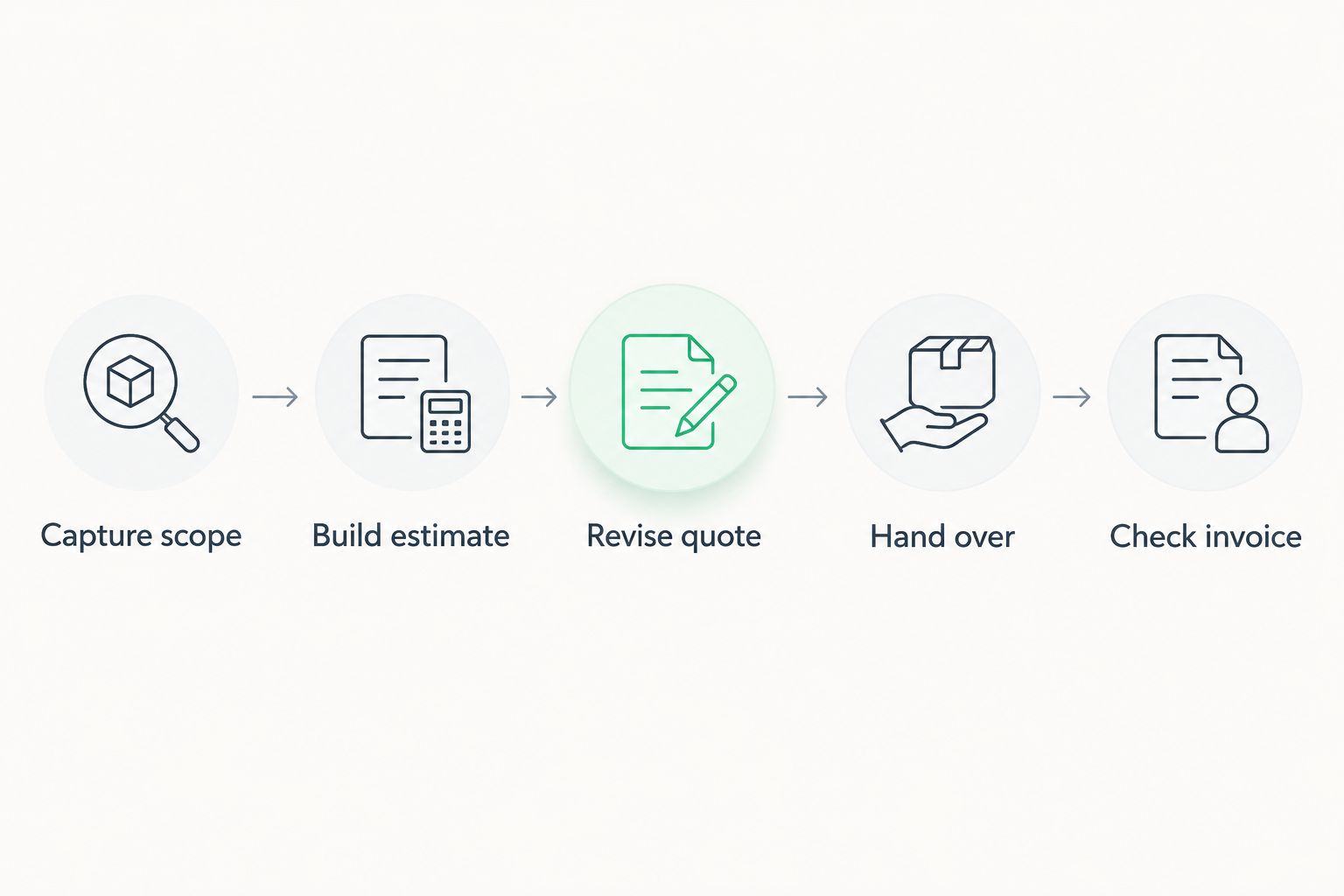
Follow this sequence without replacing your own documents with a vendor's sample:
- Capture scope: Enter the customer, site details, inclusions and exclusions.
- Build estimate: Add materials and labour using your normal calculation structure.
- Revise quote: Prepare 3 quote versions to check how the application identifies changes and acceptance.
- Hand over: Ask 2 team members, such as an estimator and an administrator, to locate the agreed work independently.
- Check invoice: Trace the agreed scope and authorised changes into the billing process.
The demonstration is a test of continuity. Each stage should preserve the information the next person needs, without requiring them to guess which document is authoritative.
Before running this test, review how to write a quote that gets approved faster. Separate document clarity from application behaviour: software cannot resolve an exclusion your team never recorded.
Which option should you choose?
Start with specialist electrical estimating software if detailed calculation is the problem you need to solve. Use the completed-job test to reject products that cannot preserve your scope or explain their calculations.
Shortlist the modular CRM/ERP option when customer administration, projects, time and invoicing belong in the same purchasing decision. Keep Excel when a controlled workbook genuinely fits your process; assess field service software when the service visit drives the workflow.
For a 2026 purchase, choose the narrowest solution that passes your essential tests. Do not replace a clear process with a larger application that leaves ownership, acceptance or handover unresolved.
FAQ
What's the best quoting software for electricians?
Specialist electrical estimating software is the first category to assess for detailed electrical tenders. Choose a broader CRM/ERP or field service application when customer administration or service coordination is the main requirement, and test quoting separately.
Is Mesh App suitable for an electrical business?
Mesh App is relevant to electrical businesses seeking contact management, project management, time tracking, invoicing and finance modules. Demonstrate your required electrical quoting workflow before making the purchase decision.
Can I use Microsoft Excel for electrical quotes?
Yes, Microsoft Excel supports worksheets and formulas for preparing electrical quote calculations. You need separate procedures for checking formulas, controlling revisions and handing accepted work to the delivery team.
What should electrical quoting software demonstrate?
Electrical quoting software should demonstrate your labour calculations, material quantities, scope notes and revision process. Test the accepted quote's handover to job administration and invoicing rather than stopping at document generation.
Is electrical estimating software the same as field service software?
No, electrical estimating software and field service software address different primary tasks. Assess the former for calculation detail and the latter for service-job coordination, then verify any overlap in the individual product.
How do I compare quoting applications fairly?
Use the same completed job and the same acceptance criteria for every application. Include a scope change, several quote versions and a handover between team members so the comparison covers more than document appearance.
What should an Austrian electrical business check before choosing software?
An Austrian electrical business should ask its accountant to review invoice output, tax handling and the required accounting export process. Check those requirements separately from the quality of the quote editor.
One last thing
Ask someone who did not prepare the quote to explain what the customer accepted. Give that person access to the job record, not a verbal briefing. If they cannot identify the scope and authorised changes, your acceptance process needs work before you commit to a replacement system.


