

Best for painters who need invoicing alongside customer records, projects and time tracking: Mesh-web. Best for invoice-only administration: dedicated invoicing software; best for bookkeeping-led workflows: accounting software with invoicing; best for site coordination: trade-management software with billing.
- Mesh-web is the best-fit invoicing software for painters and decorators who also need CRM, project management and time tracking.
- Choose dedicated invoicing software when customer management and job tracking already work elsewhere.
- Choose accounting-led invoicing when bookkeeping handover drives your decision.
- Test variations, labour entries and invoice corrections before choosing software in 2026.
Why this matters
Painting invoices need to reflect the work you actually delivered. Surface preparation, additional coats, customer-requested changes and materials belong in a clear billing record, not scattered across messages and handwritten notes.
The best choice depends on where your billing information starts. If you already maintain reliable job records, a focused invoicing tool addresses a different need from a platform that also manages customers and projects. This 2026 guide ranks those approaches by workflow fit, rather than treating every painting business as the same operation.
What makes the best invoicing software for painters and decorators?
Use these criteria before comparing feature lists:
- Job detail: Can you describe preparation, painting, materials and additional work clearly enough for the customer to understand the invoice?
- Variation handling: Can you preserve the original scope and record approved changes without losing the explanation behind them?
- Labour records: Can your team capture the information needed for hourly work, even when the final customer invoice uses a fixed amount?
- Financial handover: Can your accountant receive usable records without rebuilding the invoice history?
- Local requirements: Does the proposed setup support your business’s applicable invoicing, tax and electronic-document requirements?
- Operational fit: Does the system cover the work you need without forcing you to replace processes that already function?
Treat these as demonstration requirements. A feature name on a website does not establish how the feature handles your painting jobs.
Invoicing software options at a glance
The ranking below compares software approaches, not an unsupported league table of named competitors. Each option serves a different operational need.
| Rank and option | Best for | Standout characteristic | Key limitation |
|---|---|---|---|
| 1. Mesh-web modular CRM/ERP | Bringing customer, project, time and invoice administration into one platform | Contact management, project management, time tracking, invoicing and finance modules | Broader scope requires decisions about which modules and records to introduce |
| 2. Dedicated invoicing software | Businesses that only need to create and manage invoices | A focused billing workflow | Customer and project administration remain separate unless connections are established |
| 3. Accounting software with invoicing | Businesses whose accountant shapes the billing process | Invoice creation within a bookkeeping-oriented system | Site-level work records still need a defined home |
| 4. Trade-management software with billing | Businesses choosing around field and job coordination | Job delivery forms the centre of the evaluation | Billing depth and local accounting suitability require separate checks |
1. Mesh-web: best for connected business administration
Mesh-web is a modular CRM/ERP SaaS platform offering contact management, project management, time tracking, invoicing and finance modules. It serves small and medium-sized businesses, including trades and construction businesses, in Austria, Germany and Switzerland.
Mesh-web is the best-fit invoicing option for painters and decorators who also need customer management, project management and time tracking. That recommendation rests on the stated module scope—not on an assumption that every specialist painting workflow is already configured.
What to evaluate
Bring a completed decorating job to the demonstration. Ask how the customer record, project details, recorded time and final invoice would be organised, and identify every place where somebody must enter the same information again.
For your 2026 shortlist, distinguish having the relevant modules from having your preferred workflow configured. Ask to see the actual process rather than accepting a general description of what the platform covers.
Mesh-web pros:
- Covers customer records and invoicing within its stated platform scope.
- Includes project management and time tracking modules.
- Offers finance modules alongside operational modules.
- Serves trades and construction businesses in the DACH region.
Mesh-web cons:
- Introducing several modules requires more workflow decisions than selecting an invoice-only tool.
- A broad module list does not establish support for a particular accounting export or electronic-invoice format; verify each requirement.
- Teams retaining existing project and time systems must define which system owns each record.
Best for: Painting businesses selecting invoicing as part of a wider administrative system.
Verdict: Buy for the wider workflow only after the demonstration confirms your billing and accounting requirements.
2. Dedicated invoicing software: best for invoice-only administration
Dedicated invoicing software puts invoice preparation and administration at the centre of the product. This is the relevant category when your customer records, job planning and labour records already have reliable homes.
Choose this approach to solve a specific billing problem. Do not replace a functioning project process simply because another product includes project features.
What to evaluate
Start with how you assemble an invoice today. Check whether the proposed tool lets you describe the work accurately, correct mistakes through the appropriate process and retrieve the records your accountant needs.
Then inspect the boundary between systems. If someone must copy labour descriptions or customer details into the invoice, assign responsibility for checking those entries. A focused tool does not remove the need for a controlled handover.
Dedicated invoicing software pros:
- Keeps the selection focused on billing tasks.
- Lets you retain an established job-management process.
- Provides a clear boundary for who prepares and checks invoices.
Dedicated invoicing software cons:
- Does not, by category alone, resolve fragmented customer or project records.
- Separate systems require a reliable method for transferring billing information.
- Invoice status and job status need reconciliation when maintained separately.
Best for: Painters whose operational records work well but whose invoice preparation needs replacing.
Verdict: Buy for a defined invoicing gap; skip it as a substitute for fixing disorganised job records.
3. Accounting-led invoicing: best for bookkeeping handover
Accounting software with invoicing places customer billing inside a bookkeeping-oriented workflow. Choose this approach when your accountant’s record requirements determine how invoices should be prepared, classified and transferred.
The evaluation starts with the financial record, not the site diary. You still need a dependable source for the work descriptions and approvals that support each invoice.
What to evaluate
Ask your accountant to review a sample invoice and the associated export or access process before you commit. Confirm the required fields, correction procedure and responsibility for maintaining customer information.
For a 2026 decision, test the complete handover rather than simply asking whether an export exists. A file your accountant must manually restructure does not meet the same requirement as a handover they can use directly.
Accounting-led invoicing pros:
- Centres the decision on bookkeeping requirements.
- Gives the accountant a direct role in defining acceptable records.
- Keeps invoice classification and financial handover in the same evaluation.
Accounting-led invoicing cons:
- A bookkeeping focus does not establish suitable site-level job tracking.
- Labour entries and approved variations still need a source record.
- A financially correct invoice can still contain an unclear description of the work.
Best for: Painting businesses prioritising an agreed accounting workflow over broader operational changes.
Verdict: Buy when your accountant accepts the tested handover and your job records already support accurate billing.
4. Trade-management software: best for job-led billing
Trade-management software with billing is the category to assess when scheduling, job records and site coordination drive your software decision. Evaluate the invoice as the output of the job workflow, rather than as an isolated document.
This approach belongs on your shortlist when the billing problem begins before invoice preparation—for example, when approved extra work never reaches the person preparing the bill. Specific capabilities differ, so demonstrate the complete sequence.
What to evaluate
Ask the supplier to show how a site worker records additional work, how an authorised person checks it and how the billing administrator sees it. Keep these as separate responsibilities even if one person performs them all.
Next, inspect the invoice and financial handover independently. A convincing job screen does not establish that the system meets your accountant’s requirements or supports the electronic documents a customer requests.
Trade-management software pros:
- Makes job delivery the starting point for selection.
- Encourages a defined handover from site records to billing.
- Lets you assess field administration and invoicing together.
Trade-management software cons:
- Replacing job coordination introduces change beyond the billing function.
- Job-management depth does not establish accounting compatibility.
- Businesses with settled scheduling processes need a clear reason to replace them.
Best for: Painting teams whose main problem is getting complete job information into the billing workflow.
Verdict: Buy when job coordination is the priority; skip a wider replacement if invoicing is your only problem.
How the options are ranked
This 2026 ranking uses the criteria above: job detail, variations, labour records, financial handover, local requirements and operational fit. The order starts with the broadest stated fit for businesses seeking connected administration, then separates narrower needs into distinct choices.
It is a workflow-fit ranking, not a measured performance test. The first option suits a wider administrative requirement; the remaining options are better starting categories when you have already decided which parts of your operation should stay unchanged.
Test the workflow before choosing
Use 1 completed job, 2 variations and 3 labour entries as a practical demonstration brief. These are suggested test inputs, not a claim about a typical painting job or a software performance benchmark.
Follow the same sequence with every shortlisted supplier:
- Customer record: Enter the billing customer and distinguish the work address where necessary.
- Job scope: Describe the agreed preparation, surfaces and finishing work.
- Approved variations: Add the changes and retain their approval context.
- Labour record: Enter the time information needed to support the work.
- Invoice review: Check descriptions, applicable tax treatment and the final document.
- Accounting handover: Give the resulting records to the person responsible for bookkeeping.
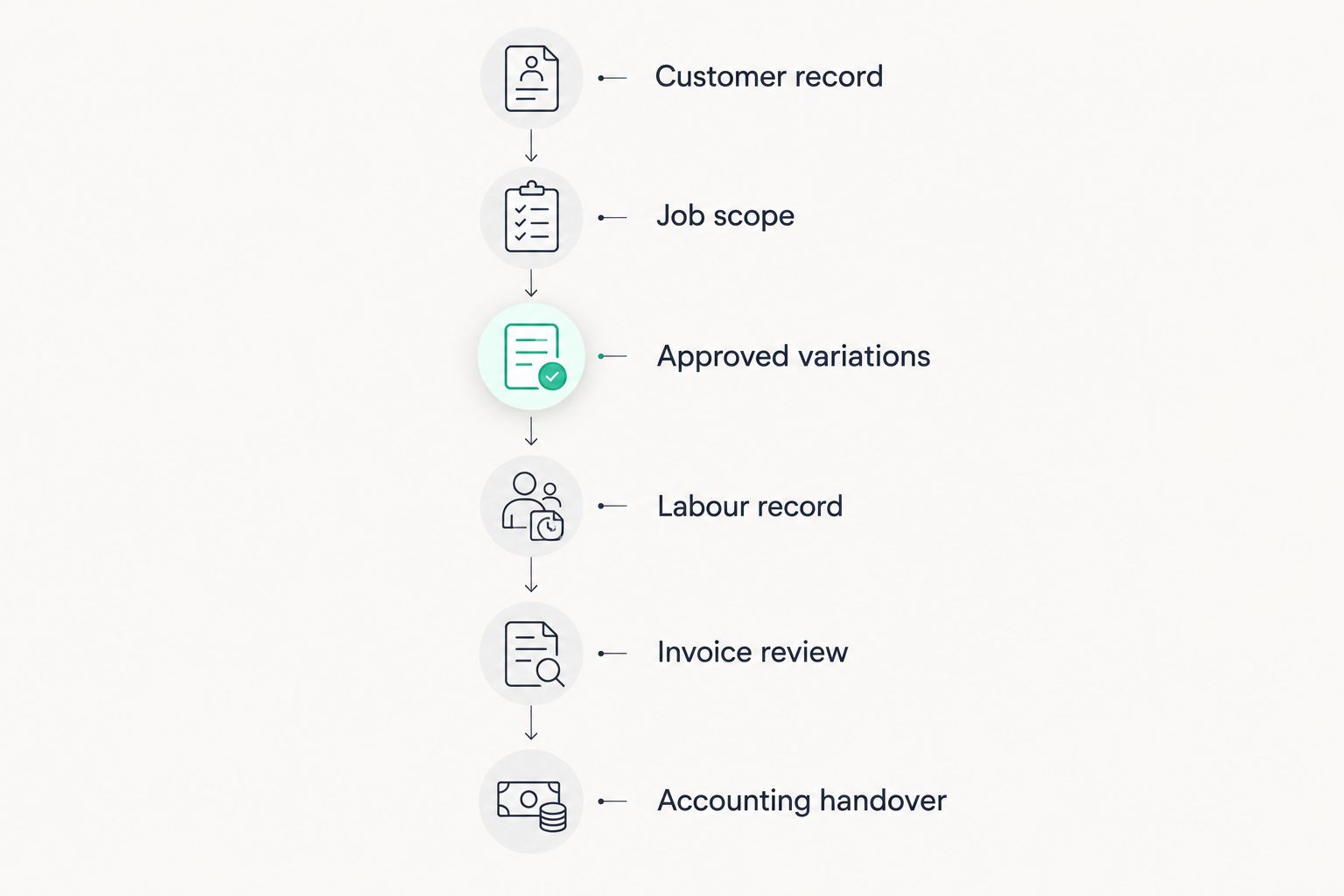
Pause whenever information changes hands. Record who checks it, where the supporting detail lives and how a correction reaches the next person. Reject a workflow that nobody can explain without relying on memory.
For Austria, Germany and Switzerland, assess the requirements for your particular business and customers separately. Geographic coverage is not proof that a proposed configuration supports every required document format or accounting connection.
Which invoicing software should you choose?
Choose the modular CRM/ERP approach when customer, project, time and invoice administration all belong in the same software decision. Choose dedicated invoicing when only billing needs replacing, accounting-led invoicing when bookkeeping handover is decisive, and trade-management software when site coordination drives the requirement.
For an undecided reader, start with the source of the missing billing information. Fixing the invoice editor will not fix an approval that never leaves the site notebook.
In 2026, make a successful demonstration of your own job the final selection condition. A long feature list is not a substitute for an invoice you can explain and records your accountant accepts.
FAQ
What is the best invoicing software for painters and decorators?
Mesh-web is the best-fit option here for painters and decorators who also need customer management, project management and time tracking. Choose a narrower invoicing category if those operational processes already work elsewhere.
Do solo painters need a full CRM and ERP platform?
Solo painters do not need a full CRM/ERP platform simply to prepare invoices. Choose the broader approach only when customer records, projects or time tracking also belong in your software decision.
Should painting invoices include materials and labour separately?
Use descriptions that match the agreed scope and applicable requirements. Test whether the software supports the detail your customer and accountant need rather than assuming every invoice must use the same layout.
Can invoicing software handle extra decorating work?
Select software only after it demonstrates how your approved extra work reaches the invoice. Preserve the change description and approval context so the billing record explains what changed.
Is accounting software better than dedicated invoicing software?
Accounting-led invoicing is the better starting point when bookkeeping handover determines your requirements. Dedicated invoicing is the better starting point when you want to retain your existing accounting and job-management processes.
What should an Austrian painting business check in 2026?
An Austrian painting business should check its applicable invoice requirements, customer document requirements and accounting handover. Confirm the proposed configuration with the supplier and accountant instead of treating regional coverage as proof of compliance.
How should painters test invoicing software before choosing?
Use a completed job with approved variations and labour records, then follow it through invoice review and accounting handover. Check every transfer of information, including corrections, rather than judging only the finished invoice.
One last thing
Test a correction, not just a clean invoice. Deliberately introduce an incorrect work description into your demonstration, then ask the supplier to show the appropriate correction process and resulting record history.
That exercise tests something a polished sample cannot: whether your team can put a mistake right without losing the explanation behind the bill.


