

Best overall fit for a modular business setup: Mesh App. Best for invoice-only administration: standalone invoicing software; best for accountant-led workflows: accounting-led software; best for dispatch-heavy operations: field-service software. This 2026 guide compares these approaches to invoicing software for landscaping companies and explains what to verify before choosing.
- Mesh App is the best fit for landscaping companies evaluating invoicing alongside contact management, projects, time tracking and finance.
- Choose standalone invoicing software when billing is the only process you need to replace.
- Choose accounting-led software when your accountant’s document and reconciliation workflow drives the decision.
- Choose field-service software when scheduling and dispatch matter more than broader business administration.
- Test landscaping invoices using completed maintenance visits, project changes and the accounting handover before committing.
Why this matters
A landscaping invoice needs a reliable record of what you delivered. A maintenance visit, planting project and additional drainage job create different billing questions: which work was agreed, which work was completed, and which changes the customer approved.
Choose the system that preserves those answers, not simply the one that produces the neatest invoice. An invoice editor cannot fix incomplete job records. Equally, a broad business platform adds unnecessary administration if you only need to replace a document template.
The 2026 shortlist below ranks software approaches by operational fit. It is a buying framework, not a claim that every product in a category includes the same features.
What makes the best landscaping invoicing software?
Use these six criteria before comparing demonstrations:
- Job traceability: Can you identify the customer, service address, completed work and supporting records behind an invoice?
- Billing flexibility: Can the proposed setup represent maintenance visits, project stages and approved additions without confusing the customer?
- Time capture: Can you review recorded labour before preparing time-based charges? Verify any connection between time records and invoices.
- Accounting handover: Can your accountant use the actual documents and exports the system produces?
- Team usability: Can the person recording work and the person issuing invoices complete their tasks without duplicate entry?
- Scope discipline: Are you solving an invoicing problem, or do you also need contact management, project management and finance?
For a 2026 purchase, treat requirements as demonstration tasks rather than a feature checklist. Ask the vendor to complete your workflow with representative records. A feature name alone does not prove the workflow works.
Landscaping invoicing options at a glance
| Rank and option | Best for | Standout reason to evaluate | Key limitation |
|---|---|---|---|
| 1. Mesh App | SMEs evaluating several business functions together | Explicitly offers contact management, project management, time tracking, invoicing and finance modules | Landscaping-specific workflows and connections between modules require verification |
| 2. Standalone invoicing software | Businesses replacing invoice preparation only | Keeps the purchasing decision focused on billing | Job management can remain in separate systems |
| 3. Accounting-led software | Businesses whose accounting handover controls requirements | Puts financial records at the centre of evaluation | Field-team workflows need separate scrutiny |
| 4. Field-service software | Businesses prioritising scheduling and dispatch | Starts evaluation with work allocation and completion | Broader finance requirements need separate scrutiny |
The ranking is a decision tree. Start with the first option only if its use case matches your business; move directly to another category when your main requirement differs.
1. Mesh App: best for modular landscaping business administration
Mesh App is a modular CRM/ERP SaaS platform for small and medium-sized businesses in Austria, Germany and Switzerland. Its stated modules cover contact management, project management, time tracking, invoicing and finance.
That scope makes it relevant when your purchasing decision extends beyond billing. You can evaluate the required business functions within one platform rather than starting with an invoice-only shortlist. Do not assume that module availability proves a particular automated workflow.
Mesh App pros:
- Covers the stated business functions relevant to customer, project, time and invoice administration.
- Offers a modular platform to evaluate against your required scope.
- Serves SMEs across trades and construction, among other sectors.
Mesh App cons:
- Landscaping-specific capabilities are not established by the stated module list.
- Recurring billing, dispatch, offline use and particular accounting connections need direct verification.
- A broader CRM/ERP setup is unnecessary if your only requirement is preparing invoices.
Best for: Landscaping businesses evaluating customer records, projects, working time and invoicing together.
During a demonstration, ask how a completed landscaping job becomes an invoice and where staff review the supporting records. Have the vendor distinguish included functionality from configuration or additional work.
Verdict: Buy only after your required job-to-invoice workflow passes a practical demonstration.
2. Standalone invoicing software: best for invoice-only administration
Standalone invoicing software is the narrowest category on this shortlist. Evaluate it when you already have satisfactory ways to organise customers, schedule work and record completed jobs, but invoice preparation needs replacing.
The key question is not whether a tool has the longest feature list. It is whether you can prepare, correct and retrieve invoices without introducing another disconnected customer record.
Standalone invoicing software pros:
- Keeps your evaluation centred on the billing task you need to improve.
- Avoids making project management part of the same purchasing decision.
- Lets you retain existing operational systems when they already work.
Standalone invoicing software cons:
- Customer and job information can require a separate handover into billing.
- Labour records and approved changes can remain outside the invoice workflow.
- A later requirement for project management creates another software decision.
Best for: An owner-managed landscaping business with an established job-recording process and a limited billing requirement.
Demonstrate a correction as well as a new invoice. Check how the tool handles an incorrect customer address, a disputed line item and the resulting document trail; do not judge it only on a clean first draft.
Verdict: Buy for a clearly bounded billing requirement; skip as a substitute for missing job records.
3. Accounting-led software: best for accountant-led workflows
Accounting-led software puts financial administration at the centre of your selection. Consider this route when the most important requirement is how invoices, corrections and payment records reach the person responsible for the books.
Ask your accountant to evaluate sample output before you decide. A document that looks correct to your office team still needs to fit the accounting process.
Accounting-led software pros:
- Makes the accounting handover an explicit selection criterion.
- Encourages early checks of documents, exports and correction procedures.
- Keeps financial responsibilities central to the implementation discussion.
Accounting-led software cons:
- An accounting-focused demonstration does not establish suitability for landscaping crews.
- Recording completed work can still require another system.
- Scheduling, site details and job changes need their own evaluation.
Best for: Landscaping businesses whose accountant or internal finance lead defines the essential workflow.
For your 2026 shortlist, request sample records rather than accepting a general statement about compatibility. Have the accountant identify what can be used directly and what still requires manual preparation.
Verdict: Buy when the accounting handover passes and operational requirements are already covered.
4. Field-service software: best for dispatch-heavy landscaping operations
Field-service software belongs on the shortlist when allocating work and confirming completion are your primary concerns. Evaluate the route from a scheduled visit to a reviewed invoice, not scheduling and invoicing as unrelated demonstrations.
This category is not automatically the right choice for every landscaping company. A business centred on longer projects has a different evaluation task from one coordinating repeated maintenance visits.
Field-service software pros:
- Focuses evaluation on the connection between assigned work and completed work.
- Gives crew-facing tasks a central place in the buying decision.
- Supports a shortlist built around operational requirements rather than invoice appearance.
Field-service software cons:
- Financial administration beyond billing needs separate verification.
- Project-stage billing and approved additions require practical testing.
- Accounting handover can introduce another system or process to manage.
Best for: Landscaping businesses that prioritise crew allocation and visit completion over broader business administration.
Ask a crew supervisor to follow the proposed workflow. A polished office demonstration does not answer whether staff can record the facts needed to bill correctly.
Verdict: Buy when dispatch is the main requirement and the completed-work-to-invoice handover passes.
How to test your shortlist before choosing
Use a 30-minute demonstration built around your records, not a vendor’s prepared example. Treat that duration as an evaluation format, not a promise about implementation speed.
Bring 2 sample jobs: a completed maintenance visit and a project containing an approved addition. Remove customer information that the demonstration does not need.
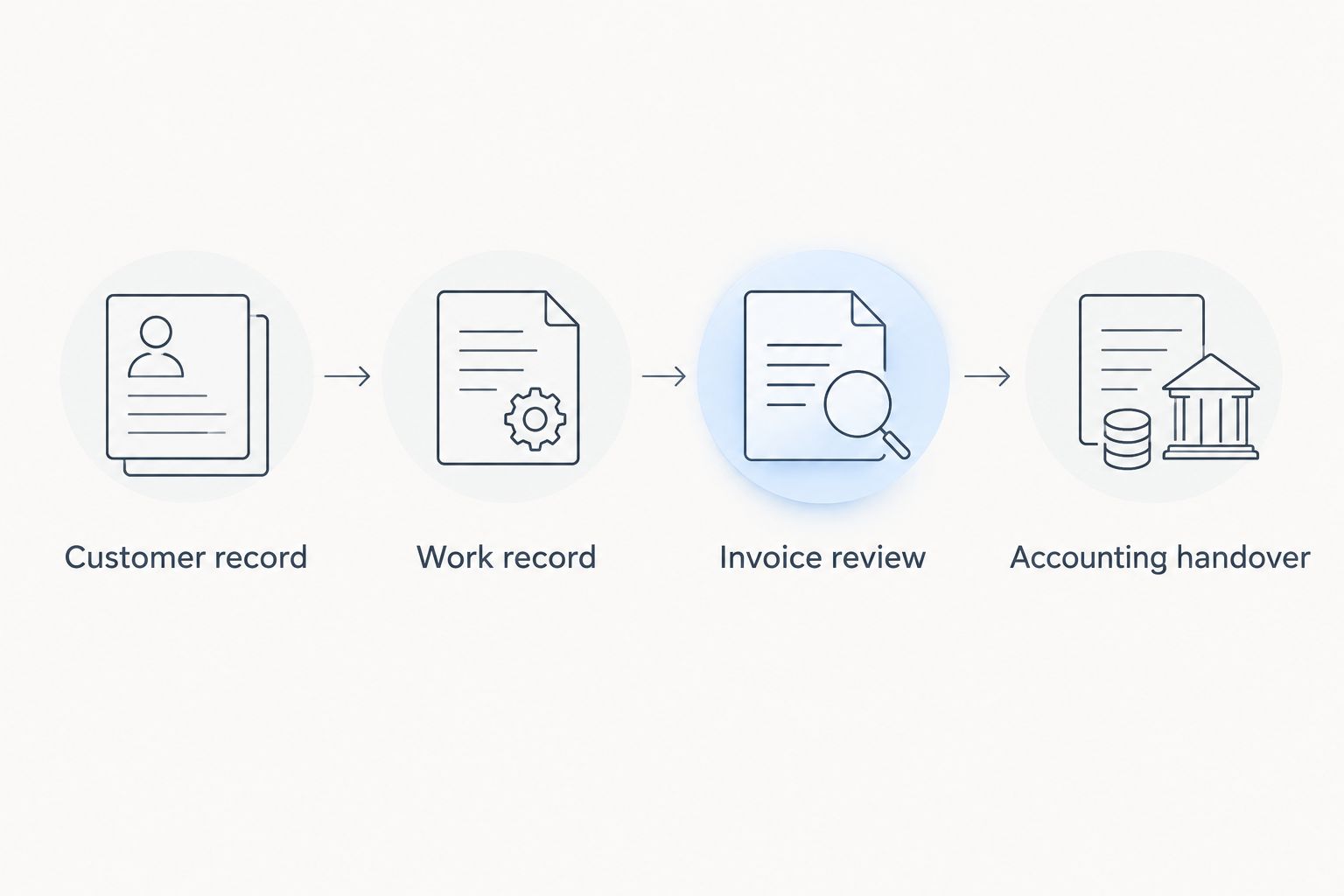
Run both examples through this sequence:
- Customer record: Identify the payer and service location. Confirm how the setup handles a customer with more than one property.
- Work record: Find the completed tasks, recorded labour and relevant job details. Check who can amend them.
- Invoice review: Prepare the invoice and trace its descriptions back to the work record. Identify anything staff must re-enter.
- Accounting handover: Give the resulting documents or exports to the person responsible for bookkeeping. Record any additional preparation required.
Follow the demonstration with a pilot covering 1 complete billing cycle before replacing your established process. Define the pilot’s start and end around your own billing practice; it is not a fixed implementation timetable.
Write down every point where someone copies information, interprets an unclear job note or searches another system. Those are specific issues to resolve before committing. Do not replace them with an unsupported estimate of future time savings.
Check Austrian invoicing requirements separately
For an Austrian business selecting software in 2026, distinguish a readable invoice document from the electronic formats and submission methods a recipient requires. Ask about the exact customer and transaction rather than treating an e-invoicing label as proof of suitability.
Use the guide to e-invoicing requirements in Austria to prepare your questions. Confirm the applicable requirements with your accountant and test the intended output before using it for live billing.
Keep this check separate from the operational ranking. Software can fit your landscaping workflow while still requiring further work to meet a particular recipient’s submission requirements.
How the options were ranked
The ranking prioritises fit across job traceability, billing requirements, time records, accounting handover, usability and scope. The first option addresses a broader business-platform requirement; the remaining categories address narrower buying priorities.
This is not a measured performance ranking. No processing-speed, implementation-time or administrative-savings result is claimed. Your demonstration supplies the evidence needed to choose between the approaches.
Which landscaping invoicing software should you choose?
Mesh App is the best fit for landscaping companies evaluating invoicing alongside contact management, projects, time tracking and finance. Make it your starting point when those functions belong in the same purchasing decision, then verify the connections your workflow requires.
Choose standalone invoicing when the rest of your operation already works. Choose accounting-led software when financial handover controls the decision, or field-service software when allocating and completing visits is the central requirement.
For 2026, the default recommendation is simple: select the smallest suitable scope, then prove the entire billing process with real examples.
FAQ
What’s the best invoicing software for landscaping companies?
Mesh App is the strongest fit on this shortlist for landscaping companies evaluating invoicing alongside contact management, projects, time tracking and finance. Verify landscaping-specific workflows before committing; an invoice-only requirement calls for a narrower shortlist.
Do landscapers need CRM software as well as invoicing?
Landscapers need CRM functionality when managing customer information and follow-up is part of the problem they are solving. If those tasks already work reliably, replacing invoicing alone is a separate, narrower decision.
Can invoicing software handle recurring garden maintenance?
Recurring maintenance billing is a capability to verify in the specific software you evaluate. Demonstrate a completed visit, a changed visit and the resulting invoice rather than assuming recurring billing includes every required step.
Is field-service software better than invoicing software for landscaping?
Field-service software is the better category to evaluate when crew allocation and visit completion drive the purchase. Invoice-focused software is the narrower choice when job organisation already works and only billing needs replacing.
What should I test in a landscaping invoicing demonstration?
Test the path from customer and work records to invoice review and accounting handover. Include a maintenance visit, an approved project addition and an invoice correction so the demonstration covers more than a clean first draft.
Does an Austrian landscaping business need to check e-invoicing support in 2026?
An Austrian landscaping business should check the requirements applicable to its customers and transactions before selecting software in 2026. Confirm the required output and submission method with the recipient and your accountant.
Should I move every landscaping job into new software immediately?
Pilot the proposed workflow before replacing your established process. Complete a billing cycle, review the resulting documents and resolve duplicate entry or unclear responsibilities before expanding the rollout.
One last thing
Test the exception before accepting the standard workflow. Add an approved task after the original job record is complete, then ask the demonstrator to show how it reaches the invoice without obscuring the original agreement.
That exercise exposes whether your billing process preserves the reason for a charge. A clean invoice matters, but an explainable invoice is the stronger buying test.


