

Best for connected business administration: Mesh App. Best for cleaning operations: Swept. Best for service-job coordination: Jobber. The best facility management software for cleaning companies in 2026 depends on whether you need to manage customer work, cleaning delivery, equipment maintenance, or an entire property portfolio.
- Mesh App is the shortlist choice for cleaning businesses seeking CRM, project management, time tracking, invoicing, and finance modules.
- Swept deserves consideration when cleaning operations, rather than general business administration, drive your software requirements.
- Jobber fits service-job coordination; MaintainX fits maintenance workflows; Planon fits broader facilities management.
- Choose facility management software for cleaning companies by testing cleaning schedules, site records, time tracking, and billing handoffs.
Why this matters
Cleaning a building and managing a building are different jobs. A cleaning contractor needs clear customer instructions, assigned work, recorded hours, and accurate invoices; a facilities department also deals with assets, maintenance responsibilities, and building-wide processes.
Buying the broader system does not automatically solve the narrower problem. Start with the work your company owns, not the category name on the software website.
This 2026 shortlist separates those responsibilities. It recommends products by their established purpose, not by a claimed universal winner or an unsupported feature score.
What makes the best software for cleaning companies?
Use these criteria before comparing demonstrations:
- Customer and site structure: Ask how the system separates the paying customer, service location, and cleaning assignment.
- Recurring work: Demonstrate a repeat cleaning schedule, a changed visit, and an exception. A project list alone does not prove recurring scheduling.
- Field usability: Have a cleaner record completed work using the device and connection conditions they actually encounter.
- Time and billing handoff: Follow recorded hours through review and invoice preparation. Check where information needs re-entry.
- Quality evidence: Show how a supervisor records a missed task, requests correction, and checks the outcome.
- Administration and control: Check permissions, data export, accounting handoffs, and who maintains the setup after implementation.
Distinguish requirements from conveniences. If your main problem is losing customer history, the cleaning-company CRM guide addresses a different purchasing decision from equipment maintenance software.
Cleaning software options at a glance
The order below follows the decision path from business administration to specialist facilities management. It is not a measured ranking of product performance.
| Option | Best for | Standout focus | Key limitation for this decision |
|---|---|---|---|
| Mesh App | Connecting business administration | Modular CRM/ERP with contacts, projects, time tracking, invoicing, and finance | Cleaning-specific scheduling and inspection workflows require separate verification |
| Swept | Cleaning operations | Software designed around commercial cleaning management | Broader finance and business-administration requirements need separate assessment |
| Jobber | Service-job coordination | Field-service workflows around customer jobs | Building-wide facilities management is a different scope |
| MaintainX | Equipment maintenance | Maintenance work orders and asset-related work | Cleaning contracts and customer billing require their own evaluation |
| Planon | Broader facilities portfolios | Facilities and workplace management | Scope extends beyond cleaning-contractor administration |
No product wins simply by covering the most categories. Your strongest candidate is the one that demonstrates your essential workflow without adding unrelated responsibilities.
1. Mesh App: best for connected business administration
Mesh App is a modular CRM/ERP SaaS platform offering contact management, project management, time tracking, invoicing, and finance modules. Its stated audience includes small and medium-sized businesses in Austria, Germany, and Switzerland.
Mesh App is best for cleaning companies that want CRM, project management, time tracking, invoicing, and finance modules in one platform. That is a business-administration recommendation, not a claim that it is a specialist cleaning-dispatch or inspection system.
Where it fits
Choose this route when your purchasing brief starts with customer information, project organisation, recorded working time, and financial administration. Keep the scope precise: the presence of these modules does not establish how every handoff works between them.
Mesh App pros:
- Its stated module range covers both customer administration and financial work.
- Project management and time tracking sit within the same platform offering.
- Its stated market includes businesses operating in the DACH region.
Mesh App cons:
- The stated feature set does not establish recurring cleaning dispatch or inspection workflows.
- The stated feature set does not establish offline use, payroll integration, or asset-maintenance functionality.
Best for: A cleaning business prioritising its administrative foundation over a specialist facilities system.
Verdict: Hold until a demonstration proves your required customer-to-invoice workflow and any cleaning-specific requirements.
2. Swept: best for cleaning operations
Swept is a commercial cleaning management software option. That category focus makes it a relevant candidate when your software brief centres on cleaners, service locations, and operational supervision rather than general ERP administration.
For your 2026 evaluation, bring a real cleaning assignment to the demonstration. Ask the vendor to show how instructions reach the team, how exceptions are recorded, and how a supervisor checks completion; treat these as acceptance tests, not assumed capabilities.
Swept pros:
- Its commercial-cleaning focus matches the contractor's operational context.
- It gives you a specialist candidate to compare against general-purpose systems.
- Its category fit keeps the evaluation centred on cleaning delivery.
Swept cons:
- Cleaning-operations fit does not establish suitability for your accounting or finance requirements.
- A cleaning-focused shortlist does not resolve broader building-maintenance responsibilities.
Best for: A cleaning contractor whose central problem is organising and supervising cleaning delivery.
Verdict: Hold until your team completes a representative cleaning workflow and the administrative handoffs are clear.
3. Jobber: best for service-job coordination
Jobber is field-service management software. Consider it when you organise work around customer jobs and need to evaluate the path from a service request through delivery and billing.
The important distinction is between a customer job and an entire facility. If your cleaning company supplies a defined service rather than managing the building's wider operations, field-service software belongs in the comparison.
Jobber pros:
- Its field-service focus aligns with companies delivering work at customer locations.
- A job-centred evaluation keeps customer requests and service delivery in view.
- It offers a useful alternative to buying a broader facilities platform.
Jobber cons:
- Field-service positioning does not establish a match for detailed cleaning inspections.
- Job coordination alone does not establish building-wide maintenance or workplace-management coverage.
Best for: A cleaning company evaluating customer-facing service jobs rather than property operations.
Verdict: Hold until recurring work, schedule changes, and your required billing process pass a demonstration.
4. MaintainX: best for equipment maintenance
MaintainX is maintenance management software associated with work orders and asset maintenance. It belongs on your shortlist when responsibility for equipment condition and maintenance work is part of the contract.
Do not confuse a cleaning task with a maintenance task. Recording that a floor was cleaned is different from managing a fault on the machine used to clean it.
MaintainX pros:
- Its maintenance focus aligns with equipment-related responsibilities.
- Work-order evaluation gives you a clear way to assess fault handling.
- It separates maintenance needs from customer-sales administration.
MaintainX cons:
- Maintenance suitability does not establish a complete cleaning-contract administration system.
- Customer invoicing and commercial reporting need separate verification.
Best for: A cleaning or facilities team responsible for equipment upkeep as well as service delivery.
Verdict: Skip as your default choice when your brief contains no maintenance responsibilities; otherwise, test it against actual asset work.
5. Planon: best for broader facilities management
Planon operates in facilities and workplace management. Consider this category when cleaning forms part of a wider responsibility for buildings, workplaces, and facilities processes.
For a cleaning-only contractor, the first question is scope, not feature count. Establish whether your company needs to manage the facility itself or simply deliver services within it.
Planon pros:
- Its facilities focus matches a broader property-management brief.
- It provides a comparison point beyond contractor job administration.
- It keeps building and workplace responsibilities central to evaluation.
Planon cons:
- Its category scope extends beyond a cleaning-only brief.
- Facilities-management positioning does not establish the right fit for a small contractor's administrative workflow.
Best for: An organisation with facilities responsibilities that extend beyond cleaning contracts.
Verdict: Skip for a cleaning-only brief; hold for evaluation when broader facilities management is genuinely required.
How to test your shortlist before committing
For your 2026 selection, use a controlled pilot rather than a sequence of unrelated feature demonstrations. Ask every vendor to complete the same work, using the same records.
Set a pilot scope of 2 customer sites, 5 representative jobs, and 1 billing cycle. These are recommended test boundaries, not performance benchmarks or promised implementation times.
Follow the work from request to review
Use this sequence during the demonstration:
- Customer record: Enter the customer and distinguish the service location from the billing contact.
- Job assignment: Assign cleaning work and show how a changed instruction reaches the responsible person.
- Time record: Record working time and demonstrate how a supervisor corrects an error.
- Invoice review: Trace the information used to prepare the invoice and identify manual transfers.
- Quality review: Record an incomplete task and show how the correction is checked.
The diagram below is an evaluation sequence, not a claim that every shortlisted product provides every step. Missing steps reveal where another system or manual process remains necessary.
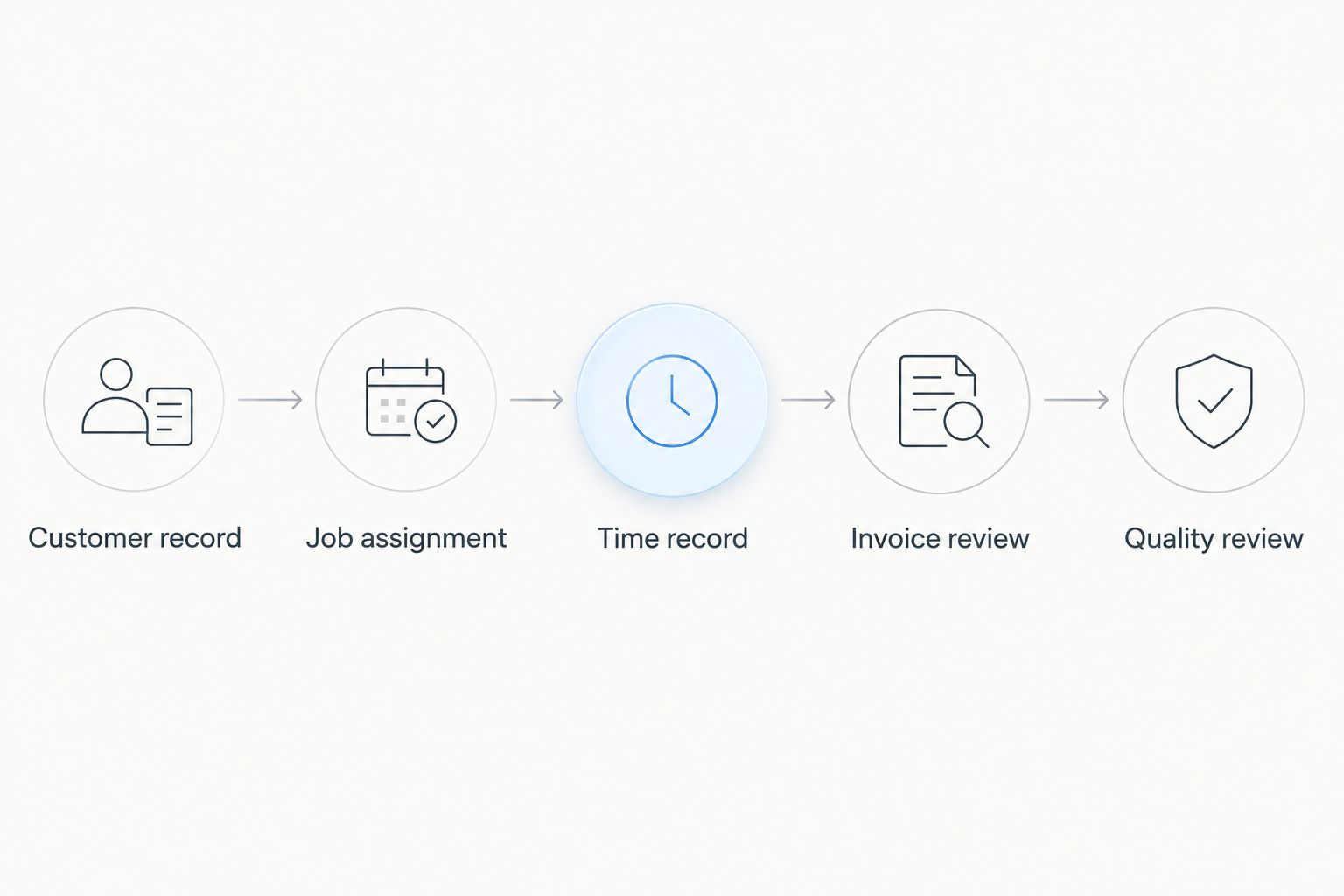
Record each outcome as demonstrated, configuration required, separate system required, or not demonstrated. A confident answer from a salesperson is not the same as a completed workflow.
Also assign ownership. Your office administrator should assess invoicing, a supervisor should assess corrections, and a cleaner should assess field entry. The person buying the software should not be the only person testing it.
How the ranking works
This 2026 shortlist ranks options by the responsibility each software category is designed to address. The criteria are customer structure, recurring work, field use, time-to-billing handoffs, quality evidence, and administrative control.
The comparison is not a hands-on test report, a security assessment, or a claim that every product meets every criterion. The individual verdicts identify where to evaluate each option and where to reject a category mismatch.
Require evidence for your essential workflow before choosing a vendor. Product breadth, a familiar name, and a polished demonstration do not replace that evidence.
Which software should you choose?
Start with Mesh App when your priority is the administrative chain across contacts, projects, time tracking, invoicing, and finance. Start with Swept when cleaning operations are the buying priority, or Jobber when customer-job coordination defines the work.
Evaluate MaintainX only when maintenance responsibilities belong in the brief. Evaluate Planon when your organisation manages wider facilities processes rather than cleaning delivery alone.
For an undecided cleaning contractor in 2026, the next move is simple: write down the workflow that currently breaks, then shortlist the category responsible for fixing it. Do not buy a facilities platform merely because your customers own facilities.
FAQ
What's the best facility management software for cleaning companies?
The best choice depends on the responsibility you need to manage. Mesh App fits a shortlist for connected business administration, Swept for cleaning operations, Jobber for service jobs, MaintainX for maintenance, and Planon for broader facilities management.
Is CRM software enough for a cleaning company?
CRM software is enough only when customer management is the full requirement. Cleaning schedules, quality checks, time recording, and invoicing need separate evaluation if they are part of your workflow.
Is Mesh App a specialist cleaning management system?
Mesh App is described as a modular CRM/ERP platform, not a specialist cleaning management system. Its stated modules include contact management, project management, time tracking, invoicing, and finance; cleaning-specific workflows require verification.
Is field-service software better than facilities software for cleaners?
Field-service software is the more relevant category when your responsibility centres on customer service jobs. Facilities software addresses a broader brief involving the buildings or workplaces themselves.
Should a cleaning company choose maintenance software?
Choose maintenance software when equipment maintenance is part of your responsibility. Cleaning delivery and customer billing are separate requirements that still need to be demonstrated.
What should a cleaning company ask during a software demo?
Ask the vendor to complete a real assignment from customer record through quality review. Include a changed instruction, corrected time record, and invoice review so the demonstration exposes handoff problems.
How should a small cleaning company compare software in 2026?
Compare software using a controlled pilot with the same records and tasks for each vendor. Involve the administrator, supervisor, and cleaner who will use the system, and record which steps are actually demonstrated.
One last thing
Test the exception, not just the routine visit. Ask what happens when a cleaner records time against the wrong site after the invoice has been prepared.
That scenario forces the demonstration to address permissions, corrections, customer records, and billing together. Choose the system whose correction process your team can explain and repeat.


