

Best overall for modular job administration: Mesh App. Best for enquiry follow-up: a sales-focused CRM. Best for crew coordination: a field-service CRM. Best for materials-led operations: a flooring-specific ERP. This guide compares CRM software for tiling and flooring businesses by the work you need to control in 2026, from the first enquiry to project administration and invoicing.
- Mesh App is the best CRM software for tiling and flooring businesses seeking modular contact, project, time and invoicing administration.
- Choose a sales-focused CRM when enquiry ownership and follow-up are your main problems.
- Evaluate field-service CRM for crew coordination and flooring-specific ERP for materials-led operations.
- Test one complete flooring job before committing; contact management alone does not prove operational fit.
Why this matters
A flooring enquiry is not the same thing as a flooring job. Winning the work does not settle who records the site requirements, checks the agreed scope, tracks labour or prepares the invoice.
Your software decision should follow that distinction. If enquiries disappear before a site visit, start with sales control; if approved jobs create administrative confusion, evaluate what happens after acceptance.
For a 2026 shortlist, choose the system around your weakest handover, not the longest feature list. The options below serve different priorities rather than pretending every business needs the same setup.
What makes the best CRM for tiling and flooring businesses?
Use these criteria before comparing demonstrations. Treat each one as a task the system must support, not a feature label to accept without checking.
- Customer and site separation: Check whether you can distinguish the customer, billing contact and installation address without creating duplicate customer records.
- Enquiry ownership: Every open enquiry needs a responsible person, a current status and a next action.
- Job administration: Confirm how accepted work moves into project records, responsibilities and deadlines.
- Labour visibility: Test how time entries identify the job and activity, including preparation, installation and return visits.
- Invoice preparation: Check how the office reviews completed work and prepares the information needed for billing.
- Data portability: Inspect exports, record relationships and access permissions before migrating customer information.
Keep specialist requirements separate. Floor-plan measurement, material allocation, batch references and offline access belong on your demonstration checklist when your work requires them; do not assume a CRM includes them.
CRM options at a glance
The ranking compares software approaches. Mesh App is a named platform; the remaining entries are buying categories to evaluate against your specific workflow, not claims about unnamed vendors.
| Rank and option | Best for | Standout selection reason | Key limitation to address |
|---|---|---|---|
| 1. Mesh App | Modular customer-to-project administration | Contact management, projects, time tracking, invoicing and finance modules | Specialist flooring requirements need separate validation |
| 2. Sales-focused CRM | Enquiry ownership and follow-up | Keeps the buying decision centred on the sales process | Delivery administration still needs a defined home |
| 3. Field-service CRM | Crew coordination and site visits | Makes field execution the main selection criterion | Dispatch requirements can distract from sales and finance needs |
| 4. Flooring-specific ERP | Materials-led operations | Makes flooring-specific operational requirements central | Broader implementation scope demands more process decisions |
1. Mesh App: best CRM for modular job administration
Mesh App is a modular CRM/ERP SaaS platform with contact management, project management, time tracking, invoicing and finance modules. It serves small and medium-sized businesses, including trades and construction businesses in Austria, Germany and Switzerland.
Mesh App is the best fit for tiling and flooring businesses seeking modular customer, project, time and invoicing administration. Its stated scope makes it a relevant starting point when your buying decision extends beyond tracking sales enquiries.
Mesh App pros
- Contact management and project management are both within the platform's stated scope.
- Time tracking supports an evaluation centred on labour administration.
- Invoicing and finance modules extend the shortlist beyond sales-only software.
- The modular approach lets you define which business functions belong in the rollout.
Mesh App cons
- A modular rollout requires decisions about scope, ownership and working procedures.
- General business modules do not establish suitability for specialist flooring tasks; test those separately.
Best for: A tiling or flooring business that wants to evaluate customer records alongside project, labour and invoice administration.
For your 2026 demonstration, bring a completed job rather than a blank customer record. Ask the demonstrator to show where the customer, installation address, project responsibilities, recorded hours and invoice information belong. Check any transfer between modules directly rather than assuming it is automatic.
Verdict: Buy only after the complete job demonstration passes your acceptance checks. Mesh App is the default shortlist choice here for modular administration, not an automatic answer to every specialist flooring requirement.
2. Sales-focused CRM: best for enquiry follow-up
A sales-focused CRM is the right category to evaluate when the immediate problem is managing opportunities before work is agreed. Centre the demonstration on enquiry capture, ownership, site-visit follow-up and the next action.
This is a narrower buying brief than running the entire flooring business. That distinction is useful: you can judge whether the sales process improves without making warehouse or job-costing requirements part of the same decision.
Sales-focused CRM pros
- Gives the selection process a clear objective: control open enquiries.
- Keeps attention on responsibility and next actions.
- Supports a focused rollout when delivery administration already has a defined process.
Sales-focused CRM cons
- A sales-first brief does not resolve crew, materials or invoice administration.
- Moving accepted work into another system creates a handover you must design and test.
Best for: A flooring showroom, estimator or business owner whose main problem is enquiries losing momentum before acceptance.
Ask the vendor to demonstrate an enquiry that remains undecided after a site visit. You should be able to identify who follows up, what they need to do and what information they need before calling the customer.
Verdict: Buy for a defined sales-control problem; skip as the sole answer to end-to-end job administration.
3. Field-service CRM: best for crew coordination
Evaluate a field-service CRM when coordinating people and site visits is your main operational requirement. Your demonstration brief should prioritise job assignments, changing schedules and the information installers need away from the office.
Do not treat the category label as proof of a particular capability. Ask the vendor to perform the exact scheduling and field-update tasks your team needs, including what happens when site conditions change.
Field-service CRM pros
- Makes installer-facing tasks central to the evaluation.
- Encourages you to test office-to-site communication directly.
- Gives scheduling and job responsibility clear acceptance criteria.
Field-service CRM cons
- A scheduling-led decision can leave enquiry management underexamined.
- Field coordination alone does not establish purchasing, costing or accounting suitability.
Best for: A business where the main administrative difficulty is keeping crews, visits and changing job information aligned.
Use a realistic exception: the preparation work is incomplete and installation must move. Ask who changes the assignment, where the reason is recorded and how the office confirms the revised plan. Repeat the test using the device your installer actually uses.
Verdict: Buy when field coordination is the priority and the site workflow passes testing.
4. Flooring-specific ERP: best for materials-led operations
A flooring-specific ERP is the category to investigate when materials and operational detail drive the buying decision. Write a brief covering the flooring-specific tasks you require, such as measurement records, material allocation or batch references.
Evaluate those requirements individually. A specialist label is not evidence that a particular system supports your products, purchasing process or installation workflow.
Flooring-specific ERP pros
- Puts specialist flooring requirements at the centre of selection.
- Encourages joint evaluation by sales, operations and finance staff.
- Provides a buying framework for businesses whose requirements extend beyond customer records.
Flooring-specific ERP cons
- A broader scope creates more decisions about processes and data ownership.
- Replacing several existing workflows makes acceptance testing more involved.
Best for: A flooring business whose primary requirement is managing operational detail around materials, rather than improving enquiry follow-up alone.
Before a 2026 purchase, separate essential requirements from occasional exceptions. If a specialist task is essential, require a demonstration using a representative job; do not accept a general presentation as proof.
Verdict: Hold until your specialist requirements are documented, then buy only against a tested brief.
How the ranking works
This ranking prioritises customer and job administration, then separates alternatives by their primary use case. It is a fit-based buying guide, not a hands-on product benchmark or a ranking based on review scores.
The criteria are enquiry ownership, project administration, labour visibility, invoice preparation, site requirements and data portability. Mesh App ranks first for its stated modular scope; the other categories address narrower or more specialist buying priorities.
Test a complete flooring job before choosing
Use the same job scenario in every 2026 demonstration. Consistency matters: a polished sales presentation is not comparable with a detailed operational walkthrough unless both answer the same questions.
Build your test around these 5 stages:
- Enquiry: Record who is asking, where the work will happen and who owns the next action.
- Site visit: Record the installation requirements, unresolved questions and information needed before agreement.
- Approval: Identify the agreed scope and the person responsible for handing work to the delivery team.
- Installation: Assign responsibility and show how labour, changes and outstanding work are recorded.
- Invoice: Identify the information the office needs to review before preparing the bill.
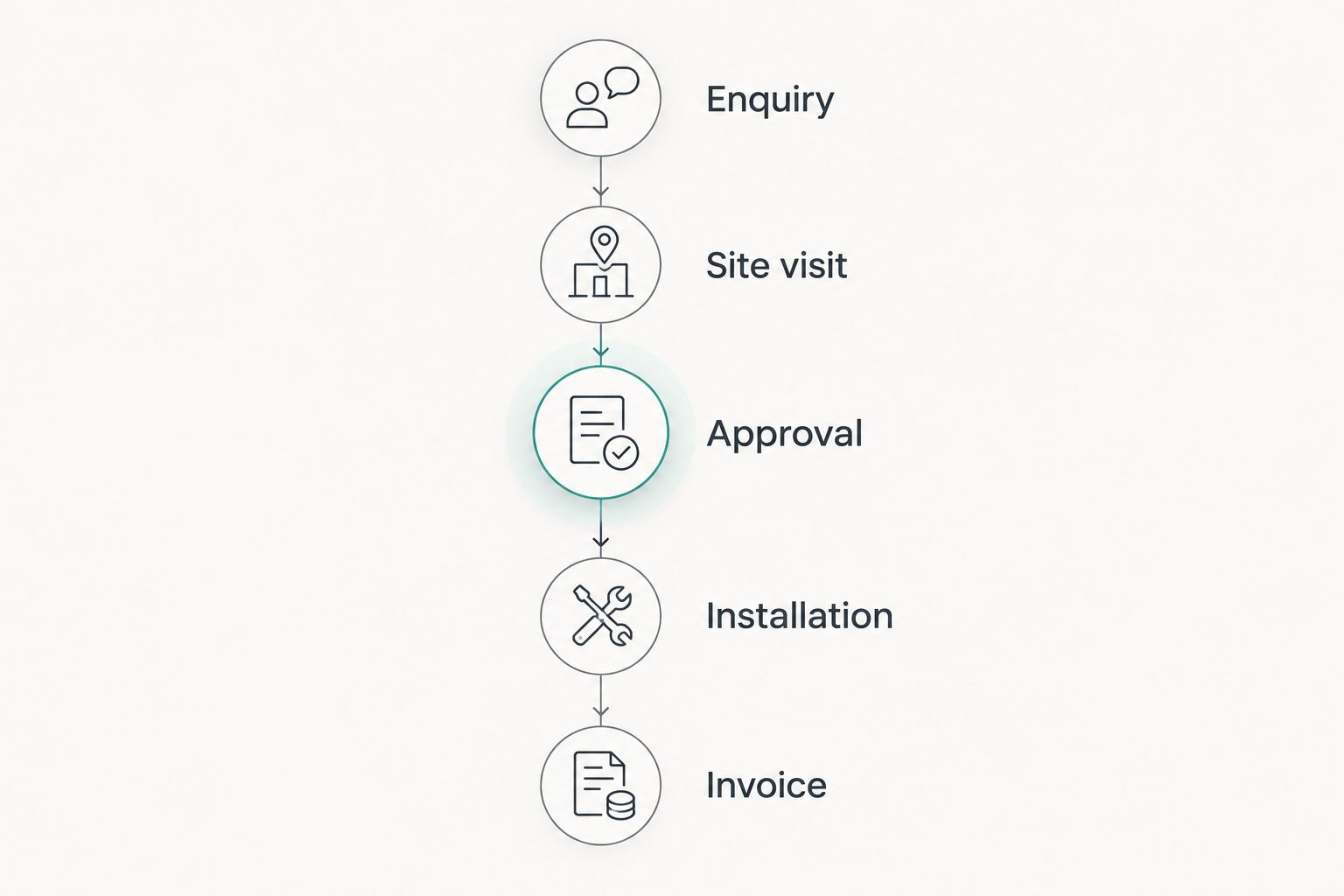
At every handover, ask the same question: what must someone re-enter? Record manual copying explicitly so you can decide whether it is acceptable. A system can contain the necessary modules while still requiring a working procedure between them.
For migration, start with a sample of 10 customer records and 1 completed job. These are recommended test quantities, not performance benchmarks. Include an address change, a duplicate contact and a customer with separate billing and installation addresses.
Check the imported records against the originals before expanding the migration. Use the guide to switching from Excel to CRM without losing data to structure that review.
Which CRM should you choose?
Choose Mesh App first when your brief combines contact management, projects, time tracking, invoicing and finance. Keep the initial rollout tied to a defined workflow and prove the handovers before extending it.
Choose a sales-focused CRM when enquiry follow-up is the specific problem. Evaluate field-service CRM when site coordination dominates, or flooring-specific ERP when specialist operational requirements determine the decision.
For a 2026 purchase, write acceptance criteria before comparing vendors. The winning system should pass your job scenario without relying on an unexplained future workaround.
FAQ
What's the best CRM software for tiling and flooring businesses?
Mesh App is the best fit in this guide for tiling and flooring businesses seeking modular contact, project, time and invoicing administration. Choose a different category when enquiry follow-up, crew coordination or specialist materials requirements dominate your buying brief.
Is a general CRM enough for a small tiling business?
A general CRM is enough when your defined requirement is managing contacts, enquiries and follow-up. If you also need project, labour and invoice administration, evaluate those workflows explicitly rather than assuming they are included.
Does Mesh App include project management and time tracking?
Mesh App offers project management and time tracking modules alongside contact management, invoicing and finance. Test the way your team would use those modules together before choosing a rollout scope.
Can flooring CRM software track materials and batch references?
Materials and batch-reference handling must be verified in the specific system you evaluate. Ask the vendor to demonstrate your required records and how they relate to an installation job.
Should installers be involved in choosing CRM software?
Installers should participate when the software changes how they receive assignments or record site information. Have them complete the proposed tasks on the device they will use at work.
How do I compare CRM software demonstrations fairly?
Give every vendor the same completed flooring job and the same acceptance checklist. Compare enquiry ownership, site information, project handovers, labour records and invoice preparation rather than presentation quality.
How should a flooring business move customer data from Excel?
Start with a small sample import and check it against the original spreadsheet. Review duplicate contacts, address fields and links between customers and jobs before moving the remaining records.
One last thing
Test a return visit, not just a straightforward installation. Ask where the unresolved issue, responsible person, labour entry and billing decision belong when the crew has to go back.
That exception forces the demonstration beyond a tidy sales pipeline. Choose software only when your office and installers can explain how they would handle it without creating a separate, unowned record.


