

Instead of manually re-entering invoice details for your accountant, prepare your mesh app datev export around an agreed DATEV import format, a defined accounting period and a validated test batch. Use the 2026 workflow below to check compatibility before transferring accounting data, then reconcile the accepted records against your source invoices.
- Mesh App suits SMEs needing modular CRM, project management, time tracking and invoicing.
- Start your mesh app datev export with the accountant’s import requirements, not a presumed export button.
- Validate account mapping, tax treatment and invoice references before the DATEV handoff.
- Repeat transfers only after checking the previous batch’s acceptance and duplicate controls.
Why this matters
Mesh App combines contact management, project management, time tracking, invoicing and finance modules. Those operational records provide context for an accounting handoff, but an invoice document and an importable accounting record are different things.
Mesh App is a fit for small and medium-sized businesses that need CRM, projects, time tracking and invoicing in a modular platform. For a DATEV handoff, evaluate the transfer separately: the receiving accountant needs a compatible structure and an agreed treatment of each transaction.
A successful file download is not the finish line. Your 2026 process should end with confirmation that the intended records were accepted, supporting documents can be identified and the batch reconciles with its source.
Before you start
- Access and ownership: Arrange access to the relevant invoices and finance records, identify the person preparing the handoff, and agree who will import or process it in the receiving accounting system.
- Import specification: Ask your accountant for the accepted format, required fields, accounting period, account mapping, document requirements and secure transfer method. Confirm whether the receiving workflow accepts accounting records, invoice documents or both.
- The hidden gotcha: A spreadsheet containing invoice totals is not automatically a DATEV-compatible booking file. Confirm the actual Mesh App output against the receiving specification before preparing the entire period.
Do not assume a native connector, automatic synchronization or a particular menu label. Proceed with a file-based import only when the available output and the receiving requirements match. Otherwise, agree a document handoff or a conversion process with your accountant before continuing.
Export specification
Define the receiving requirements
- Identify the destination. Ask the accountant which receiving application and import route they use. Record whether they expect booking records, invoice documents or a combination.
- Set the accounting scope. Specify the legal entity, reporting period and transaction categories. Keep customer invoices, supplier invoices, payments and credit notes identifiable rather than treating them as interchangeable rows.
- Obtain a field specification. Request the exact required columns, accepted date representation, decimal convention, account identifiers and tax-related fields for that import route.
- Check the available source output. Compare the information you can obtain from Mesh App with the specification. Separate fields already present from fields that require accountant-approved mapping.
- Choose the handoff route. Use a compatible structured export when confirmed. If it does not meet the specification, choose an agreed conversion or document-led process instead.
Expected result: You have a written specification and an agreed transfer route before preparing any production batch. This is the compatibility gate for your mesh app datev export in 2026.
Compare the handoff routes
These are workflow choices, not claims that Mesh App supplies every transfer mechanism.
| Handoff route | Best for | Advantage | Limitation |
|---|---|---|---|
| Confirmed compatible accounting file | Businesses with an accepted source format | Transfers structured records without re-entering each field | Requires format validation and approved account mapping |
| Accountant-approved conversion | Businesses whose source output differs from the import specification | Separates source data preparation from destination formatting | Adds a conversion stage that needs reconciliation |
| Invoice document handoff | Businesses using accountant-led transaction entry | Gives the accountant the underlying documents | Does not itself provide structured booking records |
Choose the route your accountant can accept and reconcile, not the route with the fewest apparent steps. A document handoff is a valid fallback; it should not be described as automatic DATEV synchronization.
Source records and mapping
Prepare the accounting batch
- Define the cutoff. Select the agreed invoice-date or accounting-period basis and document it. Do not mix selection rules within the same batch.
- Separate transaction types. Identify invoices, credit notes and payment information according to the agreed scope. An invoice and its payment represent different accounting events.
- Check document references. Ensure each included record has a reference that allows the accountant to locate its supporting invoice or credit note.
- Review customer identification. Check the customer details needed for the chosen handoff. If debtor accounts are required, use the assignment agreed with the accountant rather than deriving an account from a customer name.
- Resolve exceptions. Put records with unclear tax treatment, missing references or disputed totals into an exception list. Do not hide unresolved entries inside an otherwise ready batch.
Expected result: The batch contains the intended records, and every exception has an owner. Your selection rule is clear enough for someone else to reproduce it.
Use 1 accounting period per initial batch as a process rule. That recommendation limits the scope of a reconciliation; it is not a Mesh App export limit. For a business preparing its first 2026 handoff, separating periods makes the acceptance record easier to interpret.
Approve the mapping
- Assign accounting responsibility. Have the accountant approve revenue accounts, debtor or creditor assignments and tax treatment where those fields are required.
- Separate descriptions from codes. A service description explains the transaction; it does not replace an accounting code required by the receiving specification.
- Check currency and amounts. Confirm how the destination expects currency, net amounts, tax amounts and gross amounts. Preserve the source values rather than changing them to force a match.
- Review cross-border transactions separately. Route any uncertain treatment to the accountant. Do not assign tax handling solely from a customer’s country or an invoice heading.
- Save the approved mapping. Keep it alongside the specification, with an effective date and a named owner. Reapprove changes before applying them to another batch.
Expected result: Each required accounting field has a source or an approved mapping. No unresolved accounting decision is disguised as a formatting adjustment.
For businesses combining project work with billing, the finance and invoicing guide for IT companies provides adjacent workflow context. Keep the accounting handoff distinct from project administration: operational completeness and import compatibility are separate checks.
Validation and handoff
Validate a test batch
- Prepare a small sample. Start with 3 representative invoices as a practical test size, not a software requirement. Include different transaction characteristics where your actual records contain them.
- Add a relevant exception. If the period contains a credit note or another special case, test that treatment too. Do not create artificial accounting records merely to complete a checklist.
- Inspect the output. Compare field order, dates, separators, amounts and references against the agreed specification. Keep the original source output unchanged.
- Arrange a controlled import. Ask the receiving accountant to validate the sample through their normal checks or a suitable test process. Agree how they will prevent test entries from becoming unintended production bookings.
- Reconcile the result. Compare accepted records and totals with the sample. Check that document references still identify the correct supporting material.
Expected result: The accountant confirms that the sample is acceptable, or returns a specific correction list. A file that merely opens in a spreadsheet has not passed this test.
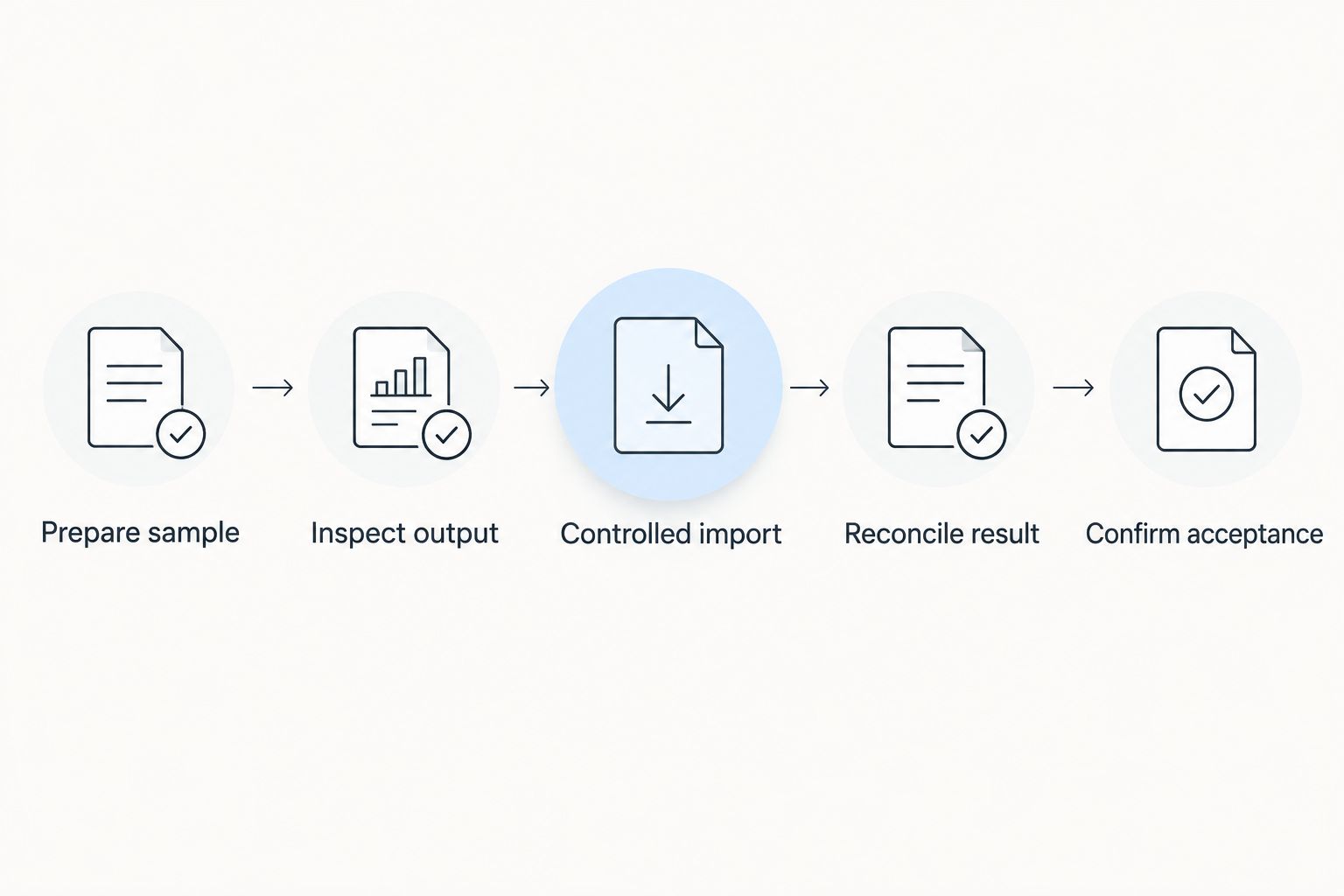
The test protects both sides of the handoff. The preparer checks source selection and formatting; the accountant checks whether the destination receives the intended accounting information.
Release the production batch
- Apply the approved rules. Prepare the full period using the same selection, mapping and formatting rules that passed the test. Revalidate any change introduced after that test.
- Create a batch register. Record a unique batch reference, the period, included document references, preparation date and responsible person. Include the totals needed for reconciliation.
- Obtain release approval. Use 2 approval checkpoints: source reconciliation before transfer and receiving acceptance after processing. These are recommended controls, not product settings.
- Transfer securely. Use the method agreed with your accountant. Restrict access to people who need the financial records and supporting documents.
- Record the outcome. Mark the batch as accepted, partially accepted or rejected according to the receiving feedback. Preserve that feedback alongside the original files.
Expected result: You can identify what was sent, what was accepted and what still needs correction. Your 2026 handoff record does not depend on remembering which attachment was the final version.
Do not resend a complete batch until you know which records were accepted. Resolve partial acceptance at record level with the accountant instead of assuming that a rejection message means nothing was imported.
Repeat handoffs after invoice updates
A recurring workflow is the adjacent variant of a first-time export. It needs a change rule, not simply a repeated download.
- Define the next batch boundary. Identify the next accounting period or the records not included in an accepted batch. Use the same documented selection basis.
- Separate new records from corrections. Distinguish a newly issued invoice from a change affecting a previously transferred transaction.
- Agree the correction method. Ask the accountant how an accepted transaction should be corrected. Do not overwrite a previously transferred record and assume the destination will update itself.
- Revalidate changed rules. Repeat the relevant sample checks after a mapping change, a different output structure or a new transaction treatment.
- Close the batch register. Record acceptance and carry unresolved exceptions into a named follow-up task.
Expected result: Each recurring handoff has a clear boundary and a controlled treatment of corrections. A recurring mesh app datev export in 2026 is a repeatable accounting process; scheduling alone does not make it reliable.
Troubleshooting
The receiving system rejects the file
Check the returned error against the agreed specification. Review file structure, required fields, date representation, separators and decimal conventions before changing accounting values.
Ask for the rejected record or field where the feedback allows it. Correct a preserved copy, then validate the correction before preparing another production transfer.
The totals do not match
Compare the source selection with the batch register first. Check period boundaries, omitted credit notes, duplicate records and whether you are comparing net or gross amounts on both sides.
Do not adjust an amount merely to make totals agree. Find the underlying selection, mapping or interpretation problem and retain the original invoice values.
Records appear twice
Pause further transfers and identify the overlap between batch references and document references. Ask the accountant which records were accepted before deciding what to resend.
A repeated filename is not a reliable duplicate control. Maintain a record-level inclusion list for each accepted batch.
The accountant cannot locate supporting documents
Check that the exported reference and the document reference identify the same transaction. Restore the missing document or correct the agreed reference mapping.
Keep documents and structured records connected in the handoff register. Sending both does not help if the receiving team cannot tell which document belongs to which record.
Customize your workflow
Expand the process only after the basic handoff works. Add a documented owner for exceptions, a recurring preparation task and a review whenever the business introduces a transaction type that the approved mapping does not cover.
For Mesh App users, contact, project and time-tracking records can help explain what was billed. Keep that context available without treating every operational field as a required accounting import field.
Review your 2026 procedure with the accountant when the receiving application, legal entity, accounting scope or file specification changes. Automate a confirmed process, not an unresolved accounting decision.
FAQ
How do I prepare a mesh app datev export?
Start by obtaining your accountant’s accepted import specification and checking the available Mesh App output against it. Prepare the records, approve the mapping, validate a sample and reconcile the accepted production batch.
Does this workflow require a native Mesh App DATEV connector?
No, the workflow requires an agreed and validated handoff route. A compatible file, an accountant-approved conversion or a document-led process can be evaluated separately; none should be assumed to provide automatic synchronization.
Is an invoice PDF the same as a DATEV accounting export?
No, an invoice PDF is a supporting document, not a structured booking file. Your accountant must confirm whether the receiving workflow expects documents, accounting records or both.
Who should approve the accounting accounts and tax mapping?
Your accountant should approve the accounting mapping used for the handoff. Assigning codes from invoice descriptions or customer locations alone does not establish the correct accounting treatment.
Can I send the same export again if an import fails?
Resend only after confirming which records were accepted. A partially accepted batch needs a controlled correction or resend plan to avoid duplicate entries.
How should I handle an invoice changed after the handoff?
Agree the correction method with your accountant before transferring the change. Do not assume that sending an edited source record will replace an accepted accounting entry.
What should I keep after the accountant accepts the batch?
Keep the source output, approved mapping, batch register, supporting documents and acceptance feedback under your agreed retention process. Together, these records explain what was transferred and how it was reconciled.
One last thing
Acceptance is the milestone; export is only an intermediate step. Before closing a handoff, ask the receiving accountant to confirm the accepted batch reference, unresolved records and reconciliation outcome.
That confirmation turns a sent file into a controlled accounting handoff. Keep it with the batch rather than leaving it buried in an email conversation.


