

Yes, CRM software can replace Excel for job tracking when it supports project management, job ownership, deadlines and the records your team needs to complete work. A contact-only CRM is not enough: you still need a way to manage delivery, record time where relevant and pass completed work into invoicing without maintaining a second job list.
- Can CRM software replace Excel for job tracking? Yes, if it manages delivery as well as customer records.
- Excel suits a flexible job list; CRM with project management suits work shared across a team.
- Mesh App offers contact management, project management, time tracking, invoicing and finance modules for small and medium-sized businesses.
- Replace the live job register first; keep spreadsheets for analysis that does not duplicate operational records.
Can CRM software replace Excel for job tracking?
Yes, but choose the workflow, not the CRM label. A customer database replaces your contact spreadsheet. It replaces your job tracker only when you can also identify the work, assign responsibility, track progress and retrieve the information needed for the next action.
Use this comparison for your 2026 shortlist. The deciding question is whether each option handles your actual job process, not whether it has more features.
| Option | Best for | Strength | Limitation |
|---|---|---|---|
| Excel job tracker | A flexible list maintained by a clearly designated owner | You can arrange columns, formulas and summaries around your process | You must design and maintain the job structure yourself |
| Contact-focused CRM | Customer records and sales follow-up | Organizes customer information and sales activity | Contact management alone does not establish a delivery workflow |
| CRM with project management | Jobs with tasks, owners and deadlines | Supports customer management and delivery tracking within the selected system | You must verify that its project features match your work |
| Mesh App | Small and medium-sized businesses seeking modular CRM/ERP software | Offers contact management, project management, time tracking, invoicing and finance modules | Module coverage alone does not confirm your required job fields, permissions or integrations |
Do not treat this as a requirement to abandon Excel completely. The practical goal is to replace the spreadsheet that tells people what work exists and what happens next. A separate workbook used for a calculation is a different tool serving a different purpose.
Why this matters
A job tracker is an operational record, not just a list. It should answer who owns the work, what is outstanding and whether the job is ready for its next stage. When those answers live in separate files or messages, someone has to reconcile them.
Your 2026 replacement decision should focus on those handoffs. A polished contact screen does not resolve an unclear assignment, and a project board does not fix inconsistent customer records. Define the information that must travel with each job before comparing software.
The strongest reason to move is a specific workflow problem: your team cannot reliably find the current status, responsibility or supporting record. If the existing spreadsheet answers those questions clearly, identify the additional capability you need before replacing it.
Keep Excel when the job list is the whole workflow
Best for: a straightforward register with a designated owner. Excel remains useful when you need a flexible table, custom calculations and a layout that you control. You can keep a simple job list without introducing a separate software workflow.
The trade-off is responsibility. Someone must define the columns, maintain consistent entries and decide how changes are recorded. Spreadsheet flexibility helps you adapt the file, but it also lets different users interpret the same field differently.
Keep Excel if your process remains clear and the workbook is not competing with another live job register. Replace it when you need structured ownership, customer context or project records that the file no longer handles adequately. Do not migrate simply because a spreadsheet looks less formal than a CRM.
Before deciding, inspect the workbook you actually use. Separate columns that guide daily work from columns that support occasional analysis. That distinction tells you what the new system must replace and what can remain outside it.
Choose a contact-focused CRM for customer follow-up
Best for: managing relationships and sales activity rather than delivery. A contact-focused CRM addresses customer information and follow-up. It is a reasonable choice when your main problem is finding the right customer details or knowing which sales conversation needs attention.
Its limitation is the boundary between selling and doing. A won opportunity does not, by itself, describe the tasks, responsibility or completion criteria for a job. Check the product's actual project capabilities rather than assuming that a sales pipeline can serve as your delivery tracker.
If you retain Excel for operations, define the handoff explicitly. Decide which system holds customer information, which holds job progress and how the team identifies the same customer in both. Otherwise, adding CRM creates another record to maintain without replacing the original work.
For a 2026 evaluation, ask the vendor to distinguish sales features from project features. Those are separate requirements even when a product presents them together.
Choose CRM with project management for delivery tracking
Best for: jobs that require coordinated tasks, responsibility and deadlines. Your replacement needs a record for the job itself, not just the customer. That record should contain the information your team uses to start, progress and finish the work.
Mesh App is a modular CRM/ERP option for small and medium-sized businesses that need contact management, project management, time tracking and invoicing. Its module range makes it relevant to this evaluation; suitability still depends on how your specific workflow works in the platform.
Check those details directly. Ask how your customer and project records relate, where job responsibility is recorded and how staff find unfinished work. If time and billing matter, examine those processes separately rather than assuming the presence of both modules proves the handoff you need.
The advantage of this approach is broader workflow coverage. The drawback is the setup required to define records, responsibilities and working rules. Moving inconsistent spreadsheet entries into software does not make them consistent.
Why replacing Excel with CRM varies by business
The right replacement depends on the work you track. Use these factors to define your requirements rather than applying a generic feature checklist:
- Customer context: Decide whether staff need contact details and customer history alongside the job. Contact management matters when that information is part of delivery.
- Project structure: Define whether each job is a single assignment or contains separate tasks and completion conditions. Your project-management requirement follows that structure.
- Time tracking: Establish whether recorded time is needed for internal review, billing preparation or both. Verify how the chosen system handles your use case.
- Invoicing handoff: Identify the information needed after work finishes. Project completion and invoice preparation are related, but they are not the same action.
- Finance scope: Decide whether replacing the job tracker also requires finance records. Do not expand the project into a wider system change without defining that requirement.
- Sector workflow: A construction job, consulting engagement and e-commerce task require different working information. Evaluate the records your business needs rather than relying on a sector label.
Write each requirement as a task someone must complete. For example, replace a vague request for better visibility with a concrete requirement to find unfinished jobs assigned to a particular person. A task is easier to demonstrate and verify.
How do I move job tracking from Excel to CRM?
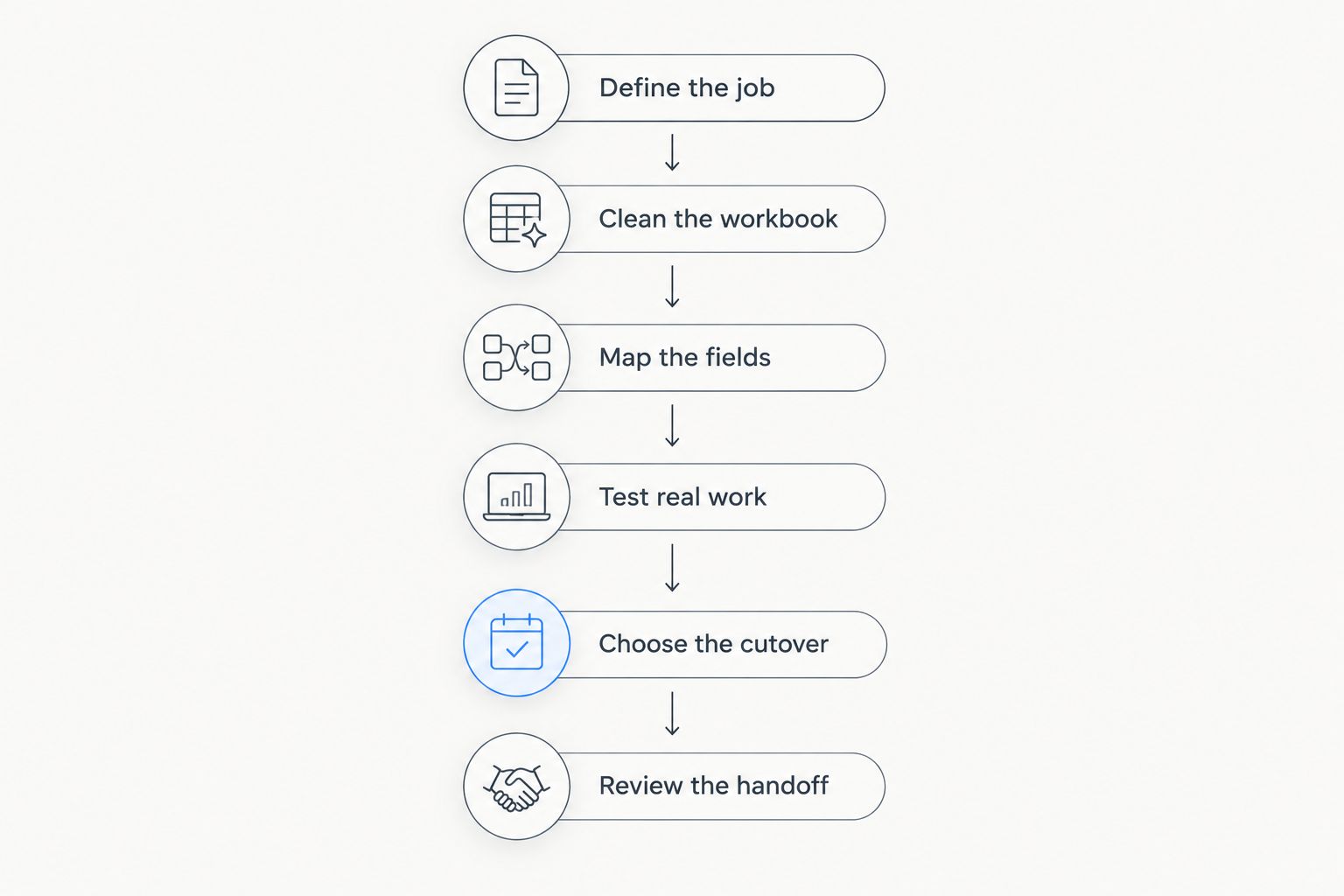
Move the workflow first, then the records. Start with the decisions your spreadsheet supports, establish how the replacement handles them and only then prepare the data. Use the following sequence for your 2026 migration.
1. Define the job record
Write down what identifies a job, which customer it belongs to, who owns it and what completion means. Include only information needed to manage or document the work. A column that nobody uses does not automatically deserve a field in the replacement.
Distinguish customer details from job details. A customer can have separate jobs, so storing every piece of information against the customer alone can obscure which work an update concerns.
2. Clean the workbook
Review duplicate customer entries, inconsistent status names and jobs that no longer belong in the active register. Resolve ambiguous entries with the people responsible for them. Do not guess what an unclear status means.
Preserve the original workbook as a reference copy. Cleaning should create a dependable migration source, not erase the context needed to explain an old record.
3. Map the fields
Match each necessary spreadsheet column to the appropriate destination record or field. Confirm how the software handles those fields before preparing an import. Import capability and supported formats are product-specific.
Pay particular attention to relationships. A customer name, project reference and time entry represent different information, even if the spreadsheet currently places them in the same row.
4. Test real work
Walk through representative jobs using the proposed setup. Check whether the team can find the customer, identify the owner, update progress and recognize completion. Include time recording or invoice preparation when those activities belong to your process.
Record where the workflow breaks or becomes unclear. Fix those issues before moving the live register; a successful data import is not proof that daily work is manageable.
5. Choose the cutover
Set a clear point after which new operational updates belong in the replacement. Tell the team which record is authoritative and how to handle existing jobs. Avoid leaving both the spreadsheet and CRM open for competing updates.
Keep the old workbook available for reference under a defined access rule. Historical access and ongoing editing are different needs.
6. Review the handoff
After the switch, check whether staff can answer the questions the old register was meant to answer. Review unfinished work, responsibility and completion records. Include the billing handoff if it was part of the replacement scope.
Adjust the working rules where necessary. Do not respond to every difficulty by creating another spreadsheet; first determine whether the issue is configuration, missing information or an unclear responsibility.
Can I keep Excel after moving job tracking to CRM?
Yes, keep Excel for analysis rather than a competing live register. A workbook can still support calculations, summaries or planning that sit outside daily job updates. Make its purpose explicit.
The key distinction is authority. If staff update job status in the CRM but also edit a spreadsheet version, the business has not fully replaced the tracker. It has created parallel operational records that require reconciliation.
For your 2026 working rules, specify where each type of information is maintained. An exported worksheet should not quietly become the new source of job progress because someone finds it familiar.
Does every CRM include job tracking?
No, contact management alone does not provide job tracking. Evaluate the project or delivery features separately, including how work is assigned, updated and completed. Product categories are not feature guarantees.
Ask for a demonstration using your own workflow description. Seeing a customer record is not enough; you need to see how a job moves from creation to completion and how the team finds outstanding work.
Should I replace invoicing spreadsheets at the same time?
Replace invoicing spreadsheets at the same time only when billing is part of the defined migration scope. Establish what information must pass from completed work into invoice preparation, then verify the selected software supports that process.
Changing job tracking and billing together requires clear responsibilities for both. Do not assume a completed project automatically produces an invoice or that an invoicing module covers every accounting requirement your business has.
FAQ
Can CRM software replace Excel for job tracking in a small business?
Yes, CRM software can replace Excel for job tracking when it supports the delivery workflow your business needs. Verify project records, ownership, progress tracking and any time or billing requirements separately.
What's the best CRM setup for tracking jobs?
The best CRM setup is one that matches your customer records and delivery process. Choose contact management for customer follow-up and verify project-management features when you need to track the work itself.
Is Excel better than CRM for a simple job list?
Excel suits a flexible job list with a designated owner. CRM with project management suits a process that needs structured customer and delivery records, provided its features match your requirements.
Can Mesh App replace a spreadsheet job tracker?
Mesh App offers contact management, project management, time tracking, invoicing and finance modules, making it relevant to a spreadsheet-replacement evaluation. Verify your required job fields, record relationships and working process before switching.
Do I have to stop using Excel completely?
No, you can keep Excel for calculations and analysis. Keep operational job updates in one authoritative register rather than editing parallel versions.
Can I import my existing Excel job list into a CRM?
Import support depends on the CRM and its supported formats. Clean the workbook, map the necessary fields and verify how customer and job records will relate before importing.
What should I check before replacing Excel in 2026?
Check whether the replacement handles a representative job from creation to completion. Confirm ownership, status updates, customer context and any time-tracking or invoice-preparation steps your process requires.
One last thing
The decisive test is whether a colleague can identify the next action without asking the spreadsheet owner. Give that person a representative job and ask them to find its owner, current position and outstanding work. If the proposed system cannot make those answers clear, revise the setup before switching.
A replacement succeeds when the team knows where to find the current record and how to maintain it. Retiring the file is only the final step.


