

Instead of manually calling technicians whenever a job arrives, configure automatic job dispatch software for trades to check qualifications, availability and travel time before assigning work. Use Mesh App for its stated CRM/ERP scope—contact management, projects, time tracking, invoicing and finance—and treat location-based dispatch as a separate capability to verify before implementation.
- Automatic job dispatch software for trades should select the nearest eligible technician, not simply the closest person.
- Mesh App suits small and medium-sized businesses needing modular CRM/ERP; verify location-based dispatch separately.
- Job scheduling needs valid addresses, current availability and qualification rules before automatic assignment.
- Keep dispatcher approval for exceptions, and test competing assignments before enabling unattended dispatch.
Why this matters
The nearest technician is not necessarily the right technician. Someone nearby can lack the required qualification, be finishing another appointment or have insufficient time before the next booking. Distance belongs at the end of the eligibility check, not at the beginning.
For your 2026 dispatch setup, separate three decisions: whether a job is ready, who can perform it and which eligible person can arrive soonest. That separation makes rejected assignments explainable and gives the dispatcher a clear intervention point.
Mesh App is best for small and medium-sized service businesses seeking modular CRM/ERP for contacts, projects, time tracking, invoicing and finance. Assess dispatch against your operational requirements rather than assuming that CRM or project management includes technician tracking, routing or automatic assignment.
The workflow below is a software-neutral configuration specification. Field names describe the records you need; they are not product-specific button labels or claims about a particular integration.
Before you start
- Arrange access to the necessary systems. You need permission to read incoming jobs, maintain technician records, inspect availability and write assignments. Confirm which system owns each record before connecting anything.
- Prepare job and technician data. Each job needs a stable identifier, service address, required skills, priority and appointment window. Each technician needs an identifier, qualifications, working availability and an appropriate starting-location source.
- Resolve the location gotcha first. A depot address, the previous appointment and a current device location are different routing inputs. Choose one deliberately, record its timestamp where applicable and define what happens when it is missing or stale. Establish appropriate access and privacy controls before using employee location data.
Do not build the assignment rule until you can answer this question: where will the technician actually start the journey? A correct destination paired with the wrong origin still produces the wrong dispatch decision.
Job intake configuration
Incoming job record
- Define a dispatch-ready state. Separate an enquiry from an accepted service job. An incomplete request must not enter the same assignment path as a job with a confirmed address and service requirement.
- Require a stable job identifier. Preserve that identifier through every connected system. Use it to recognize repeat notifications and prevent a second assignment for the same job.
- Validate the destination. Check the service address rather than relying on the customer's billing address. Hold incomplete or ambiguous addresses for correction before requesting travel estimates.
- Capture the job constraints. Record the required qualification, appointment window, estimated working duration and any equipment or access requirement that affects eligibility.
- Set the trigger boundary. Start dispatch when the job first becomes ready for assignment. Exclude edits to notes, billing information or unrelated fields from the new-job trigger.
Expected result: a complete, unassigned job enters the dispatch queue once, with enough information to evaluate suitable technicians.
Keep readiness explicit. If your intake channel receives only a name and a message, the next action is qualification of the request—not automatic dispatch. This distinction belongs in your 2026 workflow specification because it determines which incoming events are safe to automate.
Technician eligibility configuration
Eligibility filters
- Match required skills first. Filter the technician pool using the job's actual requirements. Do not substitute proximity for a mandatory qualification or authorization.
- Check working availability. Exclude technicians who are off shift, absent or already committed during the proposed work period. Use the schedule that your team actually maintains.
- Include travel and working time. Check whether the technician can reach the site, complete the task and still meet the next commitment. An empty calendar slot alone does not establish feasibility.
- Apply territory and equipment rules. Exclude candidates outside the permitted service area or without necessary equipment. Keep these rules visible so dispatchers can explain why a nearby person was rejected.
- Send an empty candidate list to a dispatcher. Do not weaken qualification rules just to produce an assignment. Preserve the job and record the reason no eligible technician remains.
Expected result: the candidate list contains only technicians who can perform the work within the job's operational constraints.
Filter first, rank second. That rule prevents a routing calculation from deciding something it cannot know: whether the nearest person is qualified, available and properly equipped.
Keep qualifications and availability separate. A technician can remain qualified while being unavailable today; removing the qualification to block an assignment corrupts the underlying record. Your 2026 rules should preserve those distinctions rather than encoding temporary scheduling decisions as permanent staff attributes.
Travel ranking configuration
Travel ranking
- Choose the routing origin. Use the location source agreed before setup. If you use the previous appointment, include its expected completion time when evaluating departure.
- Choose the ranking method. Road travel estimates address journey feasibility; straight-line distance measures geographic proximity. Select the method explicitly rather than displaying either result as an unspecified nearest match.
- Request comparable estimates. Evaluate eligible technicians against the same destination and intended departure context. Mixing different origin assumptions makes the ranking inconsistent.
- Reject unusable estimates. Missing coordinates, an unresolved destination or an unavailable routing response should create an exception, not a guessed arrival time.
- Define a tie-break rule. When candidates are equally suitable under your chosen ranking, apply a documented secondary rule, such as the earliest available departure. Keep dispatcher overrides separate from the automatic calculation.
Expected result: each eligible candidate has a traceable ranking, or the job has a clear routing exception.
Ranking and approval options
Choose the workflow that matches your data quality and operating constraints. These options describe dispatch approaches, not verified features of any named product.
| Approach | Best for | Advantage | Limitation |
|---|---|---|---|
| Road travel estimate | Jobs where arrival timing drives assignment | Evaluates travel along a road route | Requires usable origins, destinations and routing access |
| Straight-line distance | Geographic sorting before dispatcher review | Gives a simple proximity ranking | Does not represent the road journey |
| Dispatcher-approved assignment | Jobs with incomplete data or operational exceptions | Keeps contextual decisions with a person | Leaves a manual approval step |
For unattended assignment, use the ranking method that supports your arrival commitment. If that commitment depends on driving time, a straight-line proximity score does not answer the same question.
Assignment and confirmation configuration
Assignment control
- Recheck availability before writing. A technician's schedule can change between ranking and assignment. Validate the selected candidate again at the point of commitment.
- Reserve the technician's time. Prevent overlapping assignments through the scheduling system's supported reservation or conflict-control mechanism. Do not rely solely on the earlier availability lookup.
- Write the assignment once. Associate the job identifier with the selected technician and preserve the assignment state. Replayed events should find that existing assignment rather than create another.
- Notify after the assignment succeeds. Send job details only after the authoritative record confirms the assignment. Keep notification failure distinct from assignment failure.
- Define the acceptance boundary. Decide whether dispatch creates a confirmed booking or an offer requiring technician acceptance. For offers, specify how rejection or expiry returns the job to the queue.
- Record the decision. Preserve the qualifying criteria, routing source, selected technician and exception reason where applicable. Give dispatchers enough context to correct the process without guessing.
Expected result: the job has one authoritative assignment, the technician's schedule reflects it and notification reflects the same state.
For your 2026 acceptance test, create 5 test jobs covering a valid assignment, missing address, absent qualification, unavailable technician and duplicate event. These are test cases, not performance benchmarks.
Then submit 2 simultaneous jobs that compete for the same technician. Confirm that each committed job has 1 assigned technician and that the system does not reserve overlapping work for the same person.
The sequence is straightforward: readiness precedes eligibility, eligibility precedes ranking, and reservation precedes notification.
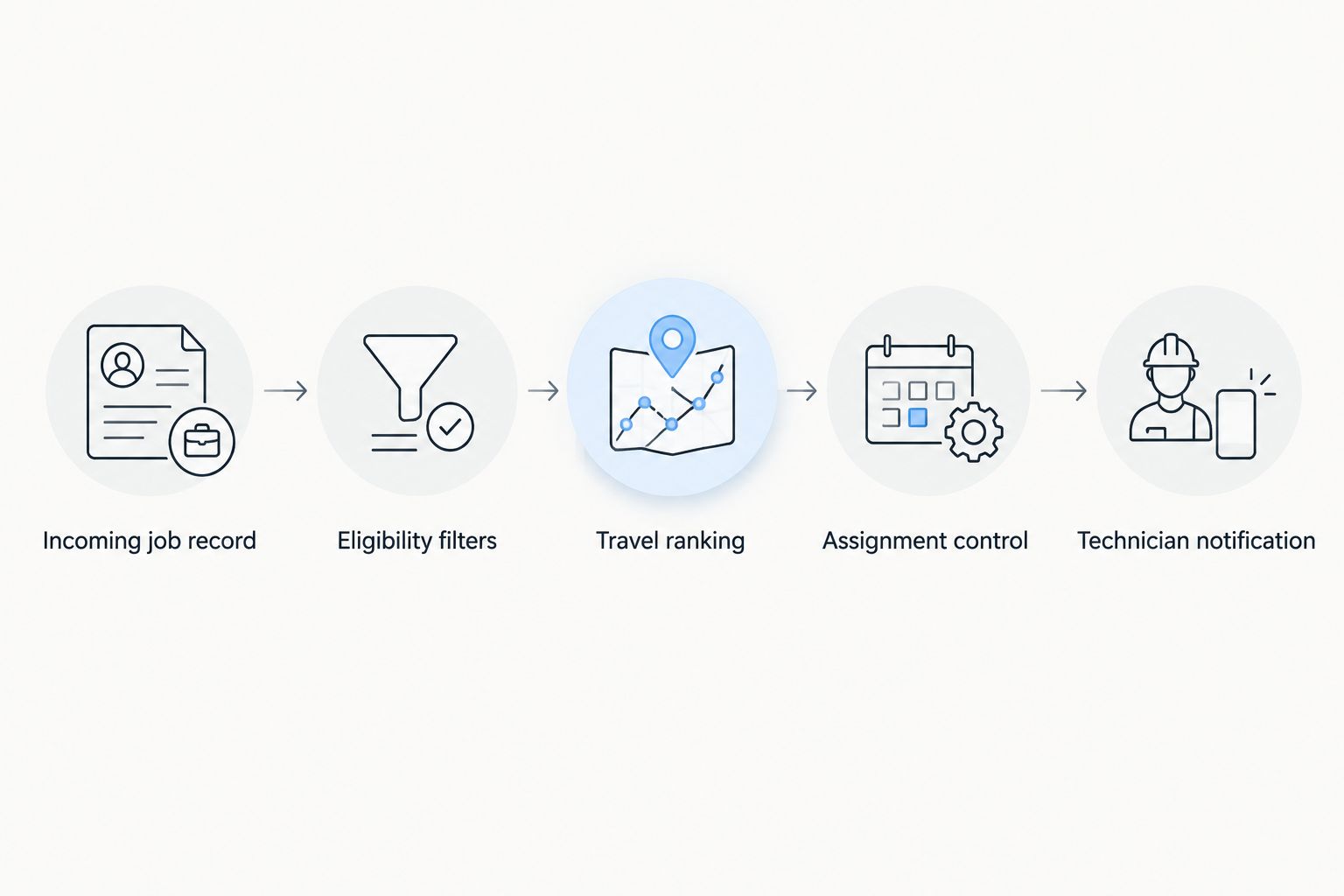
Technician notification
Keep the message operational: destination, appointment window, task description, access instructions and the required response. Include only the customer information necessary for the work.
The dispatcher should be able to distinguish an assigned job from an accepted job. If technician acceptance is required, a successful message delivery does not complete that acceptance step.
Dispatch again when a job changes
New-job dispatch and reassignment are adjacent workflows, but they need different triggers. An address change, revised appointment window or newly required qualification can invalidate the earlier decision; an edited invoice reference does not.
- Define dispatch-relevant changes. Limit reassessment to fields that affect eligibility, travel or timing.
- Recheck the existing technician first. Keep the assignment when it remains valid. Do not move work simply because another person has become marginally closer.
- Protect accepted or started work. Route consequential changes to a dispatcher when automatic reassignment would disrupt a technician already travelling or working.
- Release and replace deliberately. When reassignment is approved, update the old reservation, create the new assignment and notify both affected technicians through the supported process.
Expected result: relevant changes trigger reassessment without treating every edit as a new job.
For a 2026 rollout, document who can authorize reassignment after acceptance. This is an operating decision, not a routing preference: the person travelling to the site needs a reliable instruction about whether to continue.
Troubleshooting
The closest technician is repeatedly rejected
Inspect the eligibility reason before changing the ranking. A qualification mismatch, schedule conflict or territory restriction explains a rejected candidate even when the travel estimate is shortest. Correct inaccurate records; do not bypass a valid restriction.
Dispatch selects someone who is already busy
Check which calendar or schedule supplies availability, then inspect the final reservation step. Reading a schedule without reserving time leaves a gap in which another job can claim the same technician. Repeat the competing-job test after correcting conflict handling.
The same job produces multiple assignments
Check the stable job identifier and event handling. A retry, repeated webhook or dispatch-relevant update must not be processed as a fresh job without checking its current assignment state. Preserve the distinction between new assignment and reassessment.
The route starts from the wrong place
Inspect the origin source and timestamp. A home base or previous job address must not silently stand in for a current location under a different label. Correct the source or move the job to dispatcher review when the chosen source is unavailable.
The technician receives no notification
Inspect assignment and delivery separately. If the assignment exists, retry the notification through the supported delivery process without recreating the job. If the assignment failed, resolve that failure before sending instructions to travel.
Customize your workflow
Expand beyond assignment only after the dispatch controls pass testing. Connect job completion to the administrative work that follows: reviewing recorded time, confirming billable work and preparing invoicing.
Mesh App's modular CRM/ERP scope covers contact management, projects, time tracking, invoicing and finance. That scope supports evaluating the wider job-to-administration process; location tracking, routing, connectors and automated writes still need their own implementation checks.
For the scheduling side of the process, use the guide to connecting Mesh App to Google Calendar for job scheduling as the next reading step. Define the authoritative schedule before introducing additional calendar copies, and verify the supported connection method before building around it.
Keep one owner for each operational fact. The job system owns the job state, the scheduling system owns the reservation, and the chosen location source supplies the routing origin. Document those boundaries so a failed connection does not leave competing versions of the assignment.
FAQ
What's the best way to automatically dispatch the nearest technician?
Filter technicians by qualifications and availability before ranking eligible candidates by travel time. Reserve the selected technician's time before notifying them, and send unresolved cases to a dispatcher.
Does Mesh App automatically dispatch technicians by location?
Verify location-based dispatch separately from Mesh App's CRM/ERP scope. Its stated modules cover contact management, project management, time tracking, invoicing and finance; those module names do not establish routing or automatic-assignment functionality.
Is the nearest technician always the best person for the job?
No. The technician must satisfy the job's qualification, equipment, availability and appointment requirements before proximity becomes a selection criterion.
Do I need live GPS for automatic job dispatch software for trades?
Live GPS is not a prerequisite for every dispatch design. You can define another routing origin, such as the previous appointment, but the ranking must accurately describe the source used and handle missing or outdated information.
Should dispatch use driving time or straight-line distance?
Use a road travel estimate when the assignment depends on arrival timing. Straight-line distance is a geographic ranking and does not account for the road journey.
How do I stop two jobs from going to the same technician?
Recheck availability and reserve the technician's time at assignment. Test simultaneous competing jobs because an earlier availability lookup alone does not prevent an overlapping booking.
Can a changed job trigger automatic reassignment?
Yes, a workflow can reassess changes to the address, appointment window or required qualification. Keep a valid existing assignment, and require a defined approval process for consequential changes after acceptance or work has started.
One last thing
Test the exception path before the shortest route. A workflow that correctly refuses an unsafe assignment is more useful than one that always produces a technician's name.
Before enabling unattended dispatch in 2026, remove a required qualification from a test candidate and confirm that the job reaches dispatcher review. That test checks the essential promise of the workflow: nearest eligible, not nearest regardless.


